

Add Single/Multiple Select Options

Once you have created a single/multiple select column, use this request to add options for it.

In the request body:

table_name is the name of the table;

column is the name or the key of the single/multiple select column;

options is an array containing the label (name), option color (color) and the color of the arrow (textColor):
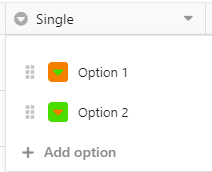
Options

Path Params
string
required
^[0-9a-fA-F]{8}\b-[0-9a-fA-F]{4}\b-[0-9a-fA-F]{4}\b-[0-9a-fA-F]{4}\b-[0-9a-fA-F]{12}$

The unique identifier of a base. Sometimes also called dtable_uuid.

Body Params
string

The name of the table to perform the operation on. Alternatively, you can use the table_id instead of table_name. If using table_id, ensure that the key in the request body is replaced accordingly.

string
^[^.}{`]*$

The name of the column.

options
array of objects
options
Response

Language
Credentials
Bearer
URL
LoadingLoading…
Response
Click Try It! to start a request and see the response here! Or choose an example:
application/json