# SeaTable API Reference
SeaTable is a collaborative no-code database platform. This is the complete REST API reference.
Base URL: `https://cloud.seatable.io` (SeaTable Cloud) or your self-hosted server URL.
## Authentication
SeaTable uses three types of bearer tokens:
- **Account-Token**: Generated from username/password. Used for account-level operations (manage bases, groups, shares).
- **API-Token**: Created in the SeaTable UI for a specific base. Permanent. Used to generate Base-Tokens.
- **Base-Token**: Generated from an API-Token or Account-Token. Valid for 3 days. Used for all operations within a base (rows, columns, tables, views).
Pass tokens via the `Authorization: Bearer {token}` header.
## Authentication
### Account-Token
#### Get Account-Token with Username and Password
`POST /api2/auth-token/`
Generate an *Account-Token* with your username and password. This Account-Token is necessary for all the following account operations.
Use the optional paramater if two-factor-authentication (2FA) is activated for your account.
**Parameters:**
- `X-SEAFILE-OTP` (header, string, optional): Two-factor token (usually generated with a mobile app like the google authenticator), optional, only needed if 2FA is activated for your account.
**Request body** (application/x-www-form-urlencoded):
- `username` (string, required): Your email address
- `password` (string, required): Your password
---
### API-Token
#### List API-Tokens
`GET /api/v2.1/workspace/{workspace_id}/dtable/{base_name}/api-tokens/`
Auth: Account-Token
List all *API-Tokens* of a base with additional informations like permission, generation date and last access time.
**Parameters:**
- `workspace_id` (path, integer, required): The id of the workspace. For an explanation how to get the *workspace_id*, check out this [help-article](https://seatable.com/help/find-workspace-id-group/). Alternatively the API endpoint [get metadata](/reference/getmetadata) can be used.
- `base_name` (path, string, required): The name of your base.
---
#### Create API-Token
`POST /api/v2.1/workspace/{workspace_id}/dtable/{base_name}/api-tokens/`
Auth: Account-Token
Create an *API-Token* for a base.
**Parameters:**
- `workspace_id` (path, integer, required): The id of the workspace. For an explanation how to get the *workspace_id*, check out this [help-article](https://seatable.com/help/find-workspace-id-group/). Alternatively the API endpoint [get metadata](/reference/getmetadata) can be used.
- `base_name` (path, string, required): The name of your base.
**Request body** (application/x-www-form-urlencoded):
- `app_name` (string, required): The name of your app. Every API-Token has a name to identify the purpose. The name of the app must be unique for every base. Example: `My App`
- `permission` (, required)
---
#### Create API-Token (temporary)
`GET /api/v2.1/workspace/{workspace_id}/dtable/{base_name}/temp-api-token/`
Auth: Account-Token
Create a *temporary API-Token* for a base that expires after one hour.
**Parameters:**
- `workspace_id` (path, integer, required): The id of the workspace. For an explanation how to get the *workspace_id*, check out this [help-article](https://seatable.com/help/find-workspace-id-group/). Alternatively the API endpoint [get metadata](/reference/getmetadata) can be used.
- `base_name` (path, string, required): The name of your base.
---
#### Update API-Token
`PUT /api/v2.1/workspace/{workspace_id}/dtable/{base_name}/api-tokens/{app_name}/`
Auth: Account-Token
Update the permission of an existing *API-Token*.
**Parameters:**
- `workspace_id` (path, integer, required): The id of the workspace. For an explanation how to get the *workspace_id*, check out this [help-article](https://seatable.com/help/find-workspace-id-group/). Alternatively the API endpoint [get metadata](/reference/getmetadata) can be used.
- `base_name` (path, string, required): The name of your base.
- `app_name` (path, string, required): The name of your app. Every API-Token has a name to identify the purpose. The name of the app must be unique for every base.
**Request body** (multipart/form-data):
- `permission` (, required)
---
#### Delete API-Token
`DELETE /api/v2.1/workspace/{workspace_id}/dtable/{base_name}/api-tokens/{app_name}/`
Auth: Account-Token
Delete one specific API token from a base. The token is identified by its *app_name*.
**Parameters:**
- `workspace_id` (path, integer, required): The id of the workspace. For an explanation how to get the *workspace_id*, check out this [help-article](https://seatable.com/help/find-workspace-id-group/). Alternatively the API endpoint [get metadata](/reference/getmetadata) can be used.
- `base_name` (path, string, required): The name of your base.
- `app_name` (path, string, required): The name of your app. Every API-Token has a name to identify the purpose. The name of the app must be unique for every base.
---
### Base-Token
#### Get Base-Token with API-Token
`GET /api/v2.1/dtable/app-access-token/`
Auth: API-Token
Generate a Base-Token with an API-Token. The API-Token grants either read or write permission to this base, depending of the permission of the API-Token.
**Parameters:**
- `exp` (query, string, optional): Expiration time of the generated access token. Examples: 5h (= 5 hours) or 3d (= 3 days)
---
#### Get Base-Token with Account-Token
`GET /api/v2.1/workspace/{workspace_id}/dtable/{base_name}/access-token/`
Auth: Account-Token
Generate a Base-Token using the user's Account-Token. The read/write permission depends on the user's access permissions to the base.
**Parameters:**
- `workspace_id` (path, integer, required): The id of the workspace. For an explanation how to get the *workspace_id*, check out this [help-article](https://seatable.com/help/find-workspace-id-group/). Alternatively the API endpoint [get metadata](/reference/getmetadata) can be used.
- `base_name` (path, string, required): The name of your base.
- `exp` (query, string, optional): Expiration time of the generated access token. Examples: 5h (= 5 hours) or 3d (= 3 days)
---
## Base Operations
### Base Info
#### Get Metadata
`GET /api-gateway/api/v2/dtables/{base_uuid}/metadata/`
Auth: Base-Token
Get the complete metadata of a base with all tables, columns and views and settings. The metadata does not contain any data.
**Parameters:**
- `base_uuid` (path, string, required): The unique identifier of a base. Sometimes also called dtable_uuid.
---
#### List Collaborators
`GET /api-gateway/api/v2/dtables/{base_uuid}/related-users/`
Auth: Base-Token
List all collaborators of a base with name, email address and avatar.
**Parameters:**
- `base_uuid` (path, string, required): The unique identifier of a base. Sometimes also called dtable_uuid.
---
### Rows
#### Query SeaTable with SQL
`POST /api-gateway/api/v2/dtables/{base_uuid}/sql/`
Auth: Base-Token
This is the **recommended endpoint** for reading and modifying data in SeaTable. It supports `SELECT`, `INSERT`, `UPDATE`, and `DELETE` — giving you full access to filter, sort, group, join, and aggregate data in a single request. It works seamlessly across both normal and big data storage and returns column metadata alongside the results.
SQL syntax is case insensitive and most common functions work as expected — including `now()`, `round()`, `upper()`, `trim()`, `abs()`, and many more. Some functions use SeaTable-specific names (e.g. `mid()` instead of `SUBSTR()`, `concatenate()` instead of `CONCAT()`). See the [function reference](https://developer.seatable.com/sql/functions/) for the complete list and a MySQL/MariaDB equivalents table.
**Example queries** for a table *Contacts* with columns *Name*, *Age*, *City*:
- `SELECT * FROM Contacts WHERE Age >= 18 ORDER BY Name LIMIT 100`
- `SELECT City, COUNT(*), AVG(Age) FROM Contacts GROUP BY City`
- `SELECT DISTINCT City FROM Contacts`
- `UPDATE Contacts SET City = 'Berlin' WHERE Name = 'Alice'`
- `DELETE FROM Contacts WHERE Age < 18`
- `SELECT * FROM Contacts WHERE Name = ? AND Age = ?` (parameterized query)
For the complete SQL reference, see the [SeaTable Developer Manual](https://developer.seatable.com/sql/):
- [SELECT](https://developer.seatable.com/sql/select/) — retrieve, filter, sort, group, and join rows
- [INSERT](https://developer.seatable.com/sql/insert/) — append rows (big data storage only)
- [UPDATE](https://developer.seatable.com/sql/update/) — modify rows
- [DELETE](https://developer.seatable.com/sql/delete/) — remove rows
- [Functions](https://developer.seatable.com/sql/functions/) — all supported functions and MySQL/MariaDB equivalents
- [Limitations](https://developer.seatable.com/sql/limitations/) — column writability, NULL handling, list types
> 📘 Avoid SQL injection
>
> Use `?` placeholders in your SQL statement and pass the actual values via the `parameters` array. This protects against SQL injection. Example: `SELECT * FROM T WHERE Name = ? AND Age = ?` with `parameters: ["Alice", 30]`.
> ❗ Limits
>
> - **Default:** 100 rows. **Maximum:** 10,000 rows. Use `LIMIT` and `OFFSET` to paginate.
> - **Link columns** return a maximum of 50 linked records per row.
> - **INSERT** only works with bases that have big data storage enabled.
> 🚧 Key restrictions
>
> - Functions and expressions are **not supported** in `UPDATE SET` or `INSERT VALUES` — only constant values are allowed.
> - `JOIN` keyword is not supported — use implicit joins: `SELECT ... FROM T1, T2 WHERE T1.col = T2.col`.
> - Subqueries and `UNION` are not supported.
> - `SELECT` uses column **names** by default. Set `convert_keys` to `false` to get column keys instead.
**Parameters:**
- `base_uuid` (path, string, required): The unique identifier of a base. Sometimes also called dtable_uuid.
---
#### List Rows
`GET /api-gateway/api/v2/dtables/{base_uuid}/rows/`
Auth: Base-Token
Returns a list of rows contained in a table (or in a view if provided).
The usage of a view in SeaTable could be much more convenient than the usage of the complex SQL-syntax of the [SQL query endpoint](/reference/querysql).
> 👍 Big Data support added
>
> Since Version 4.4 this endpoint also supports the big data backend.
Every row consists of the columns, you defined in your base but also *hidden* informations like `_id`, `_mtime`, `_ctime`, `_creator` and so on. Get more details about these information in the [Models](/reference/models) area.
> 📘 Hidden Columns
>
> If no view is selected, all columns (even hidden one) are returned. If a view is selected, only the visible columns of that view are returned with the request.
> 📘 Link Columns
>
> From version 5.3 onward, the link column of a row returns a maximum of 50 records.
**Parameters:**
- `base_uuid` (path, string, required): The unique identifier of a base. Sometimes also called dtable_uuid.
- `table_name` (query, string, required): The name of the table to perform the operation on. Alternatively, you can use the `table_id` instead of `table_name`. If using `table_id`, ensure that the key in the request body is replaced accordingly. **Example:** Instead of `table_name: Table1` you can use `table_id: 0000`.
- `view_name` (query, string, optional): The name of the view to perform the operation on. Alternatively, you can use the `view_id` instead of `view_name`. If using `view_id`, ensure that the key in the request body is replaced accordingly. **Example:** Instead of `view_name: Default View` you can use `view_id: 0000`.
- `start` (query, integer, optional): Starting position (number) of the returned rows. 0 by default.
- `limit` (query, integer, optional): Number of rows that should be returned. 1000 by default.
- `convert_keys` (query, boolean, optional): Determines if the columns are returned as their keys (false by default) or their names (true).
---
#### Append Row(s)
`POST /api-gateway/api/v2/dtables/{base_uuid}/rows/`
Auth: Base-Token
Append multiple rows to a table. Define the column:values pairs of each column in the [rows object](/reference/models).
> 🚧 Column names only
>
> This endpoint always expects **column names** (e.g. `Name`) in the row object, not internal column keys (e.g. `0000`). The `convert_keys` parameter is not supported. Unknown keys are silently ignored without error.
**Parameters:**
- `base_uuid` (path, string, required): The unique identifier of a base. Sometimes also called dtable_uuid.
---
#### Update Row(s)
`PUT /api-gateway/api/v2/dtables/{base_uuid}/rows/`
Auth: Base-Token
Change the values in one or multiple existing row(s) by defining the new values for necessary columns in the row object. Both SeaTable backends are supported.
> 📘 Structure of the row object
>
> The row object contains key:value pairs with the column name as key and the desired values. Check the page [Models](/reference/models) to get a better understanding of the row object.
> 🚧 Column names only
>
> This endpoint always expects **column names** (e.g. `Name`) in the row object, not internal column keys (e.g. `0000`). The `convert_keys` parameter is not supported. Unknown keys are silently ignored without error.
**Parameters:**
- `base_uuid` (path, string, required): The unique identifier of a base. Sometimes also called dtable_uuid.
---
#### Delete Row(s)
`DELETE /api-gateway/api/v2/dtables/{base_uuid}/rows/`
Auth: Base-Token
Deletes one or multiple rows from the table, identified by its row id no matter if the row is stored in big data or normal backend.
**Parameters:**
- `base_uuid` (path, string, required): The unique identifier of a base. Sometimes also called dtable_uuid.
---
#### Get Row
`GET /api-gateway/api/v2/dtables/{base_uuid}/rows/{row_id}/`
Auth: Base-Token
Get the values of one row with all columns and values, according to the row id provided. Depending on `convert_keys` the response will contain the column names or the column keys.
**Parameters:**
- `base_uuid` (path, string, required): The unique identifier of a base. Sometimes also called dtable_uuid.
- `row_id` (path, string, required): The id of the row.
- `table_name` (query, string, required): The name of the table to perform the operation on. Alternatively, you can use the `table_id` instead of `table_name`. If using `table_id`, ensure that the key in the request body is replaced accordingly. **Example:** Instead of `table_name: Table1` you can use `table_id: 0000`.
- `convert_keys` (query, boolean, optional): Determines if the columns are returned as their keys (false by default) or their names (true).
---
#### Lock Rows
`PUT /api-gateway/api/v2/dtables/{base_uuid}/lock-rows/`
Auth: Base-Token
Locks one or more rows. It is ok to include rows that were already locked. Rows in big data backend can not be locked.
> 📘 Advanced feature
>
> Lock rows is an advanced feature in SeaTable and only available for [enterprise subscriptions](https://seatable.com/prices/).
**Parameters:**
- `base_uuid` (path, string, required): The unique identifier of a base. Sometimes also called dtable_uuid.
---
#### Unlock Rows
`PUT /api-gateway/api/v2/dtables/{base_uuid}/unlock-rows/`
Auth: Base-Token
Use this API request to unlock one or more locked rows. As this request
makes sure that all the mentioned rows are unlocked, it's OK to include
rows that were not locked.
**Parameters:**
- `base_uuid` (path, string, required): The unique identifier of a base. Sometimes also called dtable_uuid.
---
### Links
#### List Row Links
`POST /api-gateway/api/v2/dtables/{base_uuid}/query-links/`
Auth: Base-Token
When you have a "Link to other records" column in your table and you
have created some links to the current or another table, you can use
this request to query each row's linked records' IDs and display values.
By default, it returns 10 records per row. To query more records, please
set the "offset" and "limit" values for a row in the rows parameter.
> 📘 id or name
>
> In the request body you can as keys either:
> - `table_id` or `table_name`
> - `link_column_key` or `link_column_name`
To get more information about each linked record, retrieve their
`row_id` and use the [Query SeaTable with SQL](/reference/querysql) request, for example:
```
SELECT * FROM Table1 WHERE _id IN (row_id1, row_id2, ...);
```
**Parameters:**
- `base_uuid` (path, string, required): The unique identifier of a base. Sometimes also called dtable_uuid.
---
#### Create Row Link(s)
`POST /api-gateway/api/v2/dtables/{base_uuid}/links/`
Auth: Base-Token
Creates multiple links between one column and many others (1:n relation). It is not possible to create a link twice. This will result in an error.
Here is an example, how the body with `other_rows_ids_map` can look like:
```
"other_rows_ids_map": {
"ZEZuAL_8QS6p0tJ2vyKgKw": ["Qtf7xPmoRaiFyQPO1aENTj", "PSnPPXD6SranQwA4_MhN8A"],
"PCFS8gY9R8yok5ZZOSqbHg": ["WO2IlomAQVeACVVg8liOMA", "PSnPPXD6SranQwA4_MhN8A"]
}
```
**Parameters:**
- `base_uuid` (path, string, required): The unique identifier of a base. Sometimes also called dtable_uuid.
---
#### Update Row Link(s)
`PUT /api-gateway/api/v2/dtables/{base_uuid}/links/`
Auth: Base-Token
Updates the link(s) between one column and many others (1:n relation). Existing links will be removed and replaced with this new mapping.
**Parameters:**
- `base_uuid` (path, string, required): The unique identifier of a base. Sometimes also called dtable_uuid.
---
#### Delete Row Link(s)
`DELETE /api-gateway/api/v2/dtables/{base_uuid}/links/`
Auth: Base-Token
Deletes one or multiple links between two rows. Only the links between the row_ids mentioned in the mapping, will be removed. Other links will stay and not be touched.
**Parameters:**
- `base_uuid` (path, string, required): The unique identifier of a base. Sometimes also called dtable_uuid.
---
#### Auto Links
`POST /api-gateway/api/v2/dtables/{base_uuid}/auto-links/`
Auth: Base-Token
Automatically create link relationships.
The caller needs to create a link column before calling the API,
supporting both archived and unarchived data.
It will return a task ID, by querying which you can get the status of the
link creation in the backend within 5 minutes.
The matched data in the link column in the 2 tables must have the similar
data structure (not same column type). For example, the text column can match
email, auto-number or url type column, and so on.
Currently, there are a few restrictions:
- Formula and link-formula columns are not supported as matching columns
- Single-select columns cannot be matched with text columns.
**Parameters:**
- `base_uuid` (path, string, required): The unique identifier of a base. Sometimes also called dtable_uuid.
---
#### Auto Link task
`GET /api-gateway/api/v2/dtables/{base_uuid}/auto-link-task/`
Auth: Base-Token
Query the status of auto add links task. There are 3 different status:
- success
- failed
- running
**Parameters:**
- `base_uuid` (path, string, required): The unique identifier of a base. Sometimes also called dtable_uuid.
---
### Tables
#### Create Table
`POST /api-gateway/api/v2/dtables/{base_uuid}/tables/`
Auth: Base-Token
Creates a new table in a base. Optionally, you can already add some columns to the base.
> 📘 The first column is special
>
> Please be aware, that the first column can only be the column type `text`, `number`, `date`, `single select`, `formula` and `autonumber`.
**Parameters:**
- `base_uuid` (path, string, required): The unique identifier of a base. Sometimes also called dtable_uuid.
**Request body** (application/json):
- `table_name` (, required)
- `columns` (array, required)
---
#### Rename Table
`PUT /api-gateway/api/v2/dtables/{base_uuid}/tables/`
Auth: Base-Token
Rename a table by providing its original `table_name` and the desired `new_table_name`.
**Parameters:**
- `base_uuid` (path, string, required): The unique identifier of a base. Sometimes also called dtable_uuid.
---
#### Delete Table
`DELETE /api-gateway/api/v2/dtables/{base_uuid}/tables/`
Auth: Base-Token
Delete an existing table identified by its name.
**Parameters:**
- `base_uuid` (path, string, required): The unique identifier of a base. Sometimes also called dtable_uuid.
---
#### Duplicate Table
`POST /api-gateway/api/v2/dtables/{base_uuid}/tables/duplicate-table/`
Auth: Base-Token
Duplicate an existing table in your base with or without the existing data in it.
> 🚧 Rename the table in a second step
>
> If you duplicate one table, the name of this new table will always be the same like the original one plus the appendix **(copy)**. To rename the table, you will need another call.
**Parameters:**
- `base_uuid` (path, string, required): The unique identifier of a base. Sometimes also called dtable_uuid.
---
### Views
#### List Views
`GET /api-gateway/api/v2/dtables/{base_uuid}/views/`
Auth: Base-Token
List all the views and their settings in a table.
**Parameters:**
- `base_uuid` (path, string, required): The unique identifier of a base. Sometimes also called dtable_uuid.
- `table_name` (query, string, required): The name of the table to perform the operation on. Alternatively, you can use the `table_id` instead of `table_name`. If using `table_id`, ensure that the key in the request body is replaced accordingly. **Example:** Instead of `table_name: Table1` you can use `table_id: 0000`.
---
#### Create View
`POST /api-gateway/api/v2/dtables/{base_uuid}/views/`
Auth: Base-Token
Create a new view in the current table.
In the **request body**, use `name` for the name of the new view. After creating the new view, use the request [Update View](/reference/updateview) to further define your view.
**Parameters:**
- `base_uuid` (path, string, required): The unique identifier of a base. Sometimes also called dtable_uuid.
- `table_name` (query, string, required): The name of the table to perform the operation on. Alternatively, you can use the `table_id` instead of `table_name`. If using `table_id`, ensure that the key in the request body is replaced accordingly. **Example:** Instead of `table_name: Table1` you can use `table_id: 0000`.
---
#### Get View
`GET /api-gateway/api/v2/dtables/{base_uuid}/views/{view_name}/`
Auth: Base-Token
Get the detailed settings of a view by its name.
**Parameters:**
- `base_uuid` (path, string, required): The unique identifier of a base. Sometimes also called dtable_uuid.
- `view_name` (path, string, required): The name of the view.
- `table_name` (query, string, required): The name of the table to perform the operation on. Alternatively, you can use the `table_id` instead of `table_name`. If using `table_id`, ensure that the key in the request body is replaced accordingly. **Example:** Instead of `table_name: Table1` you can use `table_id: 0000`.
---
#### Update View
`PUT /api-gateway/api/v2/dtables/{base_uuid}/views/{view_name}/`
Auth: Base-Token
Change the settings of a current view by its name. All parameters are
optional.
If you don't define a parameter, existing settings for this parameter will not be changed.
To remove existing filters, sortings or groups you have to send an empty object like this:
`"sorts": [{}]`
**Parameters:**
- `base_uuid` (path, string, required): The unique identifier of a base. Sometimes also called dtable_uuid.
- `view_name` (path, string, required): The name of the view.
- `table_name` (query, string, required): The name of the table to perform the operation on. Alternatively, you can use the `table_id` instead of `table_name`. If using `table_id`, ensure that the key in the request body is replaced accordingly. **Example:** Instead of `table_name: Table1` you can use `table_id: 0000`.
---
#### Delete View
`DELETE /api-gateway/api/v2/dtables/{base_uuid}/views/{view_name}/`
Auth: Base-Token
Delete a view by its name.
**Parameters:**
- `base_uuid` (path, string, required): The unique identifier of a base. Sometimes also called dtable_uuid.
- `view_name` (path, string, required): The name of the view.
- `table_name` (query, string, required): The name of the table to perform the operation on. Alternatively, you can use the `table_id` instead of `table_name`. If using `table_id`, ensure that the key in the request body is replaced accordingly. **Example:** Instead of `table_name: Table1` you can use `table_id: 0000`.
---
### Columns
#### List Columns
`GET /api-gateway/api/v2/dtables/{base_uuid}/columns/`
Auth: Base-Token
List all the visible columns in a certain view in a table.
**Parameters:**
- `table_name` (query, string, required): The name of the table to perform the operation on. Alternatively, you can use the `table_id` instead of `table_name`. If using `table_id`, ensure that the key in the request body is replaced accordingly. **Example:** Instead of `table_name: Table1` you can use `table_id: 0000`.
- `view_name` (query, string, optional): The name of the view to perform the operation on. Alternatively, you can use the `view_id` instead of `view_name`. If using `view_id`, ensure that the key in the request body is replaced accordingly. **Example:** Instead of `view_name: Default View` you can use `view_id: 0000`.
- `base_uuid` (path, string, required): The unique identifier of a base. Sometimes also called dtable_uuid.
---
#### Insert Column
`POST /api-gateway/api/v2/dtables/{base_uuid}/columns/`
Auth: Base-Token
Create a new column. You can only add one new column at the end of a table.
**Parameters:**
- `base_uuid` (path, string, required): The unique identifier of a base. Sometimes also called dtable_uuid.
---
#### Update Column
`PUT /api-gateway/api/v2/dtables/{base_uuid}/columns/`
Auth: Base-Token
Allows various changes of the column: name, column_type, freeze/unfreeze, resize, etc...
`op_type` is required. The following options are available: - rename_column - modify_column_type - resize_column - move_column - freeze_column
`column` is the name or `key` of the target column.
`new_column_type` is the new type of the target column. For a list of column type params refer to the SeaTable API Parameter. For further information on column types, check the page [Models](https://api.seatable.com/reference/models).
**Parameters:**
- `base_uuid` (path, string, required): The unique identifier of a base. Sometimes also called dtable_uuid.
---
#### Delete Column
`DELETE /api-gateway/api/v2/dtables/{base_uuid}/columns/`
Auth: Base-Token
Delete a column with its name or `key`.
See the request body for detailed params.
**Parameters:**
- `base_uuid` (path, string, required): The unique identifier of a base. Sometimes also called dtable_uuid.
---
#### Append Columns
`POST /api-gateway/api/v2/dtables/{base_uuid}/batch-append-columns/`
Auth: Base-Token
Use this request to append multiple columns to your table at once. As for the request body, refer to the previous call, [Insert Column](/reference/insertcolumn-1), for a detailed list of column formats.
These requested and optional params can be used in the request body:
`table_name` is the name of your table, required.
`columns` is a list of columns you'd like to append, in each object of which:
* `column_name` is the name of your new column, required; * `column_type` is the type of your new column, required; * `column_data` is the format setting of a special column, required in case. For details, refer to the call [Insert Column](/reference/insertcolumn-1).
Please note that you can't append `formula`, `link` or `link-formula` columns using this endpoint. Use the [Insert Column](https://api.seatable.com/reference/insertcolumn-1) endpoint instead.
**Parameters:**
- `base_uuid` (path, string, required): The unique identifier of a base. Sometimes also called dtable_uuid.
**Request body** (application/json):
- `table_name` (, optional)
- `columns` (array, optional)
---
#### Add Single/Multiple Select Options
`POST /api-gateway/api/v2/dtables/{base_uuid}/column-options/`
Auth: Base-Token
Once you have created a single/multiple select column, use this request to add options for it.
In the request body:
`table_name` is the name of the table;
`column` is the name or the `key` of the single/multiple select column;
`options` is an array containing the label (`name`), option color (`color`) and the color of the arrow (`textColor`):
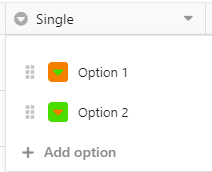
**Parameters:**
- `base_uuid` (path, string, required): The unique identifier of a base. Sometimes also called dtable_uuid.
---
#### Update Single/Multiple Select Options
`PUT /api-gateway/api/v2/dtables/{base_uuid}/column-options/`
Auth: Base-Token
Use this request to update existing single/multiple select options by changing their name and/or color.
In the request body:
`table_name` is the name of your table, required;
`column` is the name of the column, required;
`options` is a list of option objects that you would like to update, in which:
* `id` is the ID of that option, which you can retrive with the call "List Columns in A View in A Table", required;
* `color` is the label's new color, optional;
* `name` is the label's new name, optional.
`return_options` gives you the possibility to get an overview of all the options you just updated, optional, `false` by default.
**Parameters:**
- `base_uuid` (path, string, required): The unique identifier of a base. Sometimes also called dtable_uuid.
---
#### Delete Single/Multiple Select Options
`DELETE /api-gateway/api/v2/dtables/{base_uuid}/column-options/`
Auth: Base-Token
Use this request to remove single select or multiple select options that you don't need any more. These deleted options will be removed from the entries containing them.
In the request body:
`table_name` is the name of the table;
`column` is the name or the `key` of the single/multiple select column;
`option_names` is a list of options you'd like to delete.
**Parameters:**
- `base_uuid` (path, string, required): The unique identifier of a base. Sometimes also called dtable_uuid.
---
#### Update Column Cascade Settings
`POST /api-gateway/api/v2/dtables/{base_uuid}/column-cascade-settings/`
Auth: Base-Token
After you have added at least two single select columns and have added relevant options, you can start to set the cascade relationships between these single select columns.
## What are cascade settings?
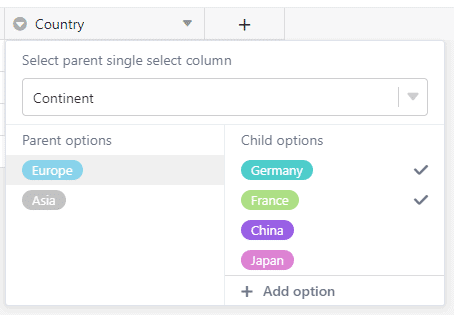
With cascade settings for the single select column, you can set up a "parent" single select column and a "child" single select column, so that when you select one option in the parent, the child column will only show you the options belonging to that parent.
For example, if the parent column is "continent" and you've selected "Europe", then the child column will only show you the countries in Europe. Of course, this doesn't happen automatically - you have to set up the cascade relationship with this API request first.
## What are the preconditions?
This API request has the following preconditions:
- The table already exists (This API request cannot create a new table);
- The parent and child column already exist (same as above);
- The parent and child column already have options (same as above).
## How to set up the cascade relationship?
It's so easy: just like demonstrated in the example request, define the following parameters/objects and you'll get `success`:
- `table_name`: The name of the table.
- `parent_column`: The 1st level of single select column's name or `key`.
- `child_column`: The 2nd level of single select column's name or `key`.
- `cascade_settings`: In this object, list all the child options for each parent option, like demonstrated in the example request.
**Parameters:**
- `base_uuid` (path, string, required): The unique identifier of a base. Sometimes also called dtable_uuid.
---
### Big Data
#### Add Rows into Big Data Backend
`POST /api-gateway/api/v2/dtables/{base_uuid}/add-archived-rows/`
Auth: Base-Token
Insert rows directly into the big data backend.
**Parameters:**
- `base_uuid` (path, string, required): The unique identifier of a base. Sometimes also called dtable_uuid.
---
#### Move Rows to Big Data Backend
`POST /api-gateway/api/v2/dtables/{base_uuid}/archive-view/`
Auth: Base-Token
Select a view to move its rows to the big data backend. Note that the big data backend must be enabled in this base.
**Parameters:**
- `base_uuid` (path, string, required): The unique identifier of a base. Sometimes also called dtable_uuid.
---
#### Move Rows to Normal Backend
`POST /api-gateway/api/v2/dtables/{base_uuid}/unarchive/`
Auth: Base-Token
Moves the selected rows from the big data backend to the normal backend.
**Parameters:**
- `base_uuid` (path, string, required): The unique identifier of a base. Sometimes also called dtable_uuid.
**Request body** (application/json):
- `table_id` (string, optional): The unique identifier of the table. Example: `0000`
- `row_ids` (array, optional): An array containing the row_ids of the rows you want to move from big data backend to normal.
---
#### Get Base Big Data Operations
`GET /api-gateway/api/v2/dtables/{base_uuid}/db-operations/`
Auth: Base-Token
Get the operation logs of big data in a base. With the base's `base_uuid`.
**Parameters:**
- `page` (query, integer, optional): The page number you want to start showing the entries. If no value is provided, 1 will be used.
- `per_page` (query, integer, optional): The number of results that should be returned. If no value is provided, 25 results will be returned.
- `base_uuid` (path, string, required): The unique identifier of a base. Sometimes also called dtable_uuid.
---
#### Restore Big Data Operations
`PUT /api-gateway/api/v2/dtables/{base_uuid}/restore-operations/{op_id}/`
Auth: Base-Token
Restore the operations by `op_id` of big data operation logs in a base. With the base's `base_uuid`.
**Parameters:**
- `base_uuid` (path, string, required): The unique identifier of a base. Sometimes also called dtable_uuid.
- `op_id` (path, integer, required): The id of the big data operation logs.
---
### Row Comments
#### List Row Comments
`GET /api-gateway/api/v2/dtables/{base_uuid}/comments/`
Auth: Base-Token
List all the comments in a certain row. The returned `id` value is the ID of each comment.
**Parameters:**
- `base_uuid` (path, string, required): The unique identifier of a base. Sometimes also called dtable_uuid.
- `row_id` (query, string, required): Unique id of a row.
---
#### Create Row Comment
`POST /api-gateway/api/v2/dtables/{base_uuid}/comments/`
Auth: Base-Token
Create a comment for a certain row.
**Parameters:**
- `base_uuid` (path, string, required): The unique identifier of a base. Sometimes also called dtable_uuid.
- `table_id` (query, string, required): The id of the table. The id of a table is unique inside a base and is often used to identify a table.
- `row_id` (query, string, required): Unique id of a row.
---
#### Get Comment
`GET /api-gateway/api/v2/dtables/{base_uuid}/comments/{comment_id}/`
Auth: Base-Token
Get the details of a certain comment with its ID.
**Parameters:**
- `base_uuid` (path, string, required): The unique identifier of a base. Sometimes also called dtable_uuid.
- `comment_id` (path, integer, required): The id of the comment.
---
#### Delete Comment
`DELETE /api-gateway/api/v2/dtables/{base_uuid}/comments/{comment_id}/`
Auth: Base-Token
Delete a certain comment by its ID.
**Parameters:**
- `base_uuid` (path, string, required): The unique identifier of a base. Sometimes also called dtable_uuid.
- `comment_id` (path, integer, required): The id of the comment.
---
#### Get Row Comments Count
`GET /api-gateway/api/v2/dtables/{base_uuid}/comments-count/`
Auth: Base-Token
Get the number of comments in a certain row. This could be a useful request to check if there's new comments there.
**Parameters:**
- `base_uuid` (path, string, required): The unique identifier of a base. Sometimes also called dtable_uuid.
- `row_id` (query, string, required): Unique id of a row.
---
#### List Comments within Days
`GET /api-gateway/api/v2/dtables/{base_uuid}/comments-within-days/`
Auth: Base-Token
List all the comments in a base within a given number of days before today.
**Parameters:**
- `base_uuid` (path, string, required): The unique identifier of a base. Sometimes also called dtable_uuid.
- `days` (query, integer, optional): Number of days to look back for comments.
---
#### Get Number of Comments
`GET /api/v2.1/dtables/{base_uuid}/rows-comments-num/`
Auth: Base-Token
Get the number of comments for all rows.
**Parameters:**
- `base_uuid` (path, string, required): The unique identifier of a base. Sometimes also called dtable_uuid.
---
### Notifications
#### List Base Notifications
`GET /api-gateway/api/v2/dtables/{base_uuid}/notifications/`
Auth: Base-Token
List all the notifications, read or unread, in a base.
**Parameters:**
- `base_uuid` (path, string, required): The unique identifier of a base. Sometimes also called dtable_uuid.
---
#### Mark Base Notifications as seen
`PUT /api-gateway/api/v2/dtables/{base_uuid}/notifications/`
Auth: Base-Token
Use this request to mark all the notifications as read.
**Parameters:**
- `base_uuid` (path, string, required): The unique identifier of a base. Sometimes also called dtable_uuid.
**Request body** (application/x-www-form-urlencoded):
- `seen` (boolean, optional): true or false for read or unread. Otherwise invalid. Example: `True`
---
#### Delete Base Notifications
`DELETE /api-gateway/api/v2/dtables/{base_uuid}/notifications/`
Auth: Base-Token
Delete all the notifications in the current base irrevocably.
**Parameters:**
- `base_uuid` (path, string, required): The unique identifier of a base. Sometimes also called dtable_uuid.
---
#### Mark Notification Read/Unread
`PUT /api-gateway/api/v2/dtables/{base_uuid}/notifications/{notification_id}/`
Auth: Base-Token
Mark a specific notification as read or unread.
**Parameters:**
- `base_uuid` (path, string, required): The unique identifier of a base. Sometimes also called dtable_uuid.
- `notification_id` (path, integer, required): The id of the notification.
**Request body** (application/x-www-form-urlencoded):
- `seen` (boolean, optional): `true` to mark as "seen" and `false` as "unseen". Example: `False`
---
#### Send Toast Notification
`POST /api-gateway/api/v2/dtables/{base_uuid}/ui-toasts/`
Auth: Base-Token
Send a toast notification
**Parameters:**
- `base_uuid` (path, string, required): The unique identifier of a base. Sometimes also called dtable_uuid.
**Request body** (application/json):
- `to_user` (string, optional): target username Example: `244b4667d1754bb4afa2c2cb7369d244@auth.local`
- `toast_type` (string, optional): type of toast, e.g., success, warning, error Example: `success`
- `detail` (object, optional)
---
### Activities & Logs
#### Get Base Activity Log
`GET /api-gateway/api/v2/dtables/{base_uuid}/operations/`
Auth: Base-Token
Get the activities log in a base. With the base's `base_uuid`.
**Parameters:**
- `page` (query, integer, optional): The page number you want to start showing the entries. If no value is provided, 1 will be used.
- `base_uuid` (path, string, required): The unique identifier of a base. Sometimes also called dtable_uuid.
---
#### List Row Activities
`GET /api-gateway/api/v2/dtables/{base_uuid}/activities/`
Auth: Base-Token
List all the activities done to a certain row with the row's `row_id`.
**Parameters:**
- `row_id` (query, string, required): Unique id of a row.
- `page` (query, integer, optional): The page number you want to start showing the entries. If no value is provided, 1 will be used.
- `per_page` (query, integer, optional): The number of results that should be returned. If no value is provided, 25 results will be returned.
- `base_uuid` (path, string, required): The unique identifier of a base. Sometimes also called dtable_uuid.
---
### Snapshots
#### Create Snapshot
`POST /api-gateway/api/v2/dtables/{base_uuid}/snapshot/`
Auth: Base-Token
Creates a snapshot for the current base. The pre-conditions are, that there's at least one change since the last snapshot and at least 10 minutes have passed.
To get a list of already existing snapshots, use the the request [List Snapshots](/reference/listsnapshots).
**Parameters:**
- `base_uuid` (path, string, required): The unique identifier of a base. Sometimes also called dtable_uuid.
---
## User Account Operations
### User
#### Get Account Info
`GET /api2/account/info/`
Auth: Account-Token
Get the detailed account information with the user's Account Token.
---
#### Update Email Address
`PUT /api/v2.1/user/contact-email/`
Auth: Account-Token
Update the user's email address. This feature is disabled on cloud.seatable.io. If you would like to change your email address in a self-hosted instance, contact your system administrator to check if this feature is activated.
**Request body** (multipart/form-data):
- `new_contact_email` (, optional)
---
#### Upload/Update User Avatar
`POST /api/v2.1/user-avatar/`
Auth: Account-Token
Upload an image to make it your current avatar. After successful uploading/updating your avatar, the file will be renamed and converted to .png. The URL of your new avatar is returned in the response.
**Request body** (multipart/form-data):
- `avatar` (, optional)
- `Avatar_size` (, optional)
---
#### Get Public User Info
`GET /api/v2.1/user-common-info/{user_id}/`
Auth: Account-Token
Get the common info from a user by his email address.
**Parameters:**
- `user_id` (path, string, required): The unique user ID in the format `xxx@auth.local`.
---
#### List Public User Infos
`POST /api/v2.1/user-list/`
Auth: Account-Token
List the details of other users identified by their email addresses.
**Request body** (application/json):
- `user_id_list` (, optional)
---
#### Search User
`GET /api2/search-user/`
Auth: Account-Token
Just search for a user with the string or substring in the `q` param. You can search by
`email` (case sensitive),
`name` (case insensitive) or
`contact_email` (case insensitive).
Substrings are allowed.
**Parameters:**
- `q` (query, string, optional): Search query string. Matches against email, name, or contact email.
---
### Bases
#### List Bases
`GET /api/v2.1/user-admin-dtables/`
Auth: Account-Token
List all the bases that the current user can administer. These include: - All the bases in the user's personal workspace; - All the bases in the groups where the current user is an owner or an admin. Each base's details are included in an object in the returned `dtables` array.
---
#### Search Base or Apps
`GET /api/v2.1/dtable/items-search/`
Auth: Account-Token
Search the base or apps of a user. Capitalization is irrelevant for the search and substrings are also allowed.
**Parameters:**
- `query_str` (query, string, optional): Search string. Substrings are allowed and capitalization does not matter.
- `query_type` (query, string, optional): Filter the search by type. Use `base` to search only bases or `app` to search only apps. Values: , base, app
---
#### Create Base
`POST /api/v2.1/dtables/`
Auth: Account-Token
Create a new base.
When you create a new base with this API request or on the web UI, SeaTable automatically adds the following content into the new base:
- A new table "Table1" (with the `table_id` of `0000`), and
- A "Default View" (with the `view_id` of `0000`), and
- A new text column "Name" (with the column's `key` of `0000`);
- Three empty rows (The row's IDs are randomly generated. Use the call [List Rows](/reference/listrows) to see their IDs).
Optionally, you can select icons and colors from the following list to customize your base's icon in the web UI:
**SeaTable base icon list**
```
DTABLE_ICON_LIST = [
'icon-worksheet',
'icon-task-management',
'icon-software-test-management',
'icon-design-assignment',
'icon-video-production',
'icon-market-analysis',
'icon-data-analysis',
'icon-product-knowledge-base',
'icon-asset-management',
'icon-financial-information-record',
'icon-dollar',
'icon-company-inventory',
'icon-customer-inquiry',
'icon-customer-list',
'icon-product-list',
'icon-store-address',
'icon-leave-record',
'icon-administrative-matters-calendar',
'icon-customer-relationship',
'icon-teachers-list',
'icon-book-library',
'icon-server-management',
'icon-time-management',
'icon-work-log',
'icon-online-promotion',
'icon-research',
'icon-user-interview',
'icon-client-review',
'icon-club-members',
]
```
**SeaTable base icon color list**
```
DTABLE_ICON_COLORS = [
'#FF8000',
'#FFB600',
'#E91E63',
'#EB00B1',
'#7626FD',
'#972CB0',
'#1DDD1D',
'#4CAF50',
'#02C0FF',
'#00C9C7',
'#1688FC',
'#656463'
]
```
You can create a base in your personal workspace ("My bases"), or in a group you have write permission to. Just specify the optional `workspace_id` parameter in the request.
The returned `id` value is the ID of your base, this numeric ID is to be distinguished from the base's UUID.
**Request body** (multipart/form-data):
- `name` (, optional)
- `workspace_id` (, optional)
- `icon` (, optional)
- `color` (, optional)
---
#### Update Base
`PUT /api/v2.1/workspace/{workspace_id}/dtable/`
Auth: Account-Token
Update a base's name, icon, and icon color.
**Parameters:**
- `workspace_id` (path, integer, required): id of your workspace.
**Request body** (multipart/form-data):
- `name` (, optional)
- `new_name` (, optional)
- `icon` (, optional)
- `color` (, optional)
---
#### Delete Base
`DELETE /api/v2.1/workspace/{workspace_id}/dtable/`
Auth: Account-Token
Delete an existing base.
**Parameters:**
- `workspace_id` (path, integer, required): id of your workspace.
**Request body** (multipart/form-data):
- `name` (, optional)
---
#### Get Base Size
`GET /api/v2.1/dtable/{base_uuid}/size/`
Auth: Account-Token
Get the storage usage of a base in bytes. This is the size of the JSON file stored on the filesystem or in S3 (depending on your server configuration).
Please note that this does not include assets stored inside the base, snapshots or rows stored in the big data backend.
**Parameters:**
- `base_uuid` (path, string, required): The unique identifier of a base. Sometimes also called dtable_uuid.
---
#### List Favorites
`GET /api/v2.1/starred-dtables/`
Auth: Account-Token
List all the starred (favorite) bases in my library.
---
#### Favorite Base
`POST /api/v2.1/starred-dtables/`
Auth: Account-Token
Add a star to a base to make it a "favorite" base.
**Request body** (multipart/form-data):
- `dtable_uuid` (, optional)
---
#### Unfavorite Base
`DELETE /api/v2.1/starred-dtables/`
Auth: Account-Token
Remove the star of a base and therefore removing it from "Favorites".
**Parameters:**
- `dtable_uuid` (query, string, required): The unique identifier of a base. Sometimes also called dtable_uuid.
---
#### Create Folder
`POST /api/v2.1/workspace/{workspace_id}/folders/`
Auth: Account-Token
With this request, you can create a base folder easily with the desired `name` of your folder.
In the response body, the `id` will be the ID of your folder. You'll need this specific ID to move bases into this folder or update, or delete this folder.
**Parameters:**
- `workspace_id` (path, integer, required): id of your workspace.
**Request body** (multipart/form-data):
- `name` (, optional)
---
#### Update Folder
`PUT /api/v2.1/workspace/{workspace_id}/folders/{folder_id}/`
Auth: Account-Token
Use this request to rename an existing folder with its `folder_id`.
**Parameters:**
- `workspace_id` (path, integer, required): id of your workspace.
- `folder_id` (path, string, required): The ID of the folder.
**Request body** (multipart/form-data):
- `name` (, optional)
---
#### Delete Folder
`DELETE /api/v2.1/workspace/{workspace_id}/folders/{folder_id}/`
Auth: Account-Token
You can only delete a folder when it's empty. To do so, first move your bases out of it and then delete it with its `folder_id` in this request.
**Parameters:**
- `workspace_id` (path, integer, required): id of your workspace.
- `folder_id` (path, string, required): The ID of the folder.
---
#### Move Base into Folder
`POST /api/v2.1/workspace/{workspace_id}/folder-item-moving/`
Auth: Account-Token
Move your base from one folder to another by giving the `folder_id` of your source and target folders. Exception: the root folder doesn't have an ID, but can be identified with '/'. See example.
All the parameters in this request are required, as we might allow you to move folders into folders in the future, by then, you will be able to use another parameter in the `item_type`.
**Parameters:**
- `workspace_id` (path, integer, required): id of your workspace.
**Request body** (multipart/form-data):
- `item_type` (, optional)
- `item_id` (, optional)
- `from` (, optional)
- `to` (, optional)
---
#### Base Password
`PUT /api/v2.1/workspace/{workspace_id}/dtable/{base_name}/password/`
Auth: Account-Token
Use this request to unset a base password. You'll need to enter the current password `password` to be able to unset it. After unsetting a password, the base is not protected by a password anymore (the `is_encrypted` is not `false`).
**Parameters:**
- `workspace_id` (path, integer, required): id of your workspace.
- `base_name` (path, string, required): name of your base.
---
#### List Trashed Bases
`GET /api/v2.1/trash-dtables/`
Auth: Account-Token
List all the bases in the trash bin.
**Parameters:**
- `page` (query, integer, optional): Page number of results to return. Default is 1.
- `per_page` (query, integer, optional): Number of results per page.
---
#### Clear Trash
`DELETE /api/v2.1/trash-dtables/`
Auth: Account-Token
By cleaning the trash bin, all the bases there will be removed permanently and cannot be restored any more.
---
#### Restore Trashed Base
`PUT /api/v2.1/trash-dtables/{trashed_base_id}/`
Auth: Account-Token
Restore a trashed base from the trash bin. The base's ID can be retrieved from the call [List Trashed Bases](/reference/listtrashedbases-1). The base's ID is written directly in the URL, like in this example, `497`.
**Parameters:**
- `trashed_base_id` (path, integer, required): The ID of the trashed base.
---
#### List Group Trashed Bases
`GET /api/v2.1/groups/{group_id}/trash-dtables/`
Auth: Account-Token
When a group base is deleted, it's sent to the group's trash bin. If you are the owner or administrator of this group, you have access to the group's trash bin.
Use this API request to take a look into your group's trash bin. You'll get a permission error if you are not the owner or admin of this group.
**Parameters:**
- `group_id` (path, integer, required): The ID of the group.
---
#### Restore Group Trashed Base
`PUT /api/v2.1/groups/{group_id}/trash-dtables/{base_uuid}/`
Auth: Account-Token
With the UUID (retrievable with the previous call) of the trashed base, you can restore it with this request.
**Parameters:**
- `group_id` (path, integer, required): The ID of the group.
- `base_uuid` (path, string, required): The unique identifier of a base. Sometimes also called dtable_uuid.
---
### Groups & Workspaces
#### List Groups
`GET /api/v2.1/groups/`
Auth: Account-Token
Show a list of all groups of the user.
---
#### Create Group
`POST /api/v2.1/groups/`
Auth: Account-Token
Create a new group. The user who creates the group becomes its owner.
**Request body** (application/json):
- `name` (, optional)
---
#### Get Group
`GET /api/v2.1/groups/{group_id}/`
Auth: Account-Token
Get the details of a specific group including its name, owner, and admins.
**Parameters:**
- `group_id` (path, integer, required): The ID of the group.
---
#### Update Group
`PUT /api/v2.1/groups/{group_id}/`
Auth: Account-Token
Use this request to rename, and/or change owner of a group.
In the request body, both parameters are optional. Only use the ones that you need to update:
* `owner` is the new owner of the group, include the user's ID here. If you don't want to change the owner, remove this parameter because if you enter the current owner's ID here, you'll get an error "User xxx is already group owner".
* `name` is the new name of your group. If you don't want to change the name, remove this parameter because if you enter the current group name here you'll get an error "There is already a group with that name".
**Parameters:**
- `group_id` (path, integer, required): The ID of the group.
**Request body** (application/json):
- `name` (, optional)
- `owner` (, optional)
---
#### Delete Group
`DELETE /api/v2.1/groups/{group_id}/`
Auth: Account-Token
Delete a group with its ID.
> 🚧 Group must be empty > > A group can only be deleted if it contains no bases. Delete or move all bases out of the group first, otherwise the API returns `400` with `"Cannot delete group with bases"`.
**Parameters:**
- `group_id` (path, integer, required): The ID of the group.
---
#### Search Group
`GET /api/v2.1/search-group/`
Auth: Account-Token
Just give a search keyword in the `q` param.
**Parameters:**
- `q` (query, string, optional): Search query string. Matches against group name.
---
#### Get Group Members
`GET /api/v2.1/groups/{group_id}/members/`
Auth: Account-Token
List all members of a group along with their roles.
**Parameters:**
- `group_id` (path, integer, required): The ID of the group.
---
#### Add Group Member
`POST /api/v2.1/groups/{group_id}/members/`
Auth: Account-Token
Add a user to a group as a member.
**Parameters:**
- `group_id` (path, integer, required): The ID of the group.
**Request body** (application/json):
- `email` (, optional)
---
#### Update Group Role
`PUT /api/v2.1/groups/{group_id}/members/{group_member}/`
Auth: Account-Token
Update the role of a group member, for example to promote or demote an admin.
**Parameters:**
- `group_id` (path, integer, required): The ID of the group.
- `group_member` (path, string, required): The unique user ID of the group member.
**Request body** (application/json):
- `is_admin` (, optional)
---
#### Remove Group Member
`DELETE /api/v2.1/groups/{group_id}/members/{group_member}/`
Auth: Account-Token
Group admins can remove other group members or a group member can leave the group.
**Parameters:**
- `group_id` (path, integer, required): The ID of the group.
- `group_member` (path, string, required): The unique user ID of the group member.
---
#### Search Group Members
`GET /api/v2.1/groups/{group_id}/search-member/`
Auth: Account-Token
As a group's administrator, you can use this API call to search for members in this group.
Just give a search keyword in the `q` param. Attention: Although a fuzzy search is allowed, unlike the web interface, the search via API is still case sensitive!
A successful search will return each member's details that fit to your search criteria. See example.
**Parameters:**
- `q` (query, string, optional): Search query string. Matches against member name or email.
- `group_id` (path, integer, required): The ID of the group.
---
#### List Workspaces
`GET /api/v2.1/workspaces/`
Auth: Account-Token
List all the workspaces/bases you have access to.
With the param `detail`, you can define if the returned list is with details (`true` or leave it by default) or without details (`false`). See the examples "with detail=false" and "with detail=true" for more information.
**Parameters:**
- `detail` (query, boolean, optional): `true` or `false`, optional, `true` by default. When `false`, only the ID, name and type of each workspace is listed.
---
#### Copy Base from Workspace
`POST /api/v2.1/dtable-copy/`
Auth: Account-Token
Copy a base from a workspace to the destination workspace.
A workspace could be your own "My library", or a group's workspace. Therefore you need to define the `src_workspace_id` and `dst_workspace_id` in the call.
For the source workspace, you at least have to have the read permission of the base; for the source workspace, you must have write permission.
**Request body** (multipart/form-data):
- `src_workspace_id` (, required)
- `name` (, required)
- `dst_workspace_id` (, required)
- `is_copy_dataset_syncs` (, optional)
---
#### Copy Base from External Link
`POST /api/v2.1/dtable-external-link/dtable-copy/`
Auth: Account-Token
Copy a base from an external link to a workspace.
**Request body** (multipart/form-data):
- `link` (, optional)
- `dst_workspace_id` (, optional)
---
### Attachment
#### Get Base Attachment Upload Link
`GET /api/v2.1/workspace/{workspace_id}/dtable-asset-upload-link/`
Auth: Account-Token
Get the attachment upload link to a base. Images should be uploaded to the `img_relative_path`, all other files should be uploaded to the `file_relative_path`.
**Parameters:**
- `workspace_id` (path, integer, required): id of your workspace.
- `base_name` (query, string, required): name of your base
---
#### List Base Asset Directories And Files
`GET /api/v2.1/dtable-asset/{base_uuid}/`
Auth: Account-Token
List all the directories, files and images in the given path in a base.
The returned `is_file` value indicates if this object is a file (`true`) or a folder (`false`).
**Parameters:**
- `parent_dir` (query, string, optional): The parent directory path.
- `base_uuid` (path, string, required): The unique identifier of a base. Sometimes also called dtable_uuid.
---
#### Delete Base Asset
`DELETE /api/v2.1/dtable-asset/{base_uuid}/`
Auth: Account-Token
Delete a directory, a file or an image from a base.
**Parameters:**
- `path` (query, string, optional): The file path relative to the asset directory.
- `base_uuid` (path, string, required): The unique identifier of a base. Sometimes also called dtable_uuid.
---
#### Get Base Asset Size
`GET /api/v2.1/dtable-asset/{base_uuid}/asset-size/`
Auth: Account-Token
Get the total size of all assets (attachments, images and files) stored in a base and check whether the base can be exported together with its assets.
All sizes are given in megabytes, rounded down. `max_size_of_export` is the server-wide limit configured by the system administrator (default: 100). If `can_export_asset` is `false`, the assets of this base exceed that limit and the base can only be exported without its assets.
**Parameters:**
- `base_uuid` (path, string, required): The unique identifier of a base. Sometimes also called dtable_uuid.
---
#### List Recently Uploaded Files
`GET /api/v2.1/dtable-recent-asset/{base_uuid}/`
Auth: Account-Token
Use this request to list off the files uploaded to the current base in the past months.
If there is no upload in a certain month, an empty list is returned for that month. See example for details.
**Parameters:**
- `months` (query, integer, optional): Number of months to list file upload history. Optional. 2 by default.
- `base_uuid` (path, string, required): The unique identifier of a base. Sometimes also called dtable_uuid.
---
#### Rename Base Asset
`POST /api/v2.1/dtable-asset/{base_uuid}/rename/`
Auth: Account-Token
Once you have the exact path and filename of an asset, you can use this request to rename it. In the request body:
`path` is the exact path and filename of your asset;
`new_name` is the new filename of your asset without path.
**Parameters:**
- `base_uuid` (path, string, required): The unique identifier of a base. Sometimes also called dtable_uuid.
**Request body** (multipart/form-data):
- `path` (, optional)
- `new_name` (, optional)
---
#### Delete Base Assets
`DELETE /api/v2.1/dtable-asset/{base_uuid}/batch-delete-assets/`
Auth: Account-Token
Delete base assets/attachments by batch.
In the request body:
- `parent_path` is the parent path in which the objects are in, that you would like to delete. They could be files, or folders.
- `asset_names` is an array of objects you'd like to delete in this path. You can list folders or file names here.
**Parameters:**
- `base_uuid` (path, string, required): The unique identifier of a base. Sometimes also called dtable_uuid.
---
#### Check If Asset Exists
`GET /api/v2.1/workspace/{workspace_id}/dtable/{base_name}/asset-exists/`
Auth: Account-Token
Check if a certain asset exists. The returned `is_exist` value confirms the existence (`true`).
**Parameters:**
- `path` (query, string, optional): The file path relative to the asset directory.
- `workspace_id` (path, integer, required): id of your workspace.
- `base_name` (path, string, required): name of your base.
---
### Import & Export
#### Import Base from xlsx or csv
`POST /api/v2.1/workspace/{workspace_id}/synchronous-import/import-excel-csv-to-base/`
Auth: Account-Token
With this request, you can create a base by uploading a .xlsx or a .csv file.
**Parameters:**
- `workspace_id` (path, integer, required): id of your workspace.
**Request body** (multipart/form-data):
- `dtable` (, optional)
- `folder` (, optional)
---
#### Import Table from xlsx or csv
`POST /api/v2.1/workspace/{workspace_id}/synchronous-import/import-excel-csv-to-table/`
Auth: Account-Token
An XLSX or CSV file can also be imported as a new table in your base. Just select the `file` and tell SeaTable your base's UUID and the file will be added to that base as a new table. The new table's name will be the filename by default.
**Parameters:**
- `workspace_id` (path, integer, required): id of your workspace.
**Request body** (multipart/form-data):
- `file` (, optional)
- `dtable_uuid` (, optional)
---
#### Import Base from dtable file
`POST /api/v2.1/workspace/{workspace_id}/import-dtable/`
Auth: Account-Token
With this request, you can create a base by uploading a .dtable file.
**Parameters:**
- `workspace_id` (path, integer, required): id of your workspace.
**Request body** (multipart/form-data):
- `dtable` (, optional)
---
#### Update from XLSX or CSV
`POST /api/v2.1/workspace/{workspace_id}/synchronous-import/update-table-via-excel-csv/`
Auth: Account-Token
This API call allows you to update a SeaTable database table by uploading an Excel (xlsx) or CSV file. The uploaded file contains rows with data that should be either matched against existing rows in the table for updates or inserted as new rows if no match is found.
Matching is performed based on the columns specified in the `selected_columns` parameter. For each row in the uploaded file, the system checks whether there are existing rows where the values in these selected columns match exactly. If a match is found, the existing row is updated with the new data from the file. If no match exists, the row is added as a new entry.
> 📘 Example of the `selected_columns` parameter
>
> - If one column is specified (e.g., `Name`), the update process finds rows where the value in that column matches the corresponding value in the file. Those rows will be updated; unmatched rows result in new rows being created.
> - If multiple columns are specified (e.g., `Name,Age`), all these columns must match exactly for a row to be considered a match and updated.
> - Rows not matching on all selected columns are treated as new and will be added to the table.
**Parameters:**
- `workspace_id` (path, integer, required): id of your workspace.
**Request body** (multipart/form-data):
- `file` (, required)
- `dtable_uuid` (, required)
- `table_name` (, required)
- `selected_columns` (, required)
---
#### Export Base
`GET /api/v2.1/workspace/{workspace_id}/synchronous-export/export-dtable/`
Auth: Account-Token
Export a base as a .dtable file. Optionally exclude assets or provide a base password for encrypted bases.
**Parameters:**
- `dtable_name` (query, string, required): The name of the base to search for.
- `workspace_id` (path, integer, required): id of your workspace.
- `password` (query, string, optional): The password of your Base.
- `ignore_asset` (query, boolean, optional): Set this to `true` to export the base without assets. Default is `false`.
---
#### Export Table
`GET /api/v2.1/workspace/{workspace_id}/synchronous-export/export-table-to-excel/`
Auth: Account-Token
Export a single table from a base to an Excel file.
**Parameters:**
- `table_id` (query, string, required): The id of the table. The id of a table is unique inside a base and is often used to identify a table. **Important: the table_id is not the table_name**.
- `table_name` (query, string, required): The name of the table.
- `dtable_name` (query, string, required): The name of the base to search for.
- `workspace_id` (path, integer, required): id of your workspace.
---
#### Export View
`GET /api/v2.1/workspace/{workspace_id}/synchronous-export/export-view-to-excel/`
Auth: Account-Token
Export a specific view of a table from a base to an Excel file.
**Parameters:**
- `table_id` (query, string, required): The id of the table. The id of a table is unique inside a base and is often used to identify a table. **Important: the table_id is not the table_name**.
- `table_name` (query, string, required): The name of the table.
- `dtable_name` (query, string, required): The name of the base to search for.
- `view_id` (query, string, required): id of view, string
- `view_name` (query, string, required): name of view, required, string
- `workspace_id` (path, integer, required): id of your workspace.
---
#### Export Base from External Link
`GET /dtable/external-links/{external_link_token}/download-zip/`
Download a base with its external link as a .dtable zip file. **Password protected external links are not supported yet**.
**Parameters:**
- `external_link_token` (path, string, required): The token of the external link.
---
#### Export Big Data View to Excel
`GET /api/v2.1/workspace/{workspace_id}/dtable/{base_name}/convert-big-data-view-to-excel/`
Auth: Account-Token
Exports a big data view as an Excel file. Returns a task ID that can be used to track the export progress.
**Parameters:**
- `workspace_id` (path, integer, required): id of your workspace.
- `base_name` (path, string, required): name of your base.
- `table_id` (query, string, required): The id of the table. The id of a table is unique inside a base and is often used to identify a table. **Important: the table_id is not the table_name**.
- `view_id` (query, string, required): id of view, string
---
#### Append Excel CSV
`POST /api/v2.1/workspace/{workspace_id}/synchronous-import/append-excel-csv-to-table/`
Auth: Account-Token
Appends rows from an uploaded Excel or CSV file to an existing table.
**Parameters:**
- `workspace_id` (path, integer, required): id of your workspace.
**Request body** (multipart/form-data):
- `file` (, optional)
- `dtable_uuid` (, optional)
- `table_name` (, optional)
---
### Sharing
#### List My Shares
`GET /api/v2.1/dtables/shared/`
Auth: Account-Token
List all the bases currently shared to you. This request only lists off all the bases shared explicit to YOU, not your groups. To see all the bases shared to your groups, use the request **List Bases Shared to My Groups**.
---
#### List User Shares
`GET /api/v2.1/workspace/{workspace_id}/dtable/{base_name}/share/`
Auth: Account-Token
List all the users sharing a base (except the current user). This request only lists off all the individual users sharing the base, which does not include groups and group members sharing this base.
To see which groups are sharing this base, use the request [List Groups Base is Shared To](/reference/listgroupshares).
**Parameters:**
- `workspace_id` (path, integer, required): id of your workspace.
- `base_name` (path, string, required): name of your base.
---
#### Create User Share
`POST /api/v2.1/workspace/{workspace_id}/dtable/{base_name}/share/`
Auth: Account-Token
Share a base to a certain user with certain permission.
**Parameters:**
- `workspace_id` (path, integer, required): id of your workspace.
- `base_name` (path, string, required): name of your base.
**Request body** (application/x-www-form-urlencoded):
- `permission` (, optional)
- `email` (, optional)
---
#### Update User Share
`PUT /api/v2.1/workspace/{workspace_id}/dtable/{base_name}/share/`
Auth: Account-Token
Change the sharing permission (read-only or read and write) of a base to a user.
**Parameters:**
- `workspace_id` (path, integer, required): id of your workspace.
- `base_name` (path, string, required): name of your base.
**Request body** (application/x-www-form-urlencoded):
- `permission` (, optional)
- `email` (, optional)
---
#### Delete User Share
`DELETE /api/v2.1/workspace/{workspace_id}/dtable/{base_name}/share/`
Auth: Account-Token
Stop sharing a base to a user.
**Parameters:**
- `workspace_id` (path, integer, required): id of your workspace.
- `base_name` (path, string, required): name of your base.
**Request body** (application/x-www-form-urlencoded):
- `email` (, required)
---
#### List My Group Shares
`GET /api/v2.1/dtables/group-shared/`
Auth: Account-Token
List all the bases shared to the groups I am in. These bases may include:
* Bases you or others created in the group;
* Bases you or others shared or copied to the group.
In the returned object, each group's ID and the details of each base are listed in the form of
```
"group_id":[bases]
```
Judging by the `workspace_id` you can determine if a base is in the group or shared to the group.
---
#### List Group Shares
`GET /api/v2.1/workspace/{workspace_id}/dtable/{base_name}/group-shares/`
Auth: Account-Token
List all the groups a particular base is being shared to.
**Parameters:**
- `workspace_id` (path, integer, required): id of your workspace.
- `base_name` (path, string, required): name of your base.
---
#### Create Group Share
`POST /api/v2.1/workspace/{workspace_id}/dtable/{base_name}/group-shares/`
Auth: Account-Token
Share a base from My Bases to a group with read-only or read and write permissions.
**Parameters:**
- `workspace_id` (path, integer, required): id of your workspace.
- `base_name` (path, string, required): name of your base.
**Request body** (multipart/form-data):
- `group_id` (, optional)
- `permission` (, optional)
---
#### Update Group Share
`PUT /api/v2.1/workspace/{workspace_id}/dtable/{base_name}/group-shares/{group_id}/`
Auth: Account-Token
Change the sharing permission (read-only/read and write) to a group.
**Parameters:**
- `workspace_id` (path, integer, required): id of your workspace.
- `base_name` (path, string, required): name of your base.
- `group_id` (path, integer, required): The ID of the group.
**Request body** (multipart/form-data):
- `permission` (, optional)
---
#### Delete Group Share
`DELETE /api/v2.1/workspace/{workspace_id}/dtable/{base_name}/group-shares/{group_id}/`
Auth: Account-Token
Stop sharing a base to a certain group.
**Parameters:**
- `workspace_id` (path, integer, required): id of your workspace.
- `base_name` (path, string, required): name of your base.
- `group_id` (path, integer, required): The ID of the group.
---
#### My Group View Shares
`GET /api/v2.1/dtables/view-shares-group-shared/`
Auth: Account-Token
As `ToUser`, you can use this request to list all the views shared to you via your groups.
In the response you can see which views you are being shared to via which groups.
---
#### List Group View Shares
`GET /api/v2.1/workspace/{workspace_id}/dtable/{base_name}/group-view-shares/`
Auth: Account-Token
This request lets you, as `FromUser`, see which views you are sharing to the groups you are in.
**Parameters:**
- `workspace_id` (path, integer, required): id of your workspace.
- `base_name` (path, string, required): name of your base.
---
#### Create Group View Share
`POST /api/v2.1/workspace/{workspace_id}/dtable/{base_name}/group-view-shares/`
Auth: Account-Token
Share a view to a group, thus you are the `FromUser` here.
**Parameters:**
- `workspace_id` (path, integer, required): id of your workspace.
- `base_name` (path, string, required): name of your base.
**Request body** (multipart/form-data):
- `table_id` (, optional)
- `view_id` (, optional)
- `permission` (, optional)
- `to_group_id` (, optional)
---
#### Delete Group View Share
`DELETE /api/v2.1/workspace/{workspace_id}/dtable/{base_name}/group-view-shares/`
Auth: Account-Token
Stop sharing the view to all the groups.
**Parameters:**
- `table_id` (query, string, required): The id of the table. The id of a table is unique inside a base and is often used to identify a table. **Important: the table_id is not the table_name**.
- `view_id` (query, string, required): id of view, string
- `workspace_id` (path, integer, required): id of your workspace.
- `base_name` (path, string, required): name of your base.
---
#### Update Group View Share
`PUT /api/v2.1/workspace/{workspace_id}/dtable/{base_name}/group-view-shares/{group_view_share_id}/`
Auth: Account-Token
Update the permission of a view sharing as a `FromUser`.
**Parameters:**
- `workspace_id` (path, integer, required): id of your workspace.
- `base_name` (path, string, required): name of your base.
- `group_view_share_id` (path, integer, required): The ID of the group view share.
**Request body** (application/x-www-form-urlencoded):
- `permission` (, optional)
---
#### Delete Group View Share
`DELETE /api/v2.1/workspace/{workspace_id}/dtable/{base_name}/group-view-shares/{group_view_share_id}/`
Auth: Account-Token
Use this request to stop sharing a view to a certain group as `FromUser`. If you would like to stop sharing it with all of the groups you are in, use the next request.
**Parameters:**
- `workspace_id` (path, integer, required): id of your workspace.
- `base_name` (path, string, required): name of your base.
- `group_view_share_id` (path, integer, required): The ID of the group view share.
---
#### List My User View Shares
`GET /api/v2.1/dtables/view-shares-user-shared/`
Auth: Account-Token
List all the views shared to you.
---
#### List User View Shares
`GET /api/v2.1/workspace/{workspace_id}/dtable/{base_name}/user-view-shares/`
Auth: Account-Token
Use this request to list all the views you are currently sharing to other users.
**Parameters:**
- `workspace_id` (path, integer, required): id of your workspace.
- `base_name` (path, string, required): name of your base.
---
#### Create User View Share
`POST /api/v2.1/workspace/{workspace_id}/dtable/{base_name}/user-view-shares/`
Auth: Account-Token
Start sharing a view to another user, which is the `ToUser` in this case.
**Parameters:**
- `workspace_id` (path, integer, required): id of your workspace.
- `base_name` (path, string, required): name of your base.
**Request body** (application/x-www-form-urlencoded):
- `permission` (, optional)
- `to_user` (, optional)
- `table_id` (, optional)
- `view_id` (, optional)
---
#### Delete User View Share
`DELETE /api/v2.1/workspace/{workspace_id}/dtable/{base_name}/user-view-shares/`
Auth: Account-Token
Stop sharing a view to all users.
**Parameters:**
- `table_id` (query, string, required): The id of the table. The id of a table is unique inside a base and is often used to identify a table. **Important: the table_id is not the table_name**.
- `view_id` (query, string, required): id of view, string
- `workspace_id` (path, integer, required): id of your workspace.
- `base_name` (path, string, required): name of your base.
---
#### Update User View Share
`PUT /api/v2.1/workspace/{workspace_id}/dtable/{base_name}/user-view-shares/{user_view_share_id}/`
Auth: Account-Token
As `FromUser`, you can use this request to update the sharing permission to a certain user.
**Parameters:**
- `workspace_id` (path, integer, required): id of your workspace.
- `base_name` (path, string, required): name of your base.
- `user_view_share_id` (path, integer, required): The ID of the user view share.
**Request body** (application/x-www-form-urlencoded):
- `permission` (, optional)
---
#### Delete User View Share
`DELETE /api/v2.1/workspace/{workspace_id}/dtable/{base_name}/user-view-shares/{user_view_share_id}/`
Auth: Account-Token
Stop sharing a view to a certain user. The `user_view_share_id` here is the value you can retrieve from the above requests when you list, add or update a sharing permission.
**Parameters:**
- `workspace_id` (path, integer, required): id of your workspace.
- `base_name` (path, string, required): name of your base.
- `user_view_share_id` (path, integer, required): The ID of the user view share.
---
#### Leave Shared View
`DELETE /api/v2.1/dtables/view-shares-user-shared/{user_view_share_id}/`
Auth: Account-Token
Delete your access to a view shared to you. After executing this request, you won't be able to see that view as a `ToUser`.
**Parameters:**
- `user_view_share_id` (path, integer, required): The ID of the user view share.
---
#### List Collaborators
`GET /api/v2.1/workspace/{workspace_id}/dtable/{base_name}/related-users/`
Auth: Account-Token
List all the collaborators (related users who have read&write permission) to a base.
**Parameters:**
- `workspace_id` (path, integer, required): id of your workspace.
- `base_name` (path, string, required): name of your base.
---
### Sharing Links
#### List Base External Links
`GET /api/v2.1/workspace/{workspace_id}/dtable/{base_name}/external-links/`
Auth: Account-Token
List all external links that have been created for a specific base.
**Parameters:**
- `workspace_id` (path, integer, required): id of your workspace.
- `base_name` (path, string, required): name of your base.
---
#### Create Base External Link
`POST /api/v2.1/workspace/{workspace_id}/dtable/{base_name}/external-links/`
Auth: Account-Token
Generate a read-only external link for a base.
**Parameters:**
- `workspace_id` (path, integer, required): id of your workspace.
- `base_name` (path, string, required): name of your base.
**Request body** (multipart/form-data):
- `password` (, optional)
- `expire_days` (, optional)
- `token` (, optional)
---
#### Delete External Link
`DELETE /api/v2.1/workspace/{workspace_id}/dtable/{base_name}/external-links/{external_link_token}/`
Auth: Account-Token
Delete a base external link by its token.
**Parameters:**
- `workspace_id` (path, integer, required): id of your workspace.
- `base_name` (path, string, required): name of your base.
- `external_link_token` (path, string, required): The token of the external link.
---
#### List View External Links
`GET /api/v2.1/workspace/{workspace_id}/dtable/{base_name}/view-external-links/`
Auth: Account-Token
List all the external links generated for a specific view with the table's and the view's IDs.
Normally when you open a view in the browser, you can see the `tid` and `vid` in the address line, which are indeed the `table_id` and `view_id` here.
**Parameters:**
- `table_id` (query, string, required): The id of the table. The id of a table is unique inside a base and is often used to identify a table. **Important: the table_id is not the table_name**.
- `view_id` (query, string, required): id of view, string
- `workspace_id` (path, integer, required): id of your workspace.
- `base_name` (path, string, required): name of your base.
---
#### Create View External Link
`POST /api/v2.1/workspace/{workspace_id}/dtable/{base_name}/view-external-links/`
Auth: Account-Token
Create a view external link from a view and optionally custom the link's token, password, permission and expiration days.
**Parameters:**
- `workspace_id` (path, integer, required): id of your workspace.
- `base_name` (path, string, required): name of your base.
**Request body** (multipart/form-data):
- `table_id` (, optional)
- `view_id` (, optional)
- `token` (, optional)
- `password` (, optional)
- `expire_days` (, optional)
---
#### Delete View External Link
`DELETE /api/v2.1/workspace/{workspace_id}/dtable/{base_name}/view-external-links/{view_external_link_token}/`
Auth: Account-Token
Delete a view external link by its token. This token could be a custom token or a random token. Include the token in the URL, in this example, it's `example`.
**Parameters:**
- `workspace_id` (path, integer, required): id of your workspace.
- `base_name` (path, string, required): name of your base.
- `view_external_link_token` (path, string, required): The token of the view external link.
---
#### Create Invite Link
`POST /api/v2.1/dtables/invite-links/`
Auth: Account-Token
Use this request to generate an invite link for your base. See below for the details for the params.
In the **response:**
* If you have set a password, it won't be returned in the response. As soon as the response code is 200, your password has been successfully set.
* The `token` returned is the invite link's token. You'd need it in other requests like [Delete Invite Link](/reference/deleteinvitelink-1).
**Request body** (multipart/form-data):
- `table_name` (, optional)
- `workspace_id` (, optional)
- `permission` (, optional)
- `password` (, optional)
- `expire_days` (, optional)
---
#### Delete Invite Link
`DELETE /api/v2.1/dtables/invite-links/{invite_link_token}/`
Auth: Account-Token
Delete an invite link via its `token`.
Deleting an invite link won't stop sharing the base with the other users. If you want to stop sharing it, you can
* either use the base sharing dialogue on the web interface to stop sharing the base to certain users, or
* use the API request to [Stop Sharing Base to a user](/reference/deleteusershare).
**Parameters:**
- `invite_link_token` (path, string, required): The token of the invite link.
---
### Common Dataset
#### List Common Datasets
`GET /api/v2.1/dtable/common-datasets/`
Auth: Account-Token
List all the common datasets a particular base can access by its `base_uuid`.
Basically, when a common dataset is shared to a group and this base is in the group, it has access to the common dataset.
**Parameters:**
- `dtable_uuid` (query, string, required): The unique identifier of a base. Sometimes also called dtable_uuid.
- `by_group` (query, boolean, optional): Whether return the list of datasets by groups when dtable_uuid is not given, default false, optional
---
#### Publish Common Dataset
`POST /api/v2.1/dtable/common-datasets/`
Auth: Account-Token
You can publish a common dataset from a view, if the following conditions are met: - This base is in a group, and - You are the owner or admin of this group. After successful publishing, the returned `id` value is the ID of the common dataset. All the request params are required.
**Request body** (application/x-www-form-urlencoded):
- `dataset_name` (, optional)
- `workspace_id` (, optional)
- `dtable_name` (, optional)
- `table_name` (, optional)
- `view_name` (, optional)
---
#### Import Common Dataset
`POST /api/v2.1/dtable/common-datasets/{dataset_id}/import/`
Auth: Account-Token
Import a common dataset into your destination base. This will create a new table labeled as a common dataset table.
To import a common dataset into a base, the following conditions have to be met:
- The destination base is in a group, and
- You are the admin or owner of this group, and
- This group has access to the common dataset.
The ID of the common dataset can be retrieved via the request e.g. [List Common Datasets A Base Can Access](/reference/listcommondataset-1).
**Parameters:**
- `dataset_id` (path, integer, required): The ID of the common dataset. When you e.g. publish a common dataset from a view, the returned `id` is what you need here.
**Request body** (multipart/form-data):
- `dst_dtable_uuid` (, optional)
---
#### Get Common Dataset Info
`GET /api/v2.1/dtable/common-datasets/{dataset_id}/info/`
Auth: Account-Token
List the basic information of the common dataset by the source table name and view name. The `dataset_id` used here is the ID you have retrieved from the response when you publish a common dataset.
**Parameters:**
- `dataset_id` (path, integer, required): The ID of the common dataset. When you e.g. publish a common dataset from a view, the returned `id` is what you need here.
---
#### Get Common Dataset
`GET /api/v2.1/dtable/common-datasets/{dataset_id}/`
Auth: Account-Token
List the content of the common dataset by rows, columns and related users. The `dataset_id` used here is the ID you have retrieved from the response when you publish a common dataset.
**Parameters:**
- `dataset_id` (path, integer, required): The ID of the common dataset. When you e.g. publish a common dataset from a view, the returned `id` is what you need here.
---
#### Rename Common Dataset
`PUT /api/v2.1/dtable/common-datasets/{dataset_id}/`
Auth: Account-Token
Use this request to rename a common dataset.
**Parameters:**
- `dataset_id` (path, integer, required): The ID of the common dataset. When you e.g. publish a common dataset from a view, the returned `id` is what you need here.
**Request body** (multipart/form-data):
- `dataset_name` (, optional)
---
#### Delete Common Dataset
`DELETE /api/v2.1/dtable/common-datasets/{dataset_id}/`
Auth: Account-Token
Delete a common dataset by its ID. This ID could be retrieved by the call e.g. [List Common Datasets A Base Can Access](/reference/listcommondataset-1).
This request doesn't delete anything in real. It just stops sharing that view from the original base. The data in the original base is intact.
**Parameters:**
- `dataset_id` (path, integer, required): The ID of the common dataset. When you e.g. publish a common dataset from a view, the returned `id` is what you need here.
---
#### Sync Common Dataset
`POST /api/v2.1/dtable/common-datasets/{dataset_id}/sync/`
Auth: Account-Token
Common datasets do not automatically synchronize with the original view. Use this request regularly to keep your data up-to-date.
**Parameters:**
- `dataset_id` (path, integer, required): The ID of the common dataset. When you e.g. publish a common dataset from a view, the returned `id` is what you need here.
**Request body** (multipart/form-data):
- `dst_dtable_uuid` (, optional)
- `is_sync` (, optional)
- `dst_table_id` (, optional)
- `dst_view_id` (, optional)
---
#### Update Common Dataset Sync
`PUT /api/v2.1/dtable/common-datasets/{dataset_id}/sync/`
Auth: Account-Token
You can change the configuration of your common dataset's syncing with these params:
`is_sync_periodically`: Whether syncing should be carried out daily (`true` or `false`, required);
`dst_dtable_uuid`: The UUID of the base where you'd like this common dataset to sync to;
`dst_table_id`: The ID of the destination table.
Attention: This configuration update doesn't establish a new common dataset synchronization, but only can update existing common dataset connections.
**Parameters:**
- `dataset_id` (path, integer, required): The ID of the common dataset. When you e.g. publish a common dataset from a view, the returned `id` is what you need here.
**Request body** (application/json):
- `is_sync_periodically` (, optional)
- `dst_dtable_uuid` (, optional)
- `dst_table_id` (, optional)
---
#### List Sync History
`GET /api/v2.1/dtable/common-datasets/syncs/`
Auth: Account-Token
Use this call to list off the common datasets synchronization history of the current base.
**Parameters:**
- `dtable_uuid` (query, string, required): The unique identifier of a base. Sometimes also called dtable_uuid.
---
### Departments
#### List Departments
`GET /api/v2.1/address-book-v2/departments/`
Auth: Account-Token
List all the departments of the system or, as a team user, of your team (organization).
The returned `id` values are the IDs of each department. If the `parent_id` is `-1`, it means this department is the top-level department.
---
#### List User's Departments
`GET /api/v2.1/address-book-v2/user-departments/`
Auth: Account-Token
List the departments you are a member of. Every department is returned together with its tree of `sub_departments`. Departments that are already contained in the tree of another returned department are not listed again.
---
#### List Sub-Departments
`GET /api/v2.1/address-book-v2/departments/{department_id}/sub-departments/`
Auth: Account-Token
List the direct sub-departments of a department.
**Parameters:**
- `department_id` (path, integer, required): ID of the department. Required.
---
#### List Department Members
`GET /api/v2.1/address-book-v2/departments/{department_id}/members/`
Auth: Account-Token
List the members of a department in your system or team (organization).
**Parameters:**
- `department_id` (path, integer, required): ID of the department. Required.
---
#### Add Department Members
`POST /api/v2.1/address-book-v2/departments/{department_id}/members/`
Auth: Account-Token
Add one or more users to a department. You have to be an admin of the department, and the department has to have a group.
**Parameters:**
- `department_id` (path, integer, required): ID of the department. Required.
**Request body** (application/json):
- `emails` (, required)
---
#### Update Department Member
`PUT /api/v2.1/address-book-v2/departments/{department_id}/members/{user_id}/`
Auth: Account-Token
Promote a department member to department admin or demote them. You have to be an admin of the department, and the department has to have a group.
**Parameters:**
- `department_id` (path, integer, required): ID of the department. Required.
- `user_id` (path, string, required): The unique user ID in the format `xxx@auth.local`.
**Request body** (application/json):
- `is_admin` (, optional)
---
#### Remove Department Member
`DELETE /api/v2.1/address-book-v2/departments/{department_id}/members/{user_id}/`
Auth: Account-Token
Remove a user from a department. You have to be an admin of the department, and the department has to have a group.
**Parameters:**
- `department_id` (path, integer, required): ID of the department. Required.
- `user_id` (path, string, required): The unique user ID in the format `xxx@auth.local`.
---
#### List Department Member's Bases
`GET /api/v2.1/address-book-v2/departments/{department_id}/members/{user_id}/dtables/`
Auth: Account-Token
List the personal bases of a department member. You have to be a member of one of the department's ancestor departments.
**Parameters:**
- `department_id` (path, integer, required): ID of the department. Required.
- `user_id` (path, string, required): The unique user ID in the format `xxx@auth.local`.
---
#### Get Department Group Members Count
`GET /api/v2.1/address-book-v2/departments/groups/{group_id}/members-count/`
Auth: Account-Token
Get the number of members of a department group. The members of a department group are the members of the department and of all its sub-departments.
**Parameters:**
- `group_id` (path, integer, required): The ID of the group.
---
### Forms
#### List Forms
`GET /api/v2.1/forms/`
Auth: Account-Token
List all the forms of a base with full details of these forms. The returned `form_link` value is the URL of the form page, ready to be sent to survey participants.
**Parameters:**
- `workspace_id_query` (query, integer, required): id of your workspace.
- `base_name` (query, string, required): name of your base
---
#### Create Form
`POST /api/v2.1/forms/`
Auth: Account-Token
Create a form in the base.
To customize this form, you can use the following request body in the
`form_config` parameter and:
* Define the name of the form;
* Choose which columns to include in it;
* Set required fields;
* Add descriptions;
* Add remarks;
* Send notifications;
* Add a notice on the top of the form;
* Add a notice on the bottom of the form;
* Show a notice after submission;
* Add a redirect link after submission;
* Set a submission deadline.
```
{
"form_name":"Customer Survey", // The name of your form
"columns":[ // Choose the columns to include
{
"key":"0000", // The column ID
"is_required":false, // Set obligation
"description":"", // Add a description if needed
"filters":[], // Conditional question (details follow)
"filter_conjunction":"And" // Filter behavior (details follow)
},
{
"key":"zJSb",
"is_required":false,
"description":"",
"filters":[],
"filter_conjunction":"And"
},
{
"key":"xIy2",
"is_required":false,
"description":"",
"filters":[],
"filter_conjunction":"And"
}
],
"table_id":"0000", // ID of the table
"remarkOption":{ // A notice at the bottom
"isRemarkContentShow":false,
"remarkContent":""
},
"notification_config":{ // If notification will be sent
"is_send_notification":false,
"notification_selected_users":[]
},
"top_remark_option":{ // A notice at the top
"is_top_remark_content_show":false,
"top_remark_content":""
},
"success_message_option":{ // A message after submission
"is_success_message_show":true,
"success_message":"Thanks!"
},
"success_redirect_option":{ // A redirect URL after submission
"is_success_redirect_show":true,
"success_redirect":"www.google.com"
},
""submit_deadline_option":{ // An optional submission deadline
"is_submit_deadline_show":true,
"submit_deadline":"2021-10-28 00:00:00"
}
}
```
> 🚧 Resolving the White Page Issue in Edit Mode
>
> If you cannot open the newly generated form in edit mode, please check the browser console for error messages. Typically, the page remains blank if a configuration option is missing.
**Request body** (multipart/form-data):
- `workspace_id` (, optional)
- `name` (, optional)
- `form_config` (, optional)
---
#### Update Form
`PUT /api/v2.1/forms/{form_token}/`
Auth: Account-Token
Update your form's configuration.
**Parameters:**
- `form_token` (path, string, required): The token of the form.
**Request body** (multipart/form-data):
- `form_config` (, optional)
---
#### Delete Form
`DELETE /api/v2.1/forms/{form_token}/`
Auth: Account-Token
Delete a form with its token.
**Parameters:**
- `form_token` (path, string, required): The token of the form.
---
#### Duplicate Form
`POST /api/v2.1/forms/{form_token}/duplicate/`
Auth: Account-Token
With a form's `form_token` (or `token` as returned by the call to list a user's or a base's forms), you can duplicate a form with this request.
In the response, the details of the newly created duplication are listed.
**Parameters:**
- `form_token` (path, string, required): The token of the form.
---
#### Upload Form Logo
`POST /api/v2.1/forms/{form_token}/logos/`
Auth: Account-Token
Use this request to upload a custom logo for your form using your form's `form_token`.
**Parameters:**
- `form_token` (path, string, required): The token of the form.
**Request body** (multipart/form-data):
- `form_logo` (, optional)
---
#### List Shared Forms
`GET /api/v2.1/forms/shared/`
Auth: Account-Token
List all the shared forms the user has access to.
---
### Automations
#### List Automation Rules
`GET /api/v2.1/workspace/{workspace_id}/dtable/{base_name}/automation-rules/`
Auth: Account-Token
List all the automation rules in a base.
**Parameters:**
- `workspace_id` (path, integer, required): id of your workspace.
- `base_name` (path, string, required): name of your base.
---
#### Create Automation Rule
`POST /api/v2.1/workspace/{workspace_id}/dtable/{base_name}/automation-rules/`
Auth: Account-Token
You can set the automation rule to trigger by condition, or periodically. The following instruction shows you how to send the request body. Consult the example request for demonstration.
After successful creation, an `id` is returned, this is the ID of the automation rule you just created, and is to be distinguished from the action's `_id` like explained below in the actions section.
# First, define the running condition
For the `run_condition` parameter, use
- `per_update` for conditional trigger, if the rule should be triggered when a certain condition is met when the table has been updated;
- `per_day`, `per_week`, or `per_month` for periodical trigger, if the rule should be triggered periodically.
# Then, define the trigger condition
In the `trigger` object, all the following params are required:
- `rule_name` is the name of this rule;
- `table_id` is the ID of the table;
- `view_id` is the ID of the view;
- `condition` is how you'd like the rule to trigger. Use `filters_satisfy` for conditional trigger or `run_periodically` for periodical trigger.
## Determine the trigger scenario if `run_condition` is `per_update`
In the automation rule's trigger conditions, you can watch some or all of the columns for changes, and eventually set filter conditions to narrow down the watching. So that means there are three typical scenarios:
- ### Watch all the columns without filters
This is the simplest scenario: whenever a record has been changed, this rule will trigger. To do this, just define `watch_all_columns` as `true` and you are good to go:
```
"trigger": {
"rule_name": "Watch all",
"table_id": "0000",
"view_id": "0000",
"condition": "filters_satisfy",
"watch_all_columns": true
}
```
- ### Watch one or more columns without filters
In the `column_keys` array, list the `key`s of columns you'd like to watch. Remember to set `watch_all_columns` to `false` (if you leave it as `true`, all the columns will be watched):
```
"trigger": {
"rule_name": "Watch Name and Select",
"table_id": "0000",
"view_id": "0000",
"condition": "filters_satisfy",
"column_keys": ["0000", "72IC"]
}
```
- ### To apply filters to the above scenarios
You'll need two further params, if you'd like to filter the watched columns:
- `filters` as an object. For details, refer to the **SeaTable API Parameter Reference** under "filters".
- `filter_conjunction`: Use `And` or `Or` for the filter conjunction logic.
Here's an example:
```
"trigger": {
"rule_name": "test-auto",
"table_id": "0000",
"view_id": "0000",
"condition": "filters_satisfy",
"filters": [{
"column_key": "0000",
"filter_predicate": "contains",
"filter_term": "yes"
}, {
"column_key": "_creator",
"filter_predicate": "contains",
"filter_term": ["0027d98c471a4ee69eaf073508fc0d27@auth.local"]
}],
"filter_conjunction": "And"
}
```
## Determine the trigger scenario if `run_condition` is `per_day`, `per_week`, or `per_month`
One or more further params are required:
- If the `run_condition` is `per_day`, define `notify_hour` here. Use `0` to `23` for the time of day you'd like the rule to trigger.
- If the `run_condition` is `per_week`, define these two params:
- `notify_week_day`: Use an integer from `1` to `7` for Monday to Sunday, and
- `notify_week_hour`: Use `0` to `23` for the time of day you'd like the rule to trigger.
- If the `run_condition` is `per_month`, define these two params:
- `notify_month_day`: Use an integer from `1` to `31` for the day of month. Attention: If it's set to `31` but a month doesn't have a 31st day, this rule won't be triggered. It'll only be triggered when the current day is a 31st.
- `notify_month_hour`: Use `0` to `23` for the time of day you'd like the rule to trigger.
See the example request for demonstration.
# Last but not least: The action
Different than the `trigger` object, the `actions` is a list of objects. This enables you to trigger multiple actions all at once.
**In each action object**, the `_id` is the first parameter. It's an ID of the action. If you have multiple actions in one rule, they should carry different IDs. You can decide which ID an action should carry.
### To notify one or more users:
- `type` should be `notify`;
- `users` is a list of user's IDs, it's optional if the `users_column_key` is defined;
- `users_column_key` is a list of `key`s of columns that are the types of collaborator, creator or modifier;
- `default_msg`: is the content of the message. You can use {column name} in the message to quote the content of a certain cell.
Example:
```
"actions": [
{
"type": "notify",
"users": [],
"default_msg": "look at {Name}.",
"_id": "740077",
"users_column_key": "iXRK"
}
]
```
### To modify the record:
- `type` should be `update_record`;
- `updates` is an object including the column `key` and desired content of each field that you would like to modify.
Example:
```
"actions": [
{
"type": "update_record",
"updates": {
"0000": "abc",
"6NKm": 123
},
"_id": "54696"
}
]
```
### To lock the record:
- `type` should be `lock_record`;
- `is_locked` set to `true` and the record that triggered the action will be locked.
Example:
```
"actions": [
{
"type": "lock_record",
"is_locked": true,
"_id": "872510"
}
]
```
### To add a new record:
- `type` should be `add_record`;
- `row` is an object including the column `key` and desired content of each field that you would like to add in the new record.
Example:
```
"actions": [
{
"type": "add_record",
"row": {
"0000": "abc"
},
"_id": "410993"
}
]
```
### To send an email:
- `type` should be `send_email`;
- `account_id` is the ID of the third party account you added in this base. Refer to [Third Party Email Accounts](/reference/listemailaccounts) for details;
- `send_to` is the receiver's email address. If you would like to send to multiple receivers, separate their email addresses with comma (,) inside of the quotation mark.
- `copy_to` is the CC receiver's email address. For multiple addresses see above.
- `subject` is the subject of your email.
- `default_msg` is the content of the message.
Example:
```
"actions": [
{
"type": "send_email",
"default_msg": "Content example.",
"account_id": 17,
"subject": "Subject sample",
"send_to": "email@example.com, email2@example.com",
"copy_to": "email3@example.com, email4@example.com",
"_id": "838356"
}
]
}
```
**Parameters:**
- `workspace_id` (path, integer, required): id of your workspace.
- `base_name` (path, string, required): name of your base.
---
#### Update Automation Rule
`PUT /api/v2.1/workspace/{workspace_id}/dtable/{base_name}/automation-rules/{automation_rule_id}/`
Auth: Account-Token
Update a base automation rule with this API request. Use the `id` you retrieved by listing automation rules or creating an automation rule.
For the exact parameters in the request body, consult the call "Create A Base Automation Rule".
**Parameters:**
- `workspace_id` (path, integer, required): id of your workspace.
- `base_name` (path, string, required): name of your base.
- `automation_rule_id` (path, integer, required): The ID of the automation rule.
---
#### Delete Automation Rule
`DELETE /api/v2.1/workspace/{workspace_id}/dtable/{base_name}/automation-rules/{automation_rule_id}/`
Auth: Account-Token
Delete an existing automation rule. This operation cannot be undone!
**Parameters:**
- `workspace_id` (path, integer, required): id of your workspace.
- `base_name` (path, string, required): name of your base.
- `automation_rule_id` (path, integer, required): The ID of the automation rule.
---
### Maintenance
#### Repair Base
`PUT /api/v2.1/dtable/{base_uuid}/repair/`
Auth: Account-Token
Repairs a base identified by its base_uuid. This repair scripts tries to detect errors in the json object and fix common problems.
**Parameters:**
- `base_uuid` (path, string, required): The unique identifier of a base. Sometimes also called dtable_uuid.
---
### Notifications
#### List Notification Rules
`GET /api/v2.1/workspace/{workspace_id}/dtable/{base_name}/notification-rules/`
Auth: Account-Token
Use this request to list all the existing notification rules in the current base.
**Parameters:**
- `workspace_id` (path, integer, required): id of your workspace.
- `base_name` (path, string, required): name of your base.
---
#### Add Notification Rule
`POST /api/v2.1/workspace/{workspace_id}/dtable/{base_name}/notification-rules/`
Auth: Account-Token
Use this request to add a new notification rule for a base.
**Parameters:**
- `workspace_id` (path, integer, required): id of your workspace.
- `base_name` (path, string, required): name of your base.
**Request body** (application/json):
- `run_condition` (string, required): Defines whether the action is triggered by date or table update. For "Records near deadline" use "per_day". For "Records modified" and "Records meet specific conditions after modification" use "per_update".
- `trigger` (object, required)
- `action` (object, required)
---
#### Update Notification Rule
`PUT /api/v2.1/workspace/{workspace_id}/dtable/{base_name}/notification-rules/{notification_rule_id}/`
Auth: Account-Token
Update the params of an existing notification rule.
The `notification_rule_id` is the ID of the notification to be updated. This can be retrieved by [List Notification Rules](/reference/listnotificationrules-1) or can be seen when you [Add Base Notification Rule](/reference/addnotificationrule).
For the exact params that you can update, refer to the params list in the call [Add Base Notification Rule](/reference/addnotificationrule).
**Parameters:**
- `workspace_id` (path, integer, required): id of your workspace.
- `base_name` (path, string, required): name of your base.
- `notification_rule_id` (path, string, required): The ID of the notification rule.
**Request body** (application/json):
- `run_condition` (, optional)
- `trigger` (, optional)
- `action` (, optional)
---
#### Delete Notification Rule
`DELETE /api/v2.1/workspace/{workspace_id}/dtable/{base_name}/notification-rules/{notification_rule_id}/`
Auth: Account-Token
Delete an existing notification rule.
The `notification_rule_id` is the ID of the notification to be deleted. This can be retrieved by [List Notification Rules](/reference/listnotificationrules-1) or can be seen when you [Add Base Notification Rule](/reference/addnotificationrule).
**Parameters:**
- `workspace_id` (path, integer, required): id of your workspace.
- `base_name` (path, string, required): name of your base.
- `notification_rule_id` (path, string, required): The ID of the notification rule.
---
#### Mark Notifications As Seen
`DELETE /api/v2.1/notifications/`
Auth: Account-Token
Delete all notifications sent to the current user.
---
### System Notifications
#### List System Notifications
`GET /api/v2.1/sys-user-notifications/unseen/`
Auth: Account-Token
List all the notifications that are unseen by the users. A user can only mark a system notification as seen by clicking on the "x" to close it.
---
#### Mark System Notification As Seen
`PUT /api/v2.1/sys-user-notifications/{sys_notification_id}/seen/`
Auth: Account-Token
Mark a system notification as seen with its ID.
**Parameters:**
- `sys_notification_id` (path, string, required): The id of the notification.
---
### Email Accounts
#### List Email Accounts
`GET /api/v2.1/third-party-accounts/{base_uuid}/`
Auth: Account-Token
List all email accounts available in a base.
**Parameters:**
- `base_uuid` (path, string, required): The unique identifier of a base. Sometimes also called dtable_uuid.
---
#### Add Email Account
`POST /api/v2.1/third-party-accounts/{base_uuid}/`
Auth: Account-Token
Bound a third party email account in a base by using the params in the sample request body. The returned `id` value is the ID of this account.
**Parameters:**
- `base_uuid` (path, string, required): The unique identifier of a base. Sometimes also called dtable_uuid.
**Request body** (application/json):
- `account_name` (, optional)
- `account_type` (, optional)
- `detail` (, optional)
---
#### Update Email Account
`PUT /api/v2.1/third-party-accounts/{base_uuid}/{3rd_party_account_id}/`
Auth: Account-Token
Change the account name, type, or detail (host, port, username or password) of a third party account using the account's ID in the URL. This ID can be retrieved by the call [List 3rd Party Email Accounts](/reference/listemailaccounts), or by [Add 3rd Party Email Account](/reference/addemailaccount).
**Parameters:**
- `base_uuid` (path, string, required): The unique identifier of a base. Sometimes also called dtable_uuid.
- `3rd_party_account_id` (path, string, required): The ID of the third-party account.
**Request body** (application/json):
- `account_name` (, optional)
- `account_type` (, optional)
- `detail` (, optional)
---
#### Delete Email Account
`DELETE /api/v2.1/third-party-accounts/{base_uuid}/{3rd_party_account_id}/`
Auth: Account-Token
Delete a third party account using its ID in the request URL.
**Parameters:**
- `base_uuid` (path, string, required): The unique identifier of a base. Sometimes also called dtable_uuid.
- `3rd_party_account_id` (path, string, required): The ID of the third-party account.
---
#### Get Email Account
`GET /api/v2.1/third-party-accounts/{base_uuid}/detail/`
Auth: Account-Token
Get the details of a 3rd party email account's information by its `account_name` in the URL.
**Parameters:**
- `account_name` (query, string, optional): The name of the third-party email account.
- `base_uuid` (path, string, required): The unique identifier of a base. Sometimes also called dtable_uuid.
---
#### Get Email Sending Status
`GET /api/v2.1/dtable-message-status/`
Auth: Account-Token
Query the task status with the returned `task_id` when you **Send An Email via 3rd Party Account**. If you get an error message:
```json {
"error_msg": "task_id invalid."
} ```
it means that the task has failed. This is most probably due to wrong account information.
Attention: After the task has been finished, you can only query it for once. A second query will also return the above error.
**Parameters:**
- `task_id` (query, integer, optional): The ID of the task, returned when you **Send An Email via 3rd Party Email Account**.
---
### Webhooks
#### List Webhooks
`GET /api/v2.1/workspace/{workspace_id}/dtable/{base_name}/webhooks/`
Auth: Account-Token
List all the webhooks created in a base.
**Parameters:**
- `workspace_id` (path, integer, required): id of your workspace.
- `base_name` (path, string, required): name of your base.
---
#### Create Webhook
`POST /api/v2.1/workspace/{workspace_id}/dtable/{base_name}/webhooks/`
Auth: Account-Token
Create a new webhook for a base.
**Parameters:**
- `workspace_id` (path, integer, required): id of your workspace.
- `base_name` (path, string, required): name of your base.
**Request body** (multipart/form-data):
- `url` (, optional)
- `secret` (, optional)
---
#### Update Webhook
`PUT /api/v2.1/workspace/{workspace_id}/dtable/{base_name}/webhooks/{webhook_id}/`
Auth: Account-Token
Update the URL and/or secret of a webhook.
**Parameters:**
- `workspace_id` (path, integer, required): id of your workspace.
- `base_name` (path, string, required): name of your base.
- `webhook_id` (path, integer, required): The ID of the webhook.
**Request body** (multipart/form-data):
- `url` (, optional)
- `secret` (, optional)
---
#### Delete Webhook
`DELETE /api/v2.1/workspace/{workspace_id}/dtable/{base_name}/webhooks/{webhook_id}/`
Auth: Account-Token
Remove a webhook from a base.
**Parameters:**
- `workspace_id` (path, integer, required): id of your workspace.
- `base_name` (path, string, required): name of your base.
- `webhook_id` (path, integer, required): The ID of the webhook.
---
### Snapshots
#### List Snapshots
`GET /api/v2.1/workspace/{workspace_id}/dtable/{base_name}/snapshots/`
Auth: Account-Token
List all the snapshots currently available in a base. The snapshots are saved as `.dtable` files, and therefore returned as a base name with this suffix. The `commit_id` is the ID of the snapshot, and the `ctime` is the time of creation.
**Parameters:**
- `page` (query, integer, optional): Page number of results to return. Default is 1.
- `per_page` (query, integer, optional): Number of results per page.
- `workspace_id` (path, integer, required): id of your workspace.
- `base_name` (path, string, required): name of your base.
---
#### Restore Snapshot
`POST /api/v2.1/workspace/{workspace_id}/dtable/{base_name}/snapshots/{commit_id}/restore/`
Auth: Account-Token
Restore a snapshot and save it as a new base besides the existing base.
The `commit_id` is the ID of the snapshot to be restored. This can be retrieved with the call [List Snapshots](/reference/listsnapshots).
You can give the restored base a new name by defining the value of the `snapshot_name` param. If left blank, SeaTable gives the restored base a default name which is a combination of the original base name and "(restored)" or similar.
**Parameters:**
- `workspace_id` (path, integer, required): id of your workspace.
- `base_name` (path, string, required): name of your base.
- `commit_id` (path, string, required): The commit ID for a base snapshot.
**Request body** (multipart/form-data):
- `snapshot_name` (, optional)
---
#### List Big Data Backups
`GET /api/v2.1/workspace/{workspace_id}/dtable/{base_name}/archive-backups/`
Auth: Account-Token
List all available big data backups.
**Parameters:**
- `workspace_id` (path, integer, required): id of your workspace.
- `base_name` (path, string, required): name of your base.
---
#### Get Big Data Status
`GET /api/v2.1/workspace/{workspace_id}/dtable/{base_name}/big-data-state/`
Auth: Account-Token
Verifies if Big Data is activated in the base.
**Parameters:**
- `workspace_id` (path, integer, required): id of your workspace.
- `base_name` (path, string, required): name of your base.
---
### Apps
#### List Apps
`GET /api/v2.1/universal-apps/`
Auth: Account-Token
Lists all universal apps that you manage or have access to.
---
#### Import Users to App
`POST /api/v2.1/universal-apps/{app_token}/app-users/batch/`
Auth: Account-Token
Imports multiple users to a universal app in a single batch operation.
**Parameters:**
- `app_token` (path, string, required): The token of the universal app.
**Request body** (application/json):
- `users_info` (array, optional)
---
#### List Universal App Users
`GET /api/v2.1/universal-apps/{app_token}/app-users/`
Auth: Account-Token
Lists all users of a specific universal app.
**Parameters:**
- `app_token` (path, string, required): The token of the universal app.
---
#### List App Invite Links
`GET /api/v2.1/universal-apps/{app_token}/invite-links/`
Auth: Account-Token
Lists all invite links for a specific universal app.
**Parameters:**
- `app_token` (path, string, required): The token of the universal app.
---
#### Change App Status
`PUT /api/v2.1/external-apps/{app_token}/status/`
Auth: Account-Token
Activate or deactivate a universal app. Pay attention that `true` means the app is inactive. `false` means the app is active.
**Parameters:**
- `app_token` (path, string, required): The token of the universal app.
---
### Activities & Logs
#### Get Base Activities
`GET /api/v2.1/dtable-activities/`
Auth: Account-Token
List the user's base activities in the past week.
**Parameters:**
- `page` (query, integer, optional): Page number of results to return. Default is 1.
- `per_page` (query, integer, optional): Number of results per page.
- `to_tz` (query, string, optional): Timezone offset for date/time conversion.
---
#### Get Base Activity Details
`GET /api/v2.1/dtable-activities/detail/`
Auth: Account-Token
List all activities of one specific base.
**Parameters:**
- `dtable_uuid` (query, string, required): The unique identifier of a base. Sometimes also called dtable_uuid.
- `page` (query, integer, optional): Page number of results to return. Default is 1.
- `per_page` (query, integer, optional): Number of results per page.
- `op_date` (query, string, required): Filter by operation date.
---
#### Get Big Data Operation Logs
`GET /api/v2.1/dtables/{base_uuid}/big-data-operation-logs/`
Auth: Account-Token
Fetches big data operation logs for a specified base identified by its base_uuid. Every page returns 100 entries by default.
**Parameters:**
- `base_uuid` (path, string, required): The unique identifier of a base. Sometimes also called dtable_uuid.
- `page` (query, integer, optional): Page number of results to return. Default is 1.
- `per_page` (query, integer, optional): Number of results per page.
---
## Team Admin Operations
### Users
#### List Users (Team)
`GET /api/v2.1/org/{org_id}/admin/users/`
Auth: Account-Token
List all the users in the organization, or only the admins/non-admins.
**Parameters:**
- `page` (query, integer, optional): The page number you want to start showing the entries. If no value is provided, 1 will be used.
- `per_page` (query, integer, optional): The number of results that should be returned. If no value is provided, 25 results will be returned.
- `org_id` (path, integer, required): The ID of your team/organization. Numeric. Get it from [Get Team](/reference/getteaminfo). Contact your team admin, if you are not the admin.
---
#### Add User
`POST /api/v2.1/org/{org_id}/admin/users/`
Auth: Account-Token
Add a new user in the team (organization).
In the request body, define the new user's `email`, `name` and `password`.
SeaTable does not automatically create a workspace for a newly added user: the `with_workspace` parameter is `false` by default. If you would like your new user to have a workspace when they are added (so that they can start operating workspaces and bases right away with API requests), make sure you set `true` for this parameter.
Otherwise, their workspace will only be created when they login to the SeaTable web interface for the first time.
**Parameters:**
- `org_id` (path, integer, required): The ID of your team/organization. Numeric. Get it from [Get Team](/reference/getteaminfo). Contact your team admin, if you are not the admin.
**Request body** (multipart/form-data):
- `email` (, optional)
- `name` (, optional)
- `password` (, optional)
- `with_workspace` (, optional)
---
#### Get User
`GET /api/v2.1/org/{org_id}/admin/users/{user_id}/`
Auth: Account-Token
Get a user's details.
**Parameters:**
- `org_id` (path, integer, required): The ID of your team/organization. Numeric. Get it from [Get Team](/reference/getteaminfo). Contact your team admin, if you are not the admin.
- `user_id` (path, string, required): The unique `user_id` in the form ...@auth.local. This is not the email address of the user.
---
#### Update User
`PUT /api/v2.1/org/{org_id}/admin/users/{user_id}/`
Auth: Account-Token
Update a user's details. See the parameter list for the detailed description of each entry.
**Parameters:**
- `org_id` (path, integer, required): The ID of your team/organization. Numeric. Get it from [Get Team](/reference/getteaminfo). Contact your team admin, if you are not the admin.
- `user_id` (path, string, required): The unique `user_id` in the form ...@auth.local. This is not the email address of the user.
**Request body** (multipart/form-data):
- `name` (, optional)
- `contact_email` (, optional)
- `is_staff` (, optional)
- `is_active` (, optional)
- `quota_total` (, optional)
- `id_in_org` (, optional)
---
#### Delete User
`DELETE /api/v2.1/org/{org_id}/admin/users/{user_id}/`
Auth: Account-Token
Delete a user by their `user_id` permanently. When you delete a user, their bases are automatically moved into the organization's trash bin.
**Parameters:**
- `org_id` (path, integer, required): The ID of your team/organization. Numeric. Get it from [Get Team](/reference/getteaminfo). Contact your team admin, if you are not the admin.
- `user_id` (path, string, required): The unique `user_id` in the form ...@auth.local. This is not the email address of the user.
---
#### Reset User Password
`PUT /api/v2.1/org/{org_id}/admin/users/{user_id}/set-password/`
Auth: Account-Token
Reset the password of a user and get a new password. The new password will be automatically sent to the user per email.
**Parameters:**
- `org_id` (path, integer, required): The ID of your team/organization. Numeric. Get it from [Get Team](/reference/getteaminfo). Contact your team admin, if you are not the admin.
- `user_id` (path, string, required): The unique `user_id` in the form ...@auth.local. This is not the email address of the user.
---
#### Enforce 2FA
`PUT /api/v2.1/org/{org_id}/admin/users/{user_id}/two-factor-auth/`
Auth: Account-Token
As the team administrator, you can force each team member to use 2-factor authentication (2FA).
When the value of `force_2fa` is `true` in this request, the member will be requested to activate 2FA by scanning a QR code next time they log in. To cancel enforcing them to use 2FA, change the value to `false` and send this request again.
This request is to be distinguished from the next request, because cancelling the enforcement doesn't necessarily [Disable 2FA for A User in Team](/reference/disabletwofactor-1), which serves a different purpose.
**Parameters:**
- `org_id` (path, integer, required): The ID of your team/organization. Numeric. Get it from [Get Team](/reference/getteaminfo). Contact your team admin, if you are not the admin.
- `user_id` (path, string, required): The unique `user_id` in the form ...@auth.local. This is not the email address of the user.
**Request body** (application/json):
- `force_2fa` (boolean, optional)
---
#### Disable 2FA
`DELETE /api/v2.1/org/{org_id}/admin/users/{user_id}/two-factor-auth/`
Auth: Account-Token
If a user in your team has lost their phone or deleted the authenticator App by accident, they cannot log in to SeaTable anymore if 2FA is enabled for them. In this case, you as the team administrator can disable 2FA for them.
Again, this is to be distinguished from the request [Enforce 2FA for A User in Team](/reference/enforcetwofactor-1) when you use `force_2fa = false`, which only cancels the enforcement of 2FA but doesn't necessarily disable it for them.
**Parameters:**
- `org_id` (path, integer, required): The ID of your team/organization. Numeric. Get it from [Get Team](/reference/getteaminfo). Contact your team admin, if you are not the admin.
- `user_id` (path, string, required): The unique `user_id` in the form ...@auth.local. This is not the email address of the user.
---
### Bases
#### List Bases (Team)
`GET /api/v2.1/org/{org_id}/admin/dtables/`
Auth: Account-Token
List all the bases in the current organization.
The returned `id` value is the ID of the base, to be distinguished from the base's `base_uuid`. Details see the **SeaTable API Parameter Reference**.
**Parameters:**
- `page` (query, integer, optional): The page number you want to start showing the entries. If no value is provided, 1 will be used.
- `per_page` (query, integer, optional): The number of results that should be returned. If no value is provided, 25 results will be returned.
- `org_id` (path, integer, required): The ID of your team/organization. Numeric. Get it from [Get Team](/reference/getteaminfo). Contact your team admin, if you are not the admin.
---
#### List User's Bases
`GET /api/v2.1/org/{org_id}/admin/users/{user_id}/dtables/`
Auth: Account-Token
List all the bases of a certain user by the user's ID.
**Parameters:**
- `org_id` (path, integer, required): The ID of your team/organization. Numeric. Get it from [Get Team](/reference/getteaminfo). Contact your team admin, if you are not the admin.
- `user_id` (path, string, required): The unique `user_id` in the form ...@auth.local. This is not the email address of the user.
- `page` (query, integer, optional): The page number you want to start showing the entries. If no value is provided, 1 will be used.
- `per_page` (query, integer, optional): The number of results that should be returned. If no value is provided, 25 results will be returned.
---
#### Get Base
`GET /api/v2.1/org/{org_id}/admin/dtables/{base_uuid}/`
Auth: Account-Token
Get the details of a base in a team
**Parameters:**
- `org_id` (path, integer, required): The ID of your team/organization. Numeric. Get it from [Get Team](/reference/getteaminfo). Contact your team admin, if you are not the admin.
- `base_uuid` (path, string, required): The unique identifier of a base. Sometimes also called dtable_uuid.
---
#### Delete Base
`DELETE /api/v2.1/org/{org_id}/admin/dtables/{base_uuid}/`
Auth: Account-Token
Delete a base. This base will be put into the organization's trash bin, and permanently deleted automatically after 30 days.
**Parameters:**
- `org_id` (path, integer, required): The ID of your team/organization. Numeric. Get it from [Get Team](/reference/getteaminfo). Contact your team admin, if you are not the admin.
- `base_uuid` (path, string, required): The unique identifier of a base. Sometimes also called dtable_uuid.
---
#### List Trash Bases
`GET /api/v2.1/org/{org_id}/admin/trash-dtables/`
Auth: Account-Token
List the bases in the organization's trash bin.
**Parameters:**
- `page` (query, integer, optional): The page number you want to start showing the entries. If no value is provided, 1 will be used.
- `per_page` (query, integer, optional): The number of results that should be returned. If no value is provided, 25 results will be returned.
- `org_id` (path, integer, required): The ID of your team/organization. Numeric. Get it from [Get Team](/reference/getteaminfo). Contact your team admin, if you are not the admin.
---
#### Clear Team Trash Bin
`DELETE /api/v2.1/org/{org_id}/admin/trash-dtables/`
Auth: Account-Token
Clear the team trash bin. All the bases there will be removed permanently and cannot be restored any more.
**Parameters:**
- `org_id` (path, integer, required): The ID of your team/organization. Numeric. Get it from [Get Team](/reference/getteaminfo). Contact your team admin, if you are not the admin.
---
#### Restore Base from Trash
`PUT /api/v2.1/org/{org_id}/admin/trash-dtables/{base_uuid}/`
Auth: Account-Token
Restore a base from the trash bin.
**Parameters:**
- `org_id` (path, integer, required): The ID of your team/organization. Numeric. Get it from [Get Team](/reference/getteaminfo). Contact your team admin, if you are not the admin.
- `base_uuid` (path, string, required): The unique identifier of a base. Sometimes also called dtable_uuid.
---
#### Search Base
`GET /api/v2.1/org/{org_id}/admin/search-dtables/`
Auth: Account-Token
By giving the exact or fuzzy match of the name of a base, you can find a base or all the bases that fit to that search criteria. The search is case-insensitive.
**Parameters:**
- `query` (query, string, optional): Exact name or a part of the name of the base, case insensitive.
- `org_id` (path, integer, required): The ID of your team/organization. Numeric. Get it from [Get Team](/reference/getteaminfo). Contact your team admin, if you are not the admin.
---
#### List Base Sharings
`GET /api/v2.1/org/{org_id}/admin/dtables/{base_uuid}/shares/`
Auth: Account-Token
Use this request to list all the users and groups that a base is being shared with.
**Parameters:**
- `org_id` (path, integer, required): The ID of your team/organization. Numeric. Get it from [Get Team](/reference/getteaminfo). Contact your team admin, if you are not the admin.
- `base_uuid` (path, string, required): The unique identifier of a base. Sometimes also called dtable_uuid.
---
#### List API-Tokens
`GET /api/v2.1/org/{org_id}/admin/dtables/{base_uuid}/api-tokens/`
Auth: Account-Token
List API tokens of a single base.
**Parameters:**
- `org_id` (path, integer, required): The ID of your team/organization. Numeric. Get it from [Get Team](/reference/getteaminfo). Contact your team admin, if you are not the admin.
- `base_uuid` (path, string, required): The unique identifier of a base. Sometimes also called dtable_uuid.
---
#### Delete API-Token
`DELETE /api/v2.1/org/{org_id}/admin/dtables/{base_uuid}/api-tokens/{app_name}/`
Auth: Account-Token
Delete a specific API token from a base. The token is identified by its *app_name*.
**Parameters:**
- `org_id` (path, integer, required): The ID of your team/organization. Numeric. Get it from [Get Team](/reference/getteaminfo). Contact your team admin, if you are not the admin.
- `base_uuid` (path, string, required): The unique identifier of a base. Sometimes also called dtable_uuid.
- `app_name` (path, string, required): The name of your app. Every API-Token has a name to identify the purpose. The name of the app must be unique for every base.
---
#### List API-Tokens of All Bases
`GET /api/v2.1/org/{org_id}/admin/api-tokens/`
Auth: Account-Token
List API tokens of all bases inside the team/organization.
**Parameters:**
- `org_id` (path, integer, required): The ID of your team/organization. Numeric. Get it from [Get Team](/reference/getteaminfo). Contact your team admin, if you are not the admin.
- `page` (query, integer, optional): The page number you want to start showing the entries. If no value is provided, 1 will be used.
- `per_page` (query, integer, optional): The number of results that should be returned. If no value is provided, 25 results will be returned.
---
### Groups
#### List Groups (Team)
`GET /api/v2.1/org/{org_id}/admin/groups/`
Auth: Account-Token
List all the groups existing in your team (organization). In the response, each group's ID, name, created time, name,creator etc. are returned. The `page_next` value indicates if there is a next page or not.
**Parameters:**
- `page` (query, integer, optional): The page number you want to start showing the entries. If no value is provided, 1 will be used.
- `per_page` (query, integer, optional): The number of results that should be returned. If no value is provided, 25 results will be returned.
- `org_id` (path, integer, required): The ID of your team/organization. Numeric. Get it from [Get Team](/reference/getteaminfo). Contact your team admin, if you are not the admin.
---
#### Add Group
`POST /api/v2.1/org/{org_id}/admin/groups/`
Auth: Account-Token
Add a group in the current organization and assign a group name, and a group owner.
**Parameters:**
- `org_id` (path, integer, required): The ID of your team/organization. Numeric. Get it from [Get Team](/reference/getteaminfo). Contact your team admin, if you are not the admin.
**Request body** (multipart/form-data):
- `group_name` (, optional)
- `group_owner` (, optional)
---
#### Get Group
`GET /api/v2.1/org/{org_id}/admin/groups/{group_id}/`
Auth: Account-Token
Get the specific information of one group by its ID.
**Parameters:**
- `org_id` (path, integer, required): The ID of your team/organization. Numeric. Get it from [Get Team](/reference/getteaminfo). Contact your team admin, if you are not the admin.
- `group_id` (path, integer, required): The ID of the group to query. Can be retrieved from the call [List Groups in Your Team](/reference/listgroups-1).
---
#### Update Group
`PUT /api/v2.1/org/{org_id}/admin/groups/{group_id}/`
Auth: Account-Token
Use this request to rename, and/or change owner of a group.
In the request body, both parameters are optional. Only use the ones that you need to update:
* `new_owner` is the new owner of the group, include the user's ID here. If you don't want to change the owner, remove this parameter because if you enter the current owner's ID here, you'll get an error "User xxx is already group owner".
* `new_group_name` is the new name of your group. If you don't want to change the name, remove this parameter because if you enter the current group name here you'll get an error "There is already a group with that name".
**Parameters:**
- `org_id` (path, integer, required): The ID of your team/organization. Numeric. Get it from [Get Team](/reference/getteaminfo). Contact your team admin, if you are not the admin.
- `group_id` (path, integer, required): The ID of the group to query. Can be retrieved from the call [List Groups in Your Team](/reference/listgroups-1).
**Request body** (application/json):
- `new_owner` (, optional)
- `new_group_name` (, optional)
---
#### Delete Group
`DELETE /api/v2.1/org/{org_id}/admin/groups/{group_id}/`
Auth: Account-Token
Delete a group with its ID.
> 🚧 Group must be empty > > A group can only be deleted if it contains no bases. Delete or move all bases out of the group first, otherwise the API returns `400` with `"Cannot delete group with bases"`.
**Parameters:**
- `org_id` (path, integer, required): The ID of your team/organization. Numeric. Get it from [Get Team](/reference/getteaminfo). Contact your team admin, if you are not the admin.
- `group_id` (path, integer, required): The ID of the group to query. Can be retrieved from the call [List Groups in Your Team](/reference/listgroups-1).
---
#### List Group Bases
`GET /api/v2.1/org/{org_id}/admin/groups/{group_id}/dtables/`
Auth: Account-Token
List all the bases in a specific group in your team.
**Parameters:**
- `org_id` (path, integer, required): The ID of your team/organization. Numeric. Get it from [Get Team](/reference/getteaminfo). Contact your team admin, if you are not the admin.
- `group_id` (path, integer, required): The ID of the group to query. Can be retrieved from the call [List Groups in Your Team](/reference/listgroups-1).
---
#### Re-order Your Groups
`PUT /api/v2.1/groups/move-group/`
Auth: Account-Token
On the **web user interface**, you can have an overview of all the groups you are currently in on the left-hand side navigation when you click on "Bases".
Perhaps you'd like to re-order these groups. Besides moving them manually with your mouse on the interface, you can also use this API request to do the same job.
Here's how it works: In the request form, give the `group_id` of the group you'd like to move and tell the system where to move it to: under which group ( `anchor_group_id` ). If you are just moving it to the bottom of the list, let `to_last` be `true` .
**Request body** (multipart/form-data):
- `group_id` (, optional)
- `anchor_group_id` (, optional)
- `to_last` (, optional)
---
#### List Group Members
`GET /api/v2.1/org/{org_id}/admin/groups/{group_id}/members/`
Auth: Account-Token
List the members of a group in the current team (organization).
**Parameters:**
- `org_id` (path, integer, required): The ID of your team/organization. Numeric. Get it from [Get Team](/reference/getteaminfo). Contact your team admin, if you are not the admin.
- `group_id` (path, integer, required): The ID of the group to query. Can be retrieved from the call [List Groups in Your Team](/reference/listgroups-1).
---
#### Add Group Members
`POST /api/v2.1/org/{org_id}/admin/groups/{group_id}/members/`
Auth: Account-Token
Add multiple members to a group in one call.
**Parameters:**
- `org_id` (path, integer, required): The ID of your team/organization. Numeric. Get it from [Get Team](/reference/getteaminfo). Contact your team admin, if you are not the admin.
- `group_id` (path, integer, required): The ID of the group to query. Can be retrieved from the call [List Groups in Your Team](/reference/listgroups-1).
**Request body** (multipart/form-data):
- `email` (array, optional): List of `user_ids` (xxx@auth.local).
---
#### Update Group Member Role
`PUT /api/v2.1/org/{org_id}/admin/groups/{group_id}/members/{user_id}/`
Auth: Account-Token
Update a member's role.
**Parameters:**
- `org_id` (path, integer, required): The ID of your team/organization. Numeric. Get it from [Get Team](/reference/getteaminfo). Contact your team admin, if you are not the admin.
- `group_id` (path, integer, required): The ID of the group to query. Can be retrieved from the call [List Groups in Your Team](/reference/listgroups-1).
- `user_id` (path, string, required): The unique `user_id` in the form ...@auth.local. This is not the email address of the user.
**Request body** (application/json):
- `is_admin` (boolean, required) Example: `False`
---
#### Remove Group Members
`DELETE /api/v2.1/org/{org_id}/admin/groups/{group_id}/members/{user_id}/`
Auth: Account-Token
Move a member out of a group. The group's owner cannot be removed.
**Parameters:**
- `org_id` (path, integer, required): The ID of your team/organization. Numeric. Get it from [Get Team](/reference/getteaminfo). Contact your team admin, if you are not the admin.
- `group_id` (path, integer, required): The ID of the group to query. Can be retrieved from the call [List Groups in Your Team](/reference/listgroups-1).
- `user_id` (path, string, required): The unique `user_id` in the form ...@auth.local. This is not the email address of the user.
---
### Sharing Links
#### List Shares
`GET /api/v2.1/org/{org_id}/admin/shares/`
Auth: Account-Token
List all shares inside the given team/organization.
This includes the following:
- Bases shared to individual users
- Bases shared to groups
- Views shared to individual users
- Views shared to groups
**Parameters:**
- `org_id` (path, integer, required): The ID of your team/organization. Numeric. Get it from [Get Team](/reference/getteaminfo). Contact your team admin, if you are not the admin.
---
#### List Base External Links
`GET /api/v2.1/org/{org_id}/admin/external-links/`
Auth: Account-Token
Use this request to list all the external links generated in the current team (organization).
**Parameters:**
- `org_id` (path, integer, required): The ID of your team/organization. Numeric. Get it from [Get Team](/reference/getteaminfo). Contact your team admin, if you are not the admin.
---
#### Delete External Link
`DELETE /api/v2.1/org/{org_id}/admin/external-links/{external_link_token}/`
Auth: Account-Token
Delete an external link with its token.
**Parameters:**
- `org_id` (path, integer, required): The ID of your team/organization. Numeric. Get it from [Get Team](/reference/getteaminfo). Contact your team admin, if you are not the admin.
- `external_link_token` (path, string, required): The token of the external link.
---
#### List View External Links
`GET /api/v2.1/org/{org_id}/admin/view-external-links/`
Auth: Account-Token
Use this request to list all the view external links generated in the current team (organization).
**Parameters:**
- `org_id` (path, integer, required): The ID of your team/organization. Numeric. Get it from [Get Team](/reference/getteaminfo). Contact your team admin, if you are not the admin.
---
#### Delete View External Link
`DELETE /api/v2.1/org/{org_id}/admin/view-external-links/{view_external_link_token}/`
Auth: Account-Token
Use this request to delete an existing view external link with its token.
**Parameters:**
- `org_id` (path, integer, required): The ID of your team/organization. Numeric. Get it from [Get Team](/reference/getteaminfo). Contact your team admin, if you are not the admin.
- `view_external_link_token` (path, string, required): The token of the view external link.
---
#### List Invite Links
`GET /api/v2.1/org/{org_id}/admin/invite-links/`
Auth: Account-Token
As administrator of your team, you can use this request to gain a overview of all the invite links currently generated in your team, regardless which user or group.
**Parameters:**
- `page` (query, integer, optional): The page number you want to start showing the entries. If no value is provided, 1 will be used.
- `per_page` (query, integer, optional): The number of results that should be returned. If no value is provided, 25 results will be returned.
- `org_id` (path, integer, required): The ID of your team/organization. Numeric. Get it from [Get Team](/reference/getteaminfo). Contact your team admin, if you are not the admin.
---
#### Update Invite Link
`PUT /api/v2.1/org/{org_id}/admin/invite-links/{invite_link_token}/`
Auth: Account-Token
You as team admin can also update an invite link. In the request body:
- `permission` is the read/write permission of the new invite link, with `r` as read-only and `rw` as read-and-write;
- `password` is the new password of your invite link;
- `expire_days` is the number of days after which the invite link will expire.
**Parameters:**
- `org_id` (path, integer, required): The ID of your team/organization. Numeric. Get it from [Get Team](/reference/getteaminfo). Contact your team admin, if you are not the admin.
- `invite_link_token` (path, string, required): The token of the invite link.
**Request body** (application/json):
- `permission` (, optional)
- `password` (, optional)
- `expire_days` (, optional)
---
#### Delete Invite Link
`DELETE /api/v2.1/org/{org_id}/admin/invite-links/{invite_link_token}/`
Auth: Account-Token
Delete an invite link with this request. The `invite_link_token` can be retrieved from the previous calls, or simply from the URL of the invite link, which is the last part of the URL.
**Parameters:**
- `org_id` (path, integer, required): The ID of your team/organization. Numeric. Get it from [Get Team](/reference/getteaminfo). Contact your team admin, if you are not the admin.
- `invite_link_token` (path, string, required): The token of the invite link.
---
### Info & Settings
#### Get Team Info
`GET /api/v2.1/org/admin/info/`
Auth: Account-Token
Get the basic information (e.g. ID, name, storage quota etc. see example response for details) of your team (organization).
---
#### Update Team
`PUT /api/v2.1/org/admin/info/`
Auth: Account-Token
Update the infos (e.g. name) of the organization
**Request body** (multipart/form-data):
- `new_org_name` (, optional)
---
#### Get Team Settings
`GET /api/v2.1/org/admin/settings/`
Auth: Account-Token
List the current organization settings.
**Return Values**
`enable_force_2fa`: if the 2-factor-authentication is forced (`true` or `false`).
`enable_force_sso_login`: if login via single-sign on (SSO) is enforced (`true` or `false`).
`enable_new_user_email`: if newly added users will get a system email (`true` or `false`).
`enable_external_user_access_invite_link`: if external users can access bases via invite links (`true` or `false`).
`enable_member_modify_name`: if members are allowed to change their names (`true` or `false`).
---
#### Update Team Settings
`PUT /api/v2.1/org/admin/settings/`
Auth: Account-Token
Update the settings of the organization.
**Request body** (multipart/form-data):
- `enable_force_2fa` (, optional)
- `enable_force_sso_login` (, optional)
- `enable_new_user_email` (, optional)
- `enable_external_user_access_invite_link` (, optional)
- `enable_member_modify_name` (, optional)
---
#### Delete Team
`DELETE /api/v2.1/org/admin/`
Auth: Account-Token
Delete a team (organization) with its ID. This will eliminate the team!
However, this won't delete the team users - but all its members will become team-less users in the system.
---
### Activities & Logs
#### List Team Operations
`GET /api/v2.1/org/{org_id}/admin/admin-logs/`
Auth: Account-Token
Retrieves the operation log of all team members.
**Parameters:**
- `page` (query, integer, optional): The page number you want to start showing the entries. If no value is provided, 1 will be used.
- `per_page` (query, integer, optional): The number of results that should be returned. If no value is provided, 25 results will be returned.
- `org_id` (path, integer, required): The ID of your team/organization. Numeric. Get it from [Get Team](/reference/getteaminfo). Contact your team admin, if you are not the admin.
- `operation_group` (query, string, optional): Filter by a specific operation group. By default, all operations are returned. Values: user, group, base
- `start` (query, string, optional): Start date in ISO format.
- `end` (query, string, optional): End date in ISO format.
---
#### List Group Member Audit Logs
`GET /api/v2.1/org/{org_id}/admin/group-member-audit/`
Auth: Account-Token
Retrieves audit logs for changes to group members (either `group_member_add` or `group_member_delete`).
**Parameters:**
- `page` (query, integer, optional): The page number you want to start showing the entries. If no value is provided, 1 will be used.
- `per_page` (query, integer, optional): The number of results that should be returned. If no value is provided, 25 results will be returned.
- `org_id` (path, integer, required): The ID of your team/organization. Numeric. Get it from [Get Team](/reference/getteaminfo). Contact your team admin, if you are not the admin.
---
#### List Team Logins
`GET /api/v2.1/org/{org_id}/admin/login-logs/`
Auth: Account-Token
Retrieves the login activities of all team members.
**Parameters:**
- `page` (query, integer, optional): The page number you want to start showing the entries. If no value is provided, 1 will be used.
- `per_page` (query, integer, optional): The number of results that should be returned. If no value is provided, 25 results will be returned.
- `org_id` (path, integer, required): The ID of your team/organization. Numeric. Get it from [Get Team](/reference/getteaminfo). Contact your team admin, if you are not the admin.
- `status` (query, string, optional): Set this to `success` to only return successful logins. By default, all logins are returned. Values: success, failure
- `start` (query, string, optional): Start date in ISO format.
- `end` (query, string, optional): End date in ISO format.
---
#### List User Logins
`GET /api/v2.1/org/{org_id}/admin/login-logs/{user_id}/`
Auth: Account-Token
Returns the login activities of one specific team member.
**Parameters:**
- `page` (query, integer, optional): The page number you want to start showing the entries. If no value is provided, 1 will be used.
- `per_page` (query, integer, optional): The number of results that should be returned. If no value is provided, 25 results will be returned.
- `org_id` (path, integer, required): The ID of your team/organization. Numeric. Get it from [Get Team](/reference/getteaminfo). Contact your team admin, if you are not the admin.
- `user_id` (path, string, required): The unique `user_id` in the form ...@auth.local. This is not the email address of the user.
---
#### List File Access Logs
`GET /api/v2.1/org/{org_id}/admin/file-access-logs/`
Auth: Account-Token
Returns a list of accessed files inside a specific team.
**Parameters:**
- `org_id` (path, integer, required): The ID of your team/organization. Numeric. Get it from [Get Team](/reference/getteaminfo). Contact your team admin, if you are not the admin.
- `page` (query, integer, optional): The page number you want to start showing the entries. If no value is provided, 1 will be used.
- `per_page` (query, integer, optional): The number of results that should be returned. If no value is provided, 25 results will be returned.
---
#### List Automation Logs
`GET /api/v2.1/org/{org_id}/admin/automation-logs/`
Auth: Account-Token
Returns a list of automation logs inside a specific team.
**Parameters:**
- `org_id` (path, integer, required): The ID of your team/organization. Numeric. Get it from [Get Team](/reference/getteaminfo). Contact your team admin, if you are not the admin.
- `dtable_uuid` (query, string, optional): The unique identifier of a base.
- `start` (query, string, optional): Start date in ISO format.
- `end` (query, string, optional): End date in ISO format.
- `page` (query, integer, optional): The page number you want to start showing the entries. If no value is provided, 1 will be used.
- `per_page` (query, integer, optional): The number of results that should be returned. If no value is provided, 25 results will be returned.
---
#### List Python Runs
`GET /api/v2.1/org/{org_id}/admin/python-runs/`
Auth: Account-Token
Returns a list of python runs inside a specific team.
**Parameters:**
- `org_id` (path, integer, required): The ID of your team/organization. Numeric. Get it from [Get Team](/reference/getteaminfo). Contact your team admin, if you are not the admin.
- `dtable_uuid` (query, string, optional): The unique identifier of a base.
- `start` (query, string, optional): Start date in ISO format.
- `end` (query, string, optional): End date in ISO format.
- `page` (query, integer, optional): The page number you want to start showing the entries. If no value is provided, 1 will be used.
- `per_page` (query, integer, optional): The number of results that should be returned. If no value is provided, 25 results will be returned.
---
### Statistics
#### Admin Logs (by Day)
`GET /api/v2.1/org/{org_id}/admin/statistics/admin-logs/by-day/`
Auth: Account-Token
Returns statistics about admin logs grouped by day.
**Parameters:**
- `org_id` (path, integer, required): The ID of your team/organization. Numeric. Get it from [Get Team](/reference/getteaminfo). Contact your team admin, if you are not the admin.
- `start` (query, string, optional): Start date in ISO format.
- `end` (query, string, optional): End date in ISO format.
- `page` (query, integer, optional): The page number you want to start showing the entries. If no value is provided, 1 will be used.
- `per_page` (query, integer, optional): The number of results that should be returned. If no value is provided, 25 results will be returned.
---
#### Automation Logs (by Day)
`GET /api/v2.1/org/{org_id}/admin/statistics/automation-logs/by-day/`
Auth: Account-Token
Returns statistics about automation logs grouped by day.
**Parameters:**
- `org_id` (path, integer, required): The ID of your team/organization. Numeric. Get it from [Get Team](/reference/getteaminfo). Contact your team admin, if you are not the admin.
- `dtable_uuid` (query, string, optional): The unique identifier of a base.
- `start` (query, string, optional): Start date in ISO format.
- `end` (query, string, optional): End date in ISO format.
- `page` (query, integer, optional): The page number you want to start showing the entries. If no value is provided, 1 will be used.
- `per_page` (query, integer, optional): The number of results that should be returned. If no value is provided, 25 results will be returned.
---
#### Automation Logs (by Base)
`GET /api/v2.1/org/{org_id}/admin/statistics/automation-logs/by-base/`
Auth: Account-Token
Returns statistics about automation logs grouped by base.
**Parameters:**
- `org_id` (path, integer, required): The ID of your team/organization. Numeric. Get it from [Get Team](/reference/getteaminfo). Contact your team admin, if you are not the admin.
- `start` (query, string, optional): Start date in ISO format.
- `end` (query, string, optional): End date in ISO format.
- `page` (query, integer, optional): The page number you want to start showing the entries. If no value is provided, 1 will be used.
- `per_page` (query, integer, optional): The number of results that should be returned. If no value is provided, 25 results will be returned.
---
#### Login Logs (by Day)
`GET /api/v2.1/org/{org_id}/admin/statistics/login-logs/by-day/`
Auth: Account-Token
Returns statistics about login logs grouped by day.
**Parameters:**
- `org_id` (path, integer, required): The ID of your team/organization. Numeric. Get it from [Get Team](/reference/getteaminfo). Contact your team admin, if you are not the admin.
- `start` (query, string, optional): Start date in ISO format.
- `end` (query, string, optional): End date in ISO format.
- `page` (query, integer, optional): The page number you want to start showing the entries. If no value is provided, 1 will be used.
- `per_page` (query, integer, optional): The number of results that should be returned. If no value is provided, 25 results will be returned.
---
#### Python Runs (by Day)
`GET /api/v2.1/org/{org_id}/admin/statistics/python-runs/by-day/`
Auth: Account-Token
Returns statistics about python runs grouped by day.
**Parameters:**
- `org_id` (path, integer, required): The ID of your team/organization. Numeric. Get it from [Get Team](/reference/getteaminfo). Contact your team admin, if you are not the admin.
- `dtable_uuid` (query, string, optional): The unique identifier of a base.
- `start` (query, string, optional): Start date in ISO format.
- `end` (query, string, optional): End date in ISO format.
- `page` (query, integer, optional): The page number you want to start showing the entries. If no value is provided, 1 will be used.
- `per_page` (query, integer, optional): The number of results that should be returned. If no value is provided, 25 results will be returned.
---
#### Python Runs (by Base)
`GET /api/v2.1/org/{org_id}/admin/statistics/python-runs/by-base/`
Auth: Account-Token
Returns statistics about python runs grouped by base.
**Parameters:**
- `org_id` (path, integer, required): The ID of your team/organization. Numeric. Get it from [Get Team](/reference/getteaminfo). Contact your team admin, if you are not the admin.
- `start` (query, string, optional): Start date in ISO format.
- `end` (query, string, optional): End date in ISO format.
- `page` (query, integer, optional): The page number you want to start showing the entries. If no value is provided, 1 will be used.
- `per_page` (query, integer, optional): The number of results that should be returned. If no value is provided, 25 results will be returned.
---
#### Get AI Statistics by User/Base
`GET /api/v2.1/org/{org_id}/admin/statistics/ai/`
Auth: Account-Token
Get AI usage statistics monthly by user/base.
**Parameters:**
- `group_by` (query, string, required): Query by owner or Base Values: owner, dtable_uuid
- `date` (query, string, required): A date string in YYYY-MM-DD format
- `page` (query, integer, optional): The page number you want to start showing the entries. If no value is provided, 1 will be used.
- `per_page` (query, integer, optional): The number of results that should be returned. If no value is provided, 25 results will be returned.
- `org_id` (path, integer, required): The ID of your team/organization. Numeric. Get it from [Get Team](/reference/getteaminfo). Contact your team admin, if you are not the admin.
---
### Customizing
#### Get Team Logo
`GET /api/v2.1/org/{org_id}/admin/org-logo/`
Auth: Account-Token
Get the path to the custom team logo.
**Parameters:**
- `org_id` (path, integer, required): The ID of your team/organization. Numeric. Get it from [Get Team](/reference/getteaminfo). Contact your team admin, if you are not the admin.
---
#### Update Team Logo
`POST /api/v2.1/org/{org_id}/admin/org-logo/`
Auth: Account-Token
Replace the current team logo by uploading a new one.
**Parameters:**
- `org_id` (path, integer, required): The ID of your team/organization. Numeric. Get it from [Get Team](/reference/getteaminfo). Contact your team admin, if you are not the admin.
---
#### Delete Team Logo
`DELETE /api/v2.1/org/{org_id}/admin/org-logo/`
Auth: Account-Token
Restore the team logo to SeaTable's original default by removing the current logo."
**Parameters:**
- `org_id` (path, integer, required): The ID of your team/organization. Numeric. Get it from [Get Team](/reference/getteaminfo). Contact your team admin, if you are not the admin.
---
### SAML
#### Get SAML Config
`GET /api/v2.1/org/{org_id}/admin/saml-config/`
Auth: Account-Token
Retrieve the current configuration details of the team's SAML (Single Sign-On) account.
**Parameters:**
- `org_id` (path, integer, required): The ID of your team/organization. Numeric. Get it from [Get Team](/reference/getteaminfo). Contact your team admin, if you are not the admin.
---
#### Update SAML Config
`PUT /api/v2.1/org/{org_id}/admin/saml-config/`
Auth: Account-Token
Update the current team's SAML (Single Sign-On) account. You have to provide at least one of the parameter `metadata_url`, `domain` or `idp_certificate`.
**Parameters:**
- `org_id` (path, integer, required): The ID of your team/organization. Numeric. Get it from [Get Team](/reference/getteaminfo). Contact your team admin, if you are not the admin.
**Request body** (multipart/form-data):
- `metadata_url` (, optional)
- `domain` (, optional)
- `idp_certificate` (, optional)
---
#### Delete SAML Config
`DELETE /api/v2.1/org/{org_id}/admin/saml-config/`
Auth: Account-Token
Delete the team's SAML (Single Sign-On) configuration.
**Parameters:**
- `org_id` (path, integer, required): The ID of your team/organization. Numeric. Get it from [Get Team](/reference/getteaminfo). Contact your team admin, if you are not the admin.
---
#### Verify SAML domain
`PUT /api/v2.1/org/{org_id}/admin/verify-domain/`
Auth: Account-Token
Check for the "seatable-site-verification" value in the DNS entries of the selected domain.
**Parameters:**
- `org_id` (path, integer, required): The ID of your team/organization. Numeric. Get it from [Get Team](/reference/getteaminfo). Contact your team admin, if you are not the admin.
**Request body** (multipart/form-data):
- `domain` (, optional)
---
## System Admin Operations
### Users
#### List Users
`GET /api/v2.1/admin/users/`
Auth: Account-Token
List all users in the system with pagination support.
**Parameters:**
- `page` (query, integer, optional): The page number you want to start showing the entries. If no value is provided, 1 will be used.
- `per_page` (query, integer, optional): The number of results that should be returned. If no value is provided, 25 results will be returned.
---
#### Add New User
`POST /api/v2.1/admin/users/`
Auth: Account-Token
Add a new user with desired details.
**Request body** (application/json):
- `email` (, required)
- `password` (, required)
- `name` (, optional)
- `is_staff` (, optional)
- `is_active` (, optional)
---
#### Get User
`GET /api/v2.1/admin/users/{user_id}/`
Auth: Account-Token
Get the details of a specific user by their user ID.
**Parameters:**
- `user_id` (path, string, required): The unique user id in the form ...@auth.local. This is not the email address of the user.
---
#### Update User
`PUT /api/v2.1/admin/users/{user_id}/`
Auth: Account-Token
Update a user's details. See the parameter list for the detailed description of each entry.
**Parameters:**
- `user_id` (path, string, required): The unique user id in the form ...@auth.local. This is not the email address of the user.
**Request body** (application/json):
- `is_staff` (, optional)
- `is_active` (, optional)
- `role` (, optional)
- `name` (, optional)
- `login_id` (, optional)
- `contact_email` (, optional)
- `id_in_org` (, optional)
- `unit` (, optional)
- `password` (, optional)
- `institution` (, optional)
- `row_limit` (, optional)
- `quota_total` (, optional)
- `asset_quota_mb` (, optional)
- `monthly_automation_limit_per_user` (, optional)
---
#### Delete User
`DELETE /api/v2.1/admin/users/{user_id}/`
Auth: Account-Token
Delete a user by their ID.
If the user is in a team, you cannot delete them with this request, but with the request [Delete Team User](/reference/deleteteamuser).
**Parameters:**
- `user_id` (path, string, required): The unique user id in the form ...@auth.local. This is not the email address of the user.
---
#### List Admin Users
`GET /api/v2.1/admin/admin-users/`
Auth: Account-Token
List all the system administrators in the current system.
---
#### Update Admin's Role
`PUT /api/v2.1/admin/admin-role/`
Auth: Account-Token
> Use this request with caution!!
> -
> Do not change your own role! Once your role has been changed, you **cannot use this API request to change it back**: You'll get a permission error, and lose access to a majority of admin functions. If you already did that, the only solution left for you is to login as another superuser and change your role back with that account. If there's no further superuser available, you can create one. Don't remember how to create a superuser? Read the [Manual](https://admin.seatable.com/).
### There are 4 types of system administrators:
- default admin (can use this request)
- system admin (cannot use this request)
- daily admin (cannot use this request)
- audit admin (cannot use this request)
The default admin has the most permissions, while the other 3 types have limited permissions:
| Permissions | Default admin | Daily admin | System admin | Audit admin |
| -------------: |:--------------------:|:--------------------:|:--------------------:|:--------------------:|
| Info | ✓ | ✓ | ✓ | ✓ |
| Statistics | ✓ | ✓ | | |
| Settings | ✓ | | ✓ | |
| Bases | ✓ | | | |
| Forms | ✓ | | | |
| Users | ✓ | ✓ | | |
| Groups | ✓ | ✓ | | |
| External links | ✓ | | | |
| Organizations | ✓ | | | |
| Notifications | ✓ | | | |
| Administrator-logs | ✓ | | | ✓ |
| Plugins | ✓ | | | |
| Rules | ✓ | | | |
| Abuse reports | ✓ | | | |
| Scripts | ✓ | | | |
| Email sending logs | ✓ | | | |
### Do not change your own admin role
As seen from the table above - If you change your role from "default admin" to "system admin" or "audit admin", you won't be able to change it back because the "Users" page is gone.
### What to do if you already did that
Add another super user, login as that super user and change your role back. Unfortunately, you cannot do this with the API. Refer to [SeaTable Admin Manual - Starting SeaTable Server](https://admin.seatable.com/maintenance/password-reset/) for details.
---
#### Reset User's Password
`PUT /api/v2.1/admin/users/{user_id}/reset-password/`
Auth: Account-Token
Reset a user's password.
**Parameters:**
- `user_id` (path, string, required): The unique user id in the form ...@auth.local. This is not the email address of the user.
---
#### Enforce 2FA
`PUT /api/v2.1/admin/users/{user_id}/two-factor-auth/`
Auth: Account-Token
As the system administrator, you can force each user to use 2-factor authentication (2FA).
When the value of `force_2fa` is `1` in this request, the user will be requested to activate 2FA by scanning a QR code next time they log in. To cancel enforcing them to use 2FA, change the value to `0` and send this request again.
This request is to be distinguished from the next request, because cancelling the enforcement doesn't necesssarily [Disable 2FA for A User in System](/reference/disabletwofactor), which serves a different purpose.
**Parameters:**
- `user_id` (path, string, required): The unique user id in the form ...@auth.local. This is not the email address of the user.
**Request body** (application/json):
- `force_2fa` (, required)
---
#### Disable 2FA
`DELETE /api2/two-factor-auth/{user_id}/`
Auth: Account-Token
When users activate 2 factor authentication (2FA) in their personal settings, they need to provide a one-time passcode after entering their username and password at login.
However, sometimes bad things happen: lost of the phone or similar, and they cannot retrieve that passcode any more. If they also didn't save their backup codes, login would become impossible for them.
They should contact you, the system administrator then. You can then use this API request to disable their 2FA. After successful operation, they can login with just their username and password, and eventually reactivate their 2FA.
**Parameters:**
- `user_id` (path, string, required): The unique user id in the form ...@auth.local. This is not the email address of the user.
---
#### Search User / Users
`GET /api/v2.1/admin/search-user/`
Auth: Account-Token
As system administrator, you can search all the users in your system by using this API request.
For the `query` value, you can give any string from the user's name, `email` (ID) or contact email address. All the users that fit to this search criteria will be listed in the response.
**Parameters:**
- `query` (query, string, optional): Enter any query string from the user's name, ID, or contact email.
---
#### Search User by Org-ID
`GET /api/v2.1/admin/search-user-by-org-id/`
Auth: Account-Token
Search for a user by their organization ID.
**Parameters:**
- `query` (query, string, optional): Search query string.
- `org_id` (query, integer, optional): Filter by team ID.
- `limit` (query, integer, optional): Limit of search User
---
#### Import Users
`POST /api/v2.1/admin/import-users/`
Auth: Account-Token
As system administrator, you can batch import users with an Excel file, which lists the users'
- `email` as their contact email address, which is also used to login as their username;
- `password` as their initial login password;
- Optionally, also define their display name, role, and quota.
An example user list Excel file looks like this:
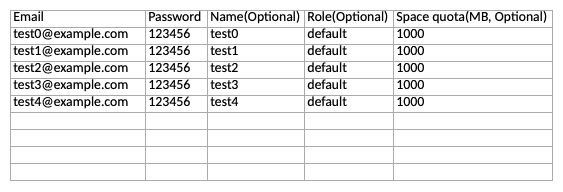 **Request body** (multipart/form-data):
- `file` (, required)
---
#### List Bases Shared to User
`GET /api/v2.1/admin/users/{user_id}/shared-dtables/`
Auth: Account-Token
List all the bases shared to a certain user with the user's ID.
**Parameters:**
- `page` (query, integer, optional): The page number you want to start showing the entries. If no value is provided, 1 will be used.
- `per_page` (query, integer, optional): The number of results that should be returned. If no value is provided, 25 results will be returned.
- `user_id` (path, string, required): The unique user id in the form ...@auth.local. This is not the email address of the user.
---
#### List User's Storage Objects
`GET /api/v2.1/admin/users/{user_id}/storage/`
Auth: Account-Token
List objects stored by a certain user by the user's ID. In the returned list, if the `is_file` value is `false`, it means this object is a folder.
In this example, the `obj_name` stands for the base's UUID. By using `/asset/` as the value of `parent_dir`, you can go into the base's asset folder, where there're probably a `files` and an `images` folder for your further inspections.
However, you as system administrator can only see the names and size of these objects, but cannot access the data saved in them.
**Parameters:**
- `parent_dir` (query, string, optional): The parent directory path.
- `user_id` (path, string, required): The unique user id in the form ...@auth.local. This is not the email address of the user.
---
### Bases
#### List User's Bases
`GET /api/v2.1/admin/users/{user_id}/dtables/`
Auth: Account-Token
List all the bases of a certain user by the user's ID.
**Parameters:**
- `page` (query, integer, optional): The page number you want to start showing the entries. If no value is provided, 1 will be used.
- `per_page` (query, integer, optional): The number of results that should be returned. If no value is provided, 25 results will be returned.
- `user_id` (path, string, required): The unique user id in the form ...@auth.local. This is not the email address of the user.
---
#### List All Bases
`GET /api/v2.1/admin/dtables/`
Auth: Account-Token
List all bases in the system with pagination support.
**Parameters:**
- `per_page` (query, integer, optional): The number of results that should be returned. If no value is provided, 25 results will be returned.
- `page` (query, integer, optional): The page number you want to start showing the entries. If no value is provided, 1 will be used.
---
#### Delete Base
`DELETE /api/v2.1/admin/dtable/{base_uuid}/`
Auth: Account-Token
Delete a base. This will move this base to its team's trash.
**Parameters:**
- `base_uuid` (path, string, required): The unique identifier of a base. Sometimes also called dtable_uuid.
---
#### List Trashed Bases
`GET /api/v2.1/admin/trash-dtables/`
Auth: Account-Token
List all the trashed bases of all teams in the system.
**Parameters:**
- `page` (query, integer, optional): The page number you want to start showing the entries. If no value is provided, 1 will be used.
- `per_page` (query, integer, optional): The number of results that should be returned. If no value is provided, 25 results will be returned.
---
#### Restore Trashed Base
`PUT /api/v2.1/admin/trash-dtables/{base_id}/`
Auth: Account-Token
Restore a deleted base from the trash bin and put it back where it was. If a base already exists there with the same name, the operation will fail and return an error.
**Parameters:**
- `base_id` (path, string, required): The id of the base. This is not the base_uuid.
---
#### List Notifications
`GET /api/v2.1/admin/dtable-notifications/`
Auth: Account-Token
As the system administrator, you can inspect a certain user's notifications inside of a certain base. To enquire these notifications, you'll need the base's UUID and the user's contact email or their username. You can also filter the result by read or unread status.
**Parameters:**
- `dtable_uuid` (query, string, required): The unique identifier of a base. Sometimes also called dtable_uuid.
- `username` (query, string, optional): Who you want to get the notifications of, optional
- `contact_email` (query, string, optional): The contact email of the user you're querying. Optional if `username` is defined.
- `seen` (query, integer, optional): Seen status, whether seen or not, 0/1, optional Values: 0, 1
- `page` (query, integer, optional): The page number you want to start showing the entries. If no value is provided, 1 will be used.
- `per_page` (query, integer, optional): The number of results that should be returned. If no value is provided, 25 results will be returned.
---
#### Delete Base Password
`PUT /api/v2.1/admin/dtable/{base_uuid}/unset-password/`
Auth: Account-Token
In the case that a user has forgotten their base password, the system admin can unset the base password with this API request. The returned value of `is_encrypted` indicates that the base's password has been unset.
**Parameters:**
- `base_uuid` (path, string, required): The unique identifier of a base. Sometimes also called dtable_uuid.
---
### Groups
#### List Groups
`GET /api/v2.1/admin/groups/`
Auth: Account-Token
Shows a list of all groups of the system. You can also search for a group by his name.
**Parameters:**
- `page` (query, integer, optional): The page number you want to start showing the entries. If no value is provided, 1 will be used.
- `per_page` (query, integer, optional): The number of results that should be returned. If no value is provided, 25 results will be returned.
- `name` (query, string, optional): Enter any query string from the name of the group.
---
#### Create Group
`POST /api/v2.1/admin/groups/`
Auth: Account-Token
Create a new group with a specified name and owner.
**Request body** (application/json):
- `group_name` (, required)
- `group_owner` (, required)
---
#### Transfer Group
`PUT /api/v2.1/admin/groups/{group_id}/`
Auth: Account-Token
Transfer the ownership of a group to a new owner.
**Parameters:**
- `group_id` (path, integer, required): The ID of the group.
**Request body** (application/json):
- `new_owner` (, required)
---
#### Delete Group
`DELETE /api/v2.1/admin/groups/{group_id}/`
Auth: Account-Token
Delete a group with its ID.
> 🚧 Group must be empty > > A group can only be deleted if it contains no bases. Delete or move all bases out of the group first, otherwise the API returns `400` with `"Cannot delete group with bases"`.
**Parameters:**
- `group_id` (path, integer, required): The ID of the group.
---
### Teams
#### List Teams
`GET /api/v2.1/admin/organizations/`
Auth: Account-Token
List all the current teams (organizations) in the system.
Use the `role` filter to only return a type of teams. The exact roles depend on your configuration.
**Parameters:**
- `page` (query, integer, optional): The page number you want to start showing the entries. If no value is provided, 1 will be used.
- `per_page` (query, integer, optional): The number of results that should be returned. If no value is provided, 25 results will be returned.
- `role` (query, string, optional): Optional. When left blank, all role types are returned.
---
#### Add Team
`POST /api/v2.1/admin/organizations/`
Auth: Account-Token
Add a team (organization) with its name and admin credentials.
In the request body, define the new team admin's `admin_email`, `admin_name` and `password`.
SeaTable does not automatically create a workspace for a newly added user: the `with_workspace` parameter is `false` by default. If you would like your new user to have a workspace when they are added (so that they can start operating workspaces and bases right away with API requests), make sure you set `true` for this parameter.
Otherwise, their workspace will only be created when they login to the SeaTable web interface for the first time.
**Request body** (application/json):
- `org_name` (, required)
- `admin_email` (, required)
- `password` (, required)
- `admin_name` (, optional)
- `with_workspace` (, optional)
---
#### List Team Bases
`GET /api/v2.1/admin/organizations/{org_id}/dtables/`
Auth: Account-Token
List all the bases of a team. As system administrator, you can see the information of these bases, but you do not have access to the data inside of them.
**Parameters:**
- `page` (query, integer, optional): The page number you want to start showing the entries. If no value is provided, 1 will be used.
- `per_page` (query, integer, optional): The number of results that should be returned. If no value is provided, 25 results will be returned.
- `org_id` (path, integer, required): The id of your team/organization. Get it from [Get Team](/reference/getteaminfo). Contact your team admin, if you are not the admin.
---
#### Get Organization Names
`GET /api/v2.1/admin/organizations-basic-info/`
Auth: Account-Token
Retrieve the names of one or more organizations by their IDs.
**Parameters:**
- `org_ids` (query, array, optional): Comma-separated list of organization IDs to look up.
---
#### Search Team
`GET /api/v2.1/admin/organizations/{org_id}/`
Auth: Account-Token
As system administrator, you can query a team by its `org_id` with this API request.
**Parameters:**
- `org_id` (path, integer, required): The id of your team/organization. Get it from [Get Team](/reference/getteaminfo). Contact your team admin, if you are not the admin.
---
#### Update Team
`PUT /api/v2.1/admin/organizations/{org_id}/`
Auth: Account-Token
Change an organization's attributes.
**Parameters:**
- `org_id` (path, integer, required): The id of your team/organization. Get it from [Get Team](/reference/getteaminfo). Contact your team admin, if you are not the admin.
**Request body** (application/json):
- `org_name` (, optional)
- `role` (string, optional): The class of the team. For example, on cloud.seatable.io, we have free teams (`org_default`), Plus teams (`org_plus`) and Enterprise teams (`org_enterprise`).
- `row_limit` (, optional)
- `max_user_number` (, optional)
- `asset_quota_mb` (, optional)
- `monthly_automation_limit_per_user` (, optional)
---
#### Delete Team
`DELETE /api/v2.1/admin/organizations/{org_id}/`
Auth: Account-Token
Delete a team (organization) with its ID. This will eliminate the team!
However, this won't delete the team users - but all its members will become team-less users in the system.
**Parameters:**
- `org_id` (path, integer, required): The id of your team/organization. Get it from [Get Team](/reference/getteaminfo). Contact your team admin, if you are not the admin.
---
#### List Team Users
`GET /api/v2.1/admin/organizations/{org_id}/users/`
Auth: Account-Token
List a team's members with their detailed information.
The `is_org_admin` value in the response indicates if this member is the administrator of the team.
**Parameters:**
- `org_id` (path, integer, required): The id of your team/organization. Get it from [Get Team](/reference/getteaminfo). Contact your team admin, if you are not the admin.
---
#### Add Team User
`POST /api/v2.1/admin/organizations/{org_id}/users/`
Auth: Account-Token
Add a new team user with desired details.
In the request body:
\* `email` is the contact email address of your new user;
\* `password` could be an initial login password you asign to them;
\* `name` is the display name of your new user;
\* `with_workspace` should be set to `true` if you want your new user to acquire a `workspace_id` immediately after adding them. The default value is `false`, which means they won't have a `workspace_id` until they login for the first time.
**Parameters:**
- `org_id` (path, integer, required): The id of your team/organization. Get it from [Get Team](/reference/getteaminfo). Contact your team admin, if you are not the admin.
**Request body** (multipart/form-data):
- `email` (, required)
- `password` (, required)
- `name` (, optional)
- `with_workspace` (, optional)
---
#### Update Team User
`PUT /api/v2.1/admin/organizations/{org_id}/users/{user_id}/`
Auth: Account-Token
The system admin can authorize a regular team member to have team admin rights.
**Parameters:**
- `org_id` (path, integer, required): The id of your team/organization. Get it from [Get Team](/reference/getteaminfo). Contact your team admin, if you are not the admin.
- `user_id` (path, string, required): The unique user id in the form ...@auth.local. This is not the email address of the user.
**Request body** (application/json):
- `is_admin` (, optional)
- `active` (, optional)
- `name` (, optional)
- `contact_email` (, optional)
- `quota_total` (, optional)
---
#### Delete Team User
`DELETE /api/v2.1/admin/organizations/{org_id}/users/{user_id}/`
Auth: Account-Token
Delete a team user with this request.
**Parameters:**
- `org_id` (path, integer, required): The id of your team/organization. Get it from [Get Team](/reference/getteaminfo). Contact your team admin, if you are not the admin.
- `user_id` (path, string, required): The unique user id in the form ...@auth.local. This is not the email address of the user.
---
#### List Team Groups
`GET /api/v2.1/admin/organizations/{org_id}/groups/`
Auth: Account-Token
List all the groups in a team with its `org_id`.
**Parameters:**
- `org_id` (path, integer, required): The id of your team/organization. Get it from [Get Team](/reference/getteaminfo). Contact your team admin, if you are not the admin.
---
#### Delete Group
`DELETE /api/v2.1/admin/organizations/{org_id}/groups/{group_id}/`
Auth: Account-Token
Delete a group with its group_id. As system administrator, you can delete any group in the system by their ID, no matter in which team they are.
**Parameters:**
- `org_id` (path, integer, required): The id of your team/organization. Get it from [Get Team](/reference/getteaminfo). Contact your team admin, if you are not the admin.
- `group_id` (path, integer, required): The ID of the group.
---
### Export
#### Export Base
`GET /api/v2.1/admin/dtables/{base_uuid}/synchronous-export/export-dtable/`
Auth: Account-Token
Use this request to export a base as System Admin.
**Parameters:**
- `base_uuid` (path, string, required): The unique identifier of a base. Sometimes also called dtable_uuid.
- `ignore_asset` (query, boolean, optional): Set this to `true` to export the base without assets. Default is `false`.
---
### Common Dataset
#### List Common Dataset
`GET /api/v2.1/admin/common-datasets/`
Auth: Account-Token
List all the common datasets in the current system. In the response, you can see * The name of the common datasets, * The source base's name, * The creator's name, and * The time of the creation.
**Parameters:**
- `page` (query, integer, optional): The page number you want to start showing the entries. If no value is provided, 1 will be used.
- `per_page` (query, integer, optional): The number of results that should be returned. If no value is provided, 25 results will be returned.
---
#### List Common Dataset Syncs
`GET /api/v2.1/admin/common-dataset/periodical-syncs/`
Auth: Account-Token
Use this request to explicitly list off the periodically synchronized common datasets in the system.
**Parameters:**
- `page` (query, integer, optional): The page number you want to start showing the entries. If no value is provided, 1 will be used.
- `per_page` (query, integer, optional): The number of results that should be returned. If no value is provided, 25 results will be returned.
---
#### List Invalid Syncs
`GET /api/v2.1/admin/common-dataset/invalid-syncs/`
Auth: Account-Token
In some cases, a common dataset synchronization configuration becomes invalid. Such cases happen when, for example, the source or destination tables are deleted. Use this request to list off all the invalid common dataset synchronization configurations in the system.
**Parameters:**
- `page` (query, integer, optional): The page number you want to start showing the entries. If no value is provided, 1 will be used.
- `per_page` (query, integer, optional): The number of results that should be returned. If no value is provided, 25 results will be returned.
---
#### Delete Invalid Syncs
`DELETE /api/v2.1/admin/common-dataset/invalid-syncs/`
Auth: Account-Token
Use this request to delete all invalid common dataset synchronization configurations at once.
---
#### Delete Invalid Sync
`DELETE /api/v2.1/admin/common-dataset/sync/{sync_id}/`
Auth: Account-Token
Delete an invalid common dataset synchronization configuration with its ID retrieved from the previous request.
**Parameters:**
- `sync_id` (path, integer, required): The ID of the invalid synchronization, retrievable from the previous call.
---
### Departments
#### List Departments
`GET /api/v2.1/admin/address-book-v2/departments/`
Auth: Account-Token
List the departments on one level of the department tree. Without `parent_id` (or with `parent_id=-1`), the top-level department is returned. With `parent_id`, the sub-departments of that department are returned.
Departments of a team are listed by passing the team's `org_id`. Without `org_id`, the system-level departments (`org_id` of `-1`) are returned.
**Parameters:**
- `parent_id` (query, integer, optional): The ID of the parent department. Optional. Without it (or with `-1`), the top-level department is returned.
- `org_id` (query, integer, optional): The ID of the team. Optional. `-1` (system-level departments) by default.
---
#### Add Department
`POST /api/v2.1/admin/address-book-v2/departments/`
Auth: Account-Token
Add a new department with a desired name below a parent department.
There can be only one top-level department (`parent_id` of `-1`) per system or team. Every further department has to be created below an existing department. Department names have to be unique within the same parent department.
**Request body** (application/json):
- `name` (, required)
- `parent_id` (, required)
- `org_id` (, optional)
---
#### Update Department
`PUT /api/v2.1/admin/address-book-v2/departments/{department_id}/`
Auth: Account-Token
Rename a department by its ID. If the department has a [group](/reference/createdepartmentgroup), the group is renamed as well.
**Parameters:**
- `department_id` (path, integer, required): The ID of the department.
**Request body** (application/json):
- `name` (, optional)
---
#### Delete Department
`DELETE /api/v2.1/admin/address-book-v2/departments/{department_id}/`
Auth: Account-Token
Delete a department by its ID. The department's group (if any) is deleted along with it.
> 🚧 Department must not have sub-departments > > A department can only be deleted if it has no sub-departments. Delete all sub-departments first, otherwise the API returns `400` with `"Forbidden deleting departments with sub departments"`.
**Parameters:**
- `department_id` (path, integer, required): The ID of the department.
---
#### List Department Members
`GET /api/v2.1/admin/address-book-v2/departments/{department_id}/members/`
Auth: Account-Token
List the members of a department by its ID.
**Parameters:**
- `department_id` (path, integer, required): The ID of the department.
---
#### Add Department Members
`POST /api/v2.1/admin/address-book-v2/departments/{department_id}/members/`
Auth: Account-Token
Add one or more users to a department. Repeat the `email` field for every user you want to add.
**Parameters:**
- `department_id` (path, integer, required): The ID of the department.
**Request body** (application/x-www-form-urlencoded):
- `email` (array, required)
---
#### Update Department Member
`PUT /api/v2.1/admin/address-book-v2/departments/{department_id}/members/{user_id}/`
Auth: Account-Token
Set whether a department member is an administrator of the department.
**Parameters:**
- `department_id` (path, integer, required): The ID of the department.
- `user_id` (path, string, required): The unique user id in the form ...@auth.local. This is not the email address of the user.
**Request body** (application/json):
- `is_staff` (, optional)
---
#### Remove Department Member
`DELETE /api/v2.1/admin/address-book-v2/departments/{department_id}/members/{user_id}/`
Auth: Account-Token
Remove a user from a department.
**Parameters:**
- `department_id` (path, integer, required): The ID of the department.
- `user_id` (path, string, required): The unique user id in the form ...@auth.local. This is not the email address of the user.
---
#### Add User to Departments
`POST /api/v2.1/admin/address-book-v2/departments/add-to-departments/`
Auth: Account-Token
Add a single user to one or more system-level departments at once. Departments the user is already a member of are listed under `failed`.
**Request body** (application/json):
- `email` (, required)
- `department_ids` (, required)
---
#### Get Department Group
`GET /api/v2.1/admin/address-book-v2/departments/{department_id}/group/`
Auth: Account-Token
Get the group of a department. Returns `404` if the department has no group.
**Parameters:**
- `department_id` (path, integer, required): The ID of the department.
---
#### Create Department Group
`POST /api/v2.1/admin/address-book-v2/departments/{department_id}/group/`
Auth: Account-Token
Create a group (with its own workspace) for a department, so that the department can own bases. A department can have at most one group.
**Parameters:**
- `department_id` (path, integer, required): The ID of the department.
---
#### Delete Department Group
`DELETE /api/v2.1/admin/address-book-v2/departments/{department_id}/group/`
Auth: Account-Token
Delete the group of a department. The department itself is kept.
> 🚧 Group must be empty > > The group can only be deleted if it contains no bases. Delete or move all bases out of the group first, otherwise the API returns `400` with `"Cannot delete group with bases"`.
**Parameters:**
- `department_id` (path, integer, required): The ID of the department.
---
#### List Users without Department
`GET /api/v2.1/admin/address-book-v2/non-department-users/`
Auth: Account-Token
List all active users that are not a member of any department. Team users are not included.
---
### Sharing Links
#### List Base External Links
`GET /api/v2.1/admin/dtable/{base_id}/external-links/`
Auth: Account-Token
List all the external links and view external links of a base. For this request, you'll need the base's `base_id`, which is to be distinguished from the base's `base_uuid`. You can retrieve a base's `base_id` with the API request e.g. [List User's Bases](/reference/listusersbases).
**Parameters:**
- `base_id` (path, string, required): The id of the base. This is not the base_uuid.
---
#### List External Links
`GET /api/v2.1/admin/external-links/`
Auth: Account-Token
List all the base external links generated in the system. In the returned objects, you can see the creator of the links, and how many times these links have been viewed.
**Parameters:**
- `page` (query, integer, optional): The page number you want to start showing the entries. If no value is provided, 1 will be used.
- `per_page` (query, integer, optional): The number of results that should be returned. If no value is provided, 25 results will be returned.
---
#### Delete Base External Link
`DELETE /api/v2.1/admin/external-links/{external_link_token}/`
Auth: Account-Token
A base external link can be deleted by its token.
**Parameters:**
- `external_link_token` (path, string, required): The token of the external link.
---
#### List View External Links
`GET /api/v2.1/admin/view-external-links/`
Auth: Account-Token
Use this request to list all the view external links generated in the current system.
---
#### Delete View External Link
`DELETE /api/v2.1/admin/view-external-links/{view_external_link_token}/`
Auth: Account-Token
Delete a view external link with its token.
**Parameters:**
- `view_external_link_token` (path, string, required): The token of the view external link.
---
### Forms
#### List Forms
`GET /api/v2.1/admin/forms/`
Auth: Account-Token
List all the forms in the current system. The returned `id` value is the ID of the form, and the `token` is the form's token.
---
#### Delete Form
`DELETE /api/v2.1/admin/forms/{form_token}/`
Auth: Account-Token
Delete a form with its token. Get a form's token with the call [List Forms](/reference/listforms).
**Parameters:**
- `form_token` (path, string, required): The token of the form.
---
#### List Data Collection Forms
`GET /api/v2.1/admin/collection-tables/`
Auth: Account-Token
List all the data collection forms generated in the system.
---
#### Delete Data Collection Forms
`DELETE /api/v2.1/admin/collection-tables/{collection_table_token}/`
Auth: Account-Token
Delete a data collection table with its token. The token can be retrieved with the call [List Data Collection Tables](/reference/listdatacollectionforms), or from the table's URL as its suffix.
**Parameters:**
- `collection_table_token` (path, string, required): The token of the collection table.
---
### Automations
#### List Automations
`GET /api/v2.1/admin/automation-rules/`
Auth: Account-Token
List all the existing base automation rules in the current system.
**Parameters:**
- `page` (query, integer, optional): The page number you want to start showing the entries. If no value is provided, 1 will be used.
- `per_page` (query, integer, optional): The number of results that should be returned. If no value is provided, 25 results will be returned.
---
#### Delete Automation
`DELETE /api/v2.1/admin/automation-rules/{automation_rule_id}/`
Auth: Account-Token
As system administrator, you can delete any automation rule existing in the current system. Attention - This operation cannot be undone!
**Parameters:**
- `automation_rule_id` (path, integer, required): The ID of the automation rule.
---
#### List Invalid Automations
`GET /api/v2.1/admin/invalid-automation-rules/`
Auth: Account-Token
When an automation rule's dependent base, row or column doesn't exist any more, it may become invalid. In this case, the system administrator can list all the invalid automation rules and eventually delete them.
**Parameters:**
- `page` (query, integer, optional): The page number you want to start showing the entries. If no value is provided, 1 will be used.
- `per_page` (query, integer, optional): The number of results that should be returned. If no value is provided, 25 results will be returned.
---
#### Delete Invalid Automations
`DELETE /api/v2.1/admin/invalid-automation-rules/`
Auth: Account-Token
If you don't want to delete the invalid automation rules one by one, you can use this request to delete them all at once.
---
### Notifications
#### List Notification Rules
`GET /api/v2.1/admin/notification-rules/`
Auth: Account-Token
List all the existing notification rules in the system. The returned `id` values are the IDs of each notification rule.
**Parameters:**
- `page` (query, integer, optional): The page number you want to start showing the entries. If no value is provided, 1 will be used.
- `per_page` (query, integer, optional): The number of results that should be returned. If no value is provided, 25 results will be returned.
---
#### Delete Notification
`DELETE /api/v2.1/admin/notification-rules/{notification_rule_id}/`
Auth: Account-Token
Delete a notification rule by its ID.
**Parameters:**
- `notification_rule_id` (path, integer, required): The ID of the notification rule.
---
#### List Invalid Notifications
`GET /api/v2.1/admin/invalid-notification-rules/`
Auth: Account-Token
The system can detect notification rules that are invalid. You can list all the invalid notification rules here.
**Parameters:**
- `page` (query, integer, optional): The page number you want to start showing the entries. If no value is provided, 1 will be used.
- `per_page` (query, integer, optional): The number of results that should be returned. If no value is provided, 25 results will be returned.
---
#### Delete Invalid Notifications
`DELETE /api/v2.1/admin/invalid-notification-rules/`
Auth: Account-Token
Delete all the notification rules that are invalid.
---
### Logs
#### List Email Logs
`GET /api/v2.1/admin/email-sending-logs/`
Auth: Account-Token
List the email sending logs in the system. The emails sent via 3rd party email accounts are listed here.
**Parameters:**
- `page` (query, integer, optional): The page number you want to start showing the entries. If no value is provided, 1 will be used.
- `per_page` (query, integer, optional): The number of results that should be returned. If no value is provided, 25 results will be returned.
---
#### List Login Logs
`GET /api/v2.1/admin/logs/login-logs/`
Auth: Account-Token
List the logins of all users in the system.
**Parameters:**
- `page` (query, integer, optional): The page number you want to start showing the entries. If no value is provided, 1 will be used.
- `per_page` (query, integer, optional): The number of results that should be returned. If no value is provided, 25 results will be returned.
---
#### List Registration Logs
`GET /api/v2.1/admin/registration-logs/`
Auth: Account-Token
List all registration and invitation logs in the system.
---
#### List Abuse Reports
`GET /api/v2.1/admin/abuse-reports/`
Auth: Account-Token
As system administrator, use this API request to list current abuse reports in the system.
The returned `id` param is the ID of each abuse report.
---
#### Update Abuse Report
`PUT /api/v2.1/admin/abuse-reports/{abuse_report_id}/`
Auth: Account-Token
As system administrator, use this API request to list current abuse reports in the system.
In the request URL, type in the `abuse_report_id` that you got from the call to list abuse reports.
**Parameters:**
- `abuse_report_id` (path, integer, required): The ID of the abuse report.
**Request body** (application/json):
- `handled` (, required)
---
#### List Audit Logs
`GET /api/v2.1/admin/audit-logs/`
Auth: Account-Token
Fetches audit logs for the system administrator.
**Parameters:**
- `page` (query, integer, optional): The page number you want to start showing the entries. If no value is provided, 1 will be used.
- `per_page` (query, integer, optional): The number of results that should be returned. If no value is provided, 25 results will be returned.
---
#### List Group Member Audit Logs
`GET /api/v2.1/admin/group-member-audit/`
Auth: Account-Token
Retrieves audit logs for changes to group members (either `group_member_add` or `group_member_delete`).
**Parameters:**
- `page` (query, integer, optional): The page number you want to start showing the entries. If no value is provided, 1 will be used.
- `per_page` (query, integer, optional): The number of results that should be returned. If no value is provided, 25 results will be returned.
---
#### List File Access Logs
`GET /api/v2.1/admin/file-access-logs/`
Auth: Account-Token
Returns a list of accessed files.
**Parameters:**
- `page` (query, integer, optional): The page number you want to start showing the entries. If no value is provided, 1 will be used.
- `per_page` (query, integer, optional): The number of results that should be returned. If no value is provided, 25 results will be returned.
---
#### List Virus Files
`GET /api/v2.1/admin/virus-files/`
Auth: Account-Token
Returns a list of files that were detected by the virus scanner.
Note: The API returns different fields per object depending on the workspace ownership (group vs. personal workspaces).
**Parameters:**
- `page` (query, integer, optional): The page number you want to start showing the entries. If no value is provided, 1 will be used.
- `per_page` (query, integer, optional): The number of results that should be returned. If no value is provided, 25 results will be returned.
- `has_handled` (query, string, optional): Filter by handling status. Use `true` for handled, `false` for unhandled, or `null` for all. Values: True, False, None
---
#### Update Virus File
`PUT /api/v2.1/admin/virus-files/{virus_id}/`
Auth: Account-Token
Updates the status of a virus file.
**Parameters:**
- `virus_id` (path, integer, required): The ID of the virus file
**Request body** (application/x-www-form-urlencoded):
- `ignore` (string, required)
---
#### Delete Virus File
`DELETE /api/v2.1/admin/virus-files/{virus_id}/`
Auth: Account-Token
Delete a virus file. You can retrieve the `virus_id` by calling the [List Virus Files](/reference/listvirusfiles) endpoint.
**Parameters:**
- `virus_id` (path, integer, required): The ID of the virus file
---
### Plugins
#### List Plugins
`GET /api/v2.1/admin/dtable-system-plugins/`
Auth: Account-Token
List all the plugins currently available in the system.
---
#### Add Plugin
`POST /api/v2.1/admin/dtable-system-plugins/`
Auth: Account-Token
Add a plugin with a .zip file. This file could be retrieved from the internet, for example, from the [SeaTable Plugins Market](https://cloud.seatable.io/apps/custom/plugin-archive/).
**Request body** (multipart/form-data):
- `plugin` (, required)
---
#### List Plugins Install Count
`GET /api/v2.1/admin/plugins-install-count/`
Auth: Account-Token
List plugins install count logs
---
#### Update Plugin
`PUT /api/v2.1/admin/dtable-system-plugins/{plugin_id}/`
Auth: Account-Token
Update a plugin via its ID (retrieved from the call [List Plugins](/reference/listplugins)) with a .zip file.
**Parameters:**
- `plugin_id` (path, integer, required): The ID of the plugin.
**Request body** (multipart/form-data):
- `plugin` (, optional)
---
#### Delete Plugin
`DELETE /api/v2.1/admin/dtable-system-plugins/{plugin_id}/`
Auth: Account-Token
Delete a plugin via its ID (retrieved from the call [List Plugins](/reference/listplugins)).
**Parameters:**
- `plugin_id` (path, integer, required): The ID of the plugin.
---
### Statistics
#### Get Active Users (per Day)
`GET /api/v2.1/admin/statistics/active-users/`
Auth: Account-Token
List the number of daily active users in a given period of time.
**Parameters:**
- `start` (query, string, optional): Starting time of the statistics like in the example. Required.
- `end` (query, string, optional): Ending time of the statistics like in the example. Required.
---
#### List Active Users (one Day)
`GET /api/v2.1/admin/daily-active-users/`
Auth: Account-Token
List the active users' details on a given day.
**Parameters:**
- `date` (query, string, optional): The date. Required.
- `page` (query, integer, optional): The page number you want to start showing the entries. If no value is provided, 1 will be used.
- `per_page` (query, integer, optional): The number of results that should be returned. If no value is provided, 25 results will be returned.
---
#### Get Automation Rules
`GET /api/v2.1/admin/statistics/auto-rules/`
Auth: Account-Token
The system documents automation rules by single users (users who are not in any teams) or by teams. In most cases, especially on cloud.seatable.io, there're no such scenario that a single user could exist, so the usage of the param `is_user` as `true` is seldom. As this API request is developed in SeaTable 2.4.2 which came out in September 2021, automation rules statistics before September 2021 could not be correctly summarized with this call.
**Parameters:**
- `is_user` (query, boolean, required): Whether you'd like to list automation rules triggered by single users who are not in any teams (`true`) or by teams (`false`). The usage of `true` here is seldom meaningful for cloud.seatable.io as all the users in the SeaTable Cloud are team users.
- `month` (query, string, optional): For which month you'd like to list the statistics in the format of YYYYMM. Statistics of automation rules before 202109 are not correctly summarized.
---
#### Get Script Running Count by User
`GET /api/v2.1/admin/statistics/scripts-running/`
Auth: Account-Token
Use this request to overview the scripts running statistics of a certain user, or all the users in your system.
In the response:
* `total_run_count` is the total number of runs;
* `total_run_time` is the total time of runs, in seconds.
**Parameters:**
- `is_user` (query, boolean, required): Whether you'd like to list automation rules triggered by single users who are not in any teams (`true`) or by teams (`false`). The usage of `true` here is seldom meaningful for cloud.seatable.io as all the users in the SeaTable Cloud are team users.
- `owner` (query, string, optional): The ID of the user you are querying. Optional. If you don't define a user, all the users are queried.
- `month` (query, string, optional): For which month you'd like to list the statistics in the format of YYYYMM. Statistics of automation rules before 202109 are not correctly summarized.
---
#### List Scripts Tasks
`GET /api/v2.1/admin/scripts-tasks/`
Auth: Account-Token
List off all the scheduled scripts tasks in the current system.
**Parameters:**
- `page` (query, integer, optional): The page number you want to start showing the entries. If no value is provided, 1 will be used.
- `per_page` (query, integer, optional): The number of results that should be returned. If no value is provided, 25 results will be returned.
---
#### Get External Apps
`GET /api/v2.1/admin/statistics/external-apps/`
Auth: Account-Token
As system admin, you can have an overview of the external apps statistics with this API request. The result can be queried by user or by team.
In the request parameter:
* `is_user` is `true` by default. If you need to see the results by team, use this param and let it be `false`.
* `month` is the time filter, and it lets you see the result by month. Use e.g. 202207 for July, 2022.
* `page` and `per_page` are your controls of the returned pages and results per page.
**Parameters:**
- `is_user` (query, boolean, required): Whether you'd like to list automation rules triggered by single users who are not in any teams (`true`) or by teams (`false`). The usage of `true` here is seldom meaningful for cloud.seatable.io as all the users in the SeaTable Cloud are team users.
- `month` (query, string, optional): For which month you'd like to list the statistics in the format of YYYYMM. Statistics of automation rules before 202109 are not correctly summarized.
- `page` (query, integer, optional): The page number you want to start showing the entries. If no value is provided, 1 will be used.
- `per_page` (query, integer, optional): The number of results that should be returned. If no value is provided, 25 results will be returned.
---
#### Get AI Statistics by Owner/Team
`GET /api/v2.1/admin/statistics/ai/`
Auth: Account-Token
Get AI usage statistics monthly by owner/team.
**Parameters:**
- `group_by` (query, string, required): Query by owner or organization Values: owner, org_id
- `date` (query, string, required): A date string in YYYY-MM-DD format
- `page` (query, integer, optional): The page number you want to start showing the entries. If no value is provided, 1 will be used.
- `per_page` (query, integer, optional): The number of results that should be returned. If no value is provided, 25 results will be returned.
---
### Maintenance
#### Repair Base
`PUT /api/v2.1/admin/dtable/{base_uuid}/repair/`
Auth: Account-Token
Repairs a base identified by its base_uuid. This repair scripts tries to detect errors in the json object and fix common problems.
**Parameters:**
- `base_uuid` (path, string, required): The unique identifier of a base. Sometimes also called dtable_uuid.
---
### System Notifications
#### List Notifications
`GET /api/v2.1/admin/sys-user-notifications/`
Auth: Account-Token
List all the system notifications sent to the users.
**Parameters:**
- `page` (query, integer, optional): The page number you want to start showing the entries. If no value is provided, 1 will be used.
- `per_page` (query, integer, optional): The number of results that should be returned. If no value is provided, 25 results will be returned.
---
#### Add Notification to User
`POST /api/v2.1/admin/sys-user-notifications/`
Auth: Account-Token
Add a system notification to a specific user with their ID.
**Request body** (application/json):
- `msg` (, required)
- `username` (, required)
---
#### Delete Notification
`DELETE /api/v2.1/admin/sys-user-notifications/{sys_notification_id}/`
Auth: Account-Token
Delete a system notification with its ID.
**Parameters:**
- `sys_notification_id` (path, integer, required): The ID of the system notification.
---
### System Info & Customizing
#### Get System Information
`GET /api/v2.1/admin/sysinfo/`
Auth: Account-Token
Get the general system information with this request as system administrator.
---
#### Update General Settings
`PUT /api/v2.1/admin/web-settings/`
Auth: Account-Token
Change the general settings of your system. For details, see the description for each parameter in the request body. Just like the settings via web interface, these settings via API request are also saved in the database table (dtable-db/constance_config). They have a higher priority over the settings in the config files. However, in the `dtable_web_settings` you'll find more setting options. For details, visit the [SeaTable Admin Manual](https://admin.seatable.com).
**Request body** (application/json):
- `SITE_TITLE` (, optional)
- `SITE_NAME` (, optional)
- `ENABLE_BRANDING_CSS` (, optional)
- `CUSTOM_CSS` (, optional)
- `ACTIVATE_AFTER_REGISTRATION` (, optional)
- `REGISTRATION_SEND_MAIL` (, optional)
- `LOGIN_REMEMBER_DAYS` (, optional)
- `LOGIN_ATTEMPT_LIMIT` (, optional)
- `FREEZE_USER_ON_LOGIN_FAILED` (, optional)
- `USER_STRONG_PASSWORD_REQUIRED` (, optional)
- `FORCE_PASSWORD_CHANGE` (, optional)
- `USER_PASSWORD_MIN_LENGTH` (, optional)
- `USER_PASSWORD_STRENGTH_LEVEL` (, optional)
- `ENABLE_TWO_FACTOR_AUTH` (, optional)
- `ENABLE_SIGNUP` (, optional)
---
#### Update Logo
`POST /api/v2.1/admin/logo/`
Auth: Account-Token
Upload an image (.png with a transparent background is recommended) as the logo of your SeaTable installation.
**Request body** (multipart/form-data):
- `logo` (, required)
---
#### Update Favicon
`POST /api/v2.1/admin/favicon/`
Auth: Account-Token
Upload an image (.png with a transparent background is recommended) as the favicon of your SeaTable installation. As per the `with_notify` param in the request body: you can use this API request twice to upload two favicons: - one is the "normal" favicon(leave `with_nofity` blank). - the other one is the "notifying" favicon which should have something like a "notifying" red dot on it (set `with_notify` to `true`). 
**Request body** (multipart/form-data):
- `favicon` (, required)
- `with_notify` (, optional)
---
#### Update Login Background Image
`POST /api/v2.1/admin/login-background-image/`
Auth: Account-Token
Change the background image shown on the login mask.
**Request body** (multipart/form-data):
- `login_bg_image` (, required)
---
## File Operations
### Files & Images
#### Get Upload Link
`GET /api/v2.1/dtable/app-upload-link/`
Auth: API-Token
Generate an upload link, including the parent- and the relative path. These values are needed in order to [upload a file / an image](https://api.seatable.com/reference/uploadfile) to a base.
Afterwards, this file/image can be attached to a file/image column. Please note that this endpoint requires an **API token** instead of a **Base token**.
> 📘 The upload link is only valid for a short time
>
> The upload link is only valid for some minutes. After that the upload link must be created again.
---
#### Upload File (or Image)
`POST /seafhttp/upload-api/{upload_link}?ret-json=1`
Auth: API-Token
Upload a file or an image as an attachment to a base. To execute this request you need to generate an upload link first.
> 📘 Three steps to add a file/an image to a base
>
> To add an image or a file to a base, three steps are necessary:
> 1. [Generate an upload link](/reference/getuploadlink).
> 2. Upload the file to the base as an attachment. (this article)
> 3. [Update a row](/reference/updaterow) and attach the file/the image to a file or image column.
>
> The [SeaTable Developer Manual](https://developer.seatable.com/clients/javascript/examples/file-upload/) includes a Node.js script that showcases the necessary API calls.
> 📘 Different variable names
>
> Pay attention that the return values of upload link have slightly different names, so `parent_path` is `parent_dir` in this call.
## Attach the file/image to a file or image column
After uploading the file/image to a base, SeaTable saves the uploaded file at non-public URL in the form: `/workspace/{workspace_id}`+`parent_dir`+`relative_path`+`name`.
You are expected to construct this relative URL yourself.
The URL consists of the following components:
- `workspace_id`: Each base is attached to a workspace. You can use the [Get Base-Token with API-Token](https://api.seatable.com/reference/getbasetokenwithapitoken) endpoint to retrieve the workspace ID for a base.
- `parent_dir`: Use the value of the `parent_path` field from the response of the [Get Upload Link](https://api.seatable.com/reference/getuploadlink) API call.
- `relative_path`: Use the value of the `img_relative_path` or `file_relative_path` field (depending on the type of asset you want to upload) from the response of the [Get Upload Link](https://api.seatable.com/reference/getuploadlink) API call.
- `name`: Use the value of the `name` field from the response of the [Upload File (or Image)](https://api.seatable.com/reference/uploadfile) API call.
Here is an example how this might look like: `https://cloud.seatable.io/workspace/24/asset/55f2f056-5da1-4095-b5f8-791bb51b991e/images/2023-07/party.png`
If you are logged in with your browser, you can access this file. Otherwise you will see the login screen.
Knowing this URL, you can add a new row or update an existing row and use the URL to add this attachment to your file/image column.
```
# Example how to add an already uploaded image to a row:
"row": {
"My Image Column": ["/workspace/24/asset/55f2f056-5da1-4095-b5f8-791bb51b991e/images/2023-07/party.png"]
}
# Example how to add an already uploaded file to a row:
"row": {
"File Column": [{
"name": "invoice.pdf",
"size": 101454,
"type": "file",
"url": "/workspace/24/asset/55f2f056-5da1-4095-b5f8-791bb51b991e/images/2023-07/invoice.pdf"
}]
}
```
> 🚧 File requires the input variables size, type and url
>
> As you can see, in the case of an image the URL is sufficient to attach the image to an image column. In case of a file, you have to provide all four input values.
**Parameters:**
- `upload_link` (path, string, required): This is the value you got from the call Get File/Image Upload Link via API Token.
---
#### Get File Download Link
`GET /api/v2.1/dtable/app-download-link/`
Auth: API-Token
Get the file download link of a base's attachment.
> 📘 The download link is only valid for a short time
>
> The download link is only valid for some hours. After that the download link must be created again. We recommend
to store images on public hosting services like AWS S3 and saving only the links in SeaTable, allowing direct use of image links in web pages.
**Parameters:**
- `path` (query, string, required): Path to the file
---
#### Delete a Base Asset
`DELETE /api/v2.1/dtable/app-asset/`
Auth: API-Token
Delete a base's attachment.
**Parameters:**
- `path` (query, string, required): Path to the file
---
### Files & Images (Custom Folder)
#### Get Files from Folder
`GET /api/v2.1/dtable/custom/app-asset-dir/`
Auth: API-Token
List files and subdirectories in a custom folder of a base.
**Parameters:**
- `path` (query, string, required): Path of the custom folder
---
#### Get File Metadata
`GET /api/v2.1/dtable/custom/app-asset-file/`
Auth: API-Token
Get metadata (name, size, last update) of a file in a custom folder.
**Parameters:**
- `path` (query, string, required): Path of the custom folder
- `name` (query, string, required): Name of the file in the custom folder
---
#### Delete a Base Asset in Custom Folder
`DELETE /api/v2.1/dtable/custom/app-asset-file/`
Auth: API-Token
Delete a base's attachment in custom folder.
**Parameters:**
- `path` (query, string, required): Path and name of the file in the custom folder
---
#### Get Upload Link
`GET /api/v2.1/dtable/custom/app-upload-link/`
Auth: API-Token
Get a temporary upload link for uploading files to a custom folder.
**Parameters:**
- `path` (query, string, required): Path of the custom folder
---
#### Get Download Link
`GET /api/v2.1/dtable/custom/app-download-link/`
Auth: API-Token
Get a temporary download link for a file in a custom folder.
**Parameters:**
- `path` (query, string, required): Path and name of the file in the custom folder
---
## Ping & Info
### Info
#### Get SeaTable Server Info
`GET /server-info/`
Use this anonymous call to retrieve the current SeaTable server version information. The response includes the current version number and the type of subscription.
---
### Ping
#### Ping Server
`GET /api2/ping/`
Check the server status.
---
#### Ping Server (with authentication)
`GET /api2/auth/ping/`
Auth: Account-Token
Executes two checks against SeaTable server:
- check the validity of the Account-Token
- check the status of SeaTable Server
---
#### Ping dtable Server
`GET /dtable-server/ping/`
Check the status of the dtable-server. Base related operations are carried out by the dtable-server. These operations are included in the section **Base Operations**.
---
#### Ping dtable-db Server
`GET /dtable-db/ping/`
Check the status of the dtable-db server.
---
#### Ping API Gateway
`GET /api-gateway/api/v2/ping/`
Check the status of the API gateway.
---
## Python Scheduler
### Statistics
#### Script Runs per User
`GET /admin/statistics/scripts-running/by-user/`
> 📘 Requires Self-Hosted Installation
>
> This endpoint requires a Python-Scheduler-Token, which can only be retrieved by the system administrator.
> Therefore this endpoint cannot be used with SeaTable Cloud.
**Parameters:**
- `month` (query, string, optional): For which month you'd like to list the statistics in the format of YYYYMM. If you leave this value empty, the current month is used.
- `order_by` (query, string, optional): Select the parameter to order the results. Values: total_run_count, total_run_time
- `direction` (query, string, optional): The direction of the sort, ascending `asc` or descending `desc`. asc by default. Direction requires that `order_by` is set. Values: , asc, desc
- `page` (query, integer, optional): The page number you want to start showing the entries. If no value is provided, 1 will be used.
- `per_page` (query, integer, optional): The number of results that should be returned. If no value is provided, 25 results will be returned.
---
#### Script Runs per Team
`GET /admin/statistics/scripts-running/by-org/`
> 📘 Requires Self-Hosted Installation
>
> This endpoint requires a Python-Scheduler-Token, which can only be retrieved by the system administrator.
> Therefore this endpoint cannot be used with SeaTable Cloud.
**Parameters:**
- `month` (query, string, optional): For which month you'd like to list the statistics in the format of YYYYMM. If you leave this value empty, the current month is used.
- `order_by` (query, string, optional): Select the parameter to order the results. Values: total_run_count, total_run_time
- `direction` (query, string, optional): The direction of the sort, ascending `asc` or descending `desc`. asc by default. Direction requires that `order_by` is set. Values: , asc, desc
- `page` (query, integer, optional): The page number you want to start showing the entries. If no value is provided, 1 will be used.
- `per_page` (query, integer, optional): The number of results that should be returned. If no value is provided, 25 results will be returned.
---
#### Script Runs per Base
`GET /admin/statistics/scripts-running/by-base/`
> 📘 Requires Self-Hosted Installation
>
> This endpoint requires a Python-Scheduler-Token, which can only be retrieved by the system administrator.
> Therefore this endpoint cannot be used with SeaTable Cloud.
**Parameters:**
- `month` (query, string, optional): For which month you'd like to list the statistics in the format of YYYYMM. If you leave this value empty, the current month is used.
- `order_by` (query, string, optional): Select the parameter to order the results. Values: total_run_count, total_run_time
- `direction` (query, string, optional): The direction of the sort, ascending `asc` or descending `desc`. asc by default. Direction requires that `order_by` is set. Values: , asc, desc
- `page` (query, integer, optional): The page number you want to start showing the entries. If no value is provided, 1 will be used.
- `per_page` (query, integer, optional): The number of results that should be returned. If no value is provided, 25 results will be returned.
---
#### Grouped by Base
`GET /admin/statistics/by-base/`
> 📘 Requires Self-Hosted Installation
>
> This endpoint requires a Python-Scheduler-Token, which can only be retrieved by the system administrator.
> Therefore this endpoint cannot be used with SeaTable Cloud.
**Parameters:**
- `org_id` (query, integer, optional): The ID of the team/organization.
- `start` (query, string, optional): Start date in ISO format.
- `end` (query, string, optional): End date in ISO format.
- `page` (query, integer, optional): The page number you want to start showing the entries. If no value is provided, 1 will be used.
- `per_page` (query, integer, optional): The number of results that should be returned. If no value is provided, 25 results will be returned.
---
#### Grouped by Day
`GET /admin/statistics/by-day/`
> 📘 Requires Self-Hosted Installation
>
> This endpoint requires a Python-Scheduler-Token, which can only be retrieved by the system administrator.
> Therefore this endpoint cannot be used with SeaTable Cloud.
**Parameters:**
- `org_id` (query, integer, optional): The ID of the team/organization.
- `base_uuid` (query, string, optional): The unique identifier of a base. Sometimes also called dtable_uuid.
- `start` (query, string, optional): Start date in ISO format.
- `end` (query, string, optional): End date in ISO format.
- `page` (query, integer, optional): The page number you want to start showing the entries. If no value is provided, 1 will be used.
- `per_page` (query, integer, optional): The number of results that should be returned. If no value is provided, 25 results will be returned.
---
### Runs
#### List Runs
`GET /admin/runs/`
> 📘 Requires Self-Hosted Installation
>
> This endpoint requires a Python-Scheduler-Token, which can only be retrieved by the system administrator.
> Therefore this endpoint cannot be used with SeaTable Cloud.
**Parameters:**
- `org_id` (query, integer, optional): The ID of the team/organization.
- `base_uuid` (query, string, optional): The unique identifier of a base. Sometimes also called dtable_uuid.
- `start` (query, string, optional): Start date in ISO format.
- `end` (query, string, optional): End date in ISO format.
- `page` (query, integer, optional): The page number you want to start showing the entries. If no value is provided, 1 will be used.
- `per_page` (query, integer, optional): The number of results that should be returned. If no value is provided, 25 results will be returned.
---
**Request body** (multipart/form-data):
- `file` (, required)
---
#### List Bases Shared to User
`GET /api/v2.1/admin/users/{user_id}/shared-dtables/`
Auth: Account-Token
List all the bases shared to a certain user with the user's ID.
**Parameters:**
- `page` (query, integer, optional): The page number you want to start showing the entries. If no value is provided, 1 will be used.
- `per_page` (query, integer, optional): The number of results that should be returned. If no value is provided, 25 results will be returned.
- `user_id` (path, string, required): The unique user id in the form ...@auth.local. This is not the email address of the user.
---
#### List User's Storage Objects
`GET /api/v2.1/admin/users/{user_id}/storage/`
Auth: Account-Token
List objects stored by a certain user by the user's ID. In the returned list, if the `is_file` value is `false`, it means this object is a folder.
In this example, the `obj_name` stands for the base's UUID. By using `/asset/` as the value of `parent_dir`, you can go into the base's asset folder, where there're probably a `files` and an `images` folder for your further inspections.
However, you as system administrator can only see the names and size of these objects, but cannot access the data saved in them.
**Parameters:**
- `parent_dir` (query, string, optional): The parent directory path.
- `user_id` (path, string, required): The unique user id in the form ...@auth.local. This is not the email address of the user.
---
### Bases
#### List User's Bases
`GET /api/v2.1/admin/users/{user_id}/dtables/`
Auth: Account-Token
List all the bases of a certain user by the user's ID.
**Parameters:**
- `page` (query, integer, optional): The page number you want to start showing the entries. If no value is provided, 1 will be used.
- `per_page` (query, integer, optional): The number of results that should be returned. If no value is provided, 25 results will be returned.
- `user_id` (path, string, required): The unique user id in the form ...@auth.local. This is not the email address of the user.
---
#### List All Bases
`GET /api/v2.1/admin/dtables/`
Auth: Account-Token
List all bases in the system with pagination support.
**Parameters:**
- `per_page` (query, integer, optional): The number of results that should be returned. If no value is provided, 25 results will be returned.
- `page` (query, integer, optional): The page number you want to start showing the entries. If no value is provided, 1 will be used.
---
#### Delete Base
`DELETE /api/v2.1/admin/dtable/{base_uuid}/`
Auth: Account-Token
Delete a base. This will move this base to its team's trash.
**Parameters:**
- `base_uuid` (path, string, required): The unique identifier of a base. Sometimes also called dtable_uuid.
---
#### List Trashed Bases
`GET /api/v2.1/admin/trash-dtables/`
Auth: Account-Token
List all the trashed bases of all teams in the system.
**Parameters:**
- `page` (query, integer, optional): The page number you want to start showing the entries. If no value is provided, 1 will be used.
- `per_page` (query, integer, optional): The number of results that should be returned. If no value is provided, 25 results will be returned.
---
#### Restore Trashed Base
`PUT /api/v2.1/admin/trash-dtables/{base_id}/`
Auth: Account-Token
Restore a deleted base from the trash bin and put it back where it was. If a base already exists there with the same name, the operation will fail and return an error.
**Parameters:**
- `base_id` (path, string, required): The id of the base. This is not the base_uuid.
---
#### List Notifications
`GET /api/v2.1/admin/dtable-notifications/`
Auth: Account-Token
As the system administrator, you can inspect a certain user's notifications inside of a certain base. To enquire these notifications, you'll need the base's UUID and the user's contact email or their username. You can also filter the result by read or unread status.
**Parameters:**
- `dtable_uuid` (query, string, required): The unique identifier of a base. Sometimes also called dtable_uuid.
- `username` (query, string, optional): Who you want to get the notifications of, optional
- `contact_email` (query, string, optional): The contact email of the user you're querying. Optional if `username` is defined.
- `seen` (query, integer, optional): Seen status, whether seen or not, 0/1, optional Values: 0, 1
- `page` (query, integer, optional): The page number you want to start showing the entries. If no value is provided, 1 will be used.
- `per_page` (query, integer, optional): The number of results that should be returned. If no value is provided, 25 results will be returned.
---
#### Delete Base Password
`PUT /api/v2.1/admin/dtable/{base_uuid}/unset-password/`
Auth: Account-Token
In the case that a user has forgotten their base password, the system admin can unset the base password with this API request. The returned value of `is_encrypted` indicates that the base's password has been unset.
**Parameters:**
- `base_uuid` (path, string, required): The unique identifier of a base. Sometimes also called dtable_uuid.
---
### Groups
#### List Groups
`GET /api/v2.1/admin/groups/`
Auth: Account-Token
Shows a list of all groups of the system. You can also search for a group by his name.
**Parameters:**
- `page` (query, integer, optional): The page number you want to start showing the entries. If no value is provided, 1 will be used.
- `per_page` (query, integer, optional): The number of results that should be returned. If no value is provided, 25 results will be returned.
- `name` (query, string, optional): Enter any query string from the name of the group.
---
#### Create Group
`POST /api/v2.1/admin/groups/`
Auth: Account-Token
Create a new group with a specified name and owner.
**Request body** (application/json):
- `group_name` (, required)
- `group_owner` (, required)
---
#### Transfer Group
`PUT /api/v2.1/admin/groups/{group_id}/`
Auth: Account-Token
Transfer the ownership of a group to a new owner.
**Parameters:**
- `group_id` (path, integer, required): The ID of the group.
**Request body** (application/json):
- `new_owner` (, required)
---
#### Delete Group
`DELETE /api/v2.1/admin/groups/{group_id}/`
Auth: Account-Token
Delete a group with its ID.
> 🚧 Group must be empty > > A group can only be deleted if it contains no bases. Delete or move all bases out of the group first, otherwise the API returns `400` with `"Cannot delete group with bases"`.
**Parameters:**
- `group_id` (path, integer, required): The ID of the group.
---
### Teams
#### List Teams
`GET /api/v2.1/admin/organizations/`
Auth: Account-Token
List all the current teams (organizations) in the system.
Use the `role` filter to only return a type of teams. The exact roles depend on your configuration.
**Parameters:**
- `page` (query, integer, optional): The page number you want to start showing the entries. If no value is provided, 1 will be used.
- `per_page` (query, integer, optional): The number of results that should be returned. If no value is provided, 25 results will be returned.
- `role` (query, string, optional): Optional. When left blank, all role types are returned.
---
#### Add Team
`POST /api/v2.1/admin/organizations/`
Auth: Account-Token
Add a team (organization) with its name and admin credentials.
In the request body, define the new team admin's `admin_email`, `admin_name` and `password`.
SeaTable does not automatically create a workspace for a newly added user: the `with_workspace` parameter is `false` by default. If you would like your new user to have a workspace when they are added (so that they can start operating workspaces and bases right away with API requests), make sure you set `true` for this parameter.
Otherwise, their workspace will only be created when they login to the SeaTable web interface for the first time.
**Request body** (application/json):
- `org_name` (, required)
- `admin_email` (, required)
- `password` (, required)
- `admin_name` (, optional)
- `with_workspace` (, optional)
---
#### List Team Bases
`GET /api/v2.1/admin/organizations/{org_id}/dtables/`
Auth: Account-Token
List all the bases of a team. As system administrator, you can see the information of these bases, but you do not have access to the data inside of them.
**Parameters:**
- `page` (query, integer, optional): The page number you want to start showing the entries. If no value is provided, 1 will be used.
- `per_page` (query, integer, optional): The number of results that should be returned. If no value is provided, 25 results will be returned.
- `org_id` (path, integer, required): The id of your team/organization. Get it from [Get Team](/reference/getteaminfo). Contact your team admin, if you are not the admin.
---
#### Get Organization Names
`GET /api/v2.1/admin/organizations-basic-info/`
Auth: Account-Token
Retrieve the names of one or more organizations by their IDs.
**Parameters:**
- `org_ids` (query, array, optional): Comma-separated list of organization IDs to look up.
---
#### Search Team
`GET /api/v2.1/admin/organizations/{org_id}/`
Auth: Account-Token
As system administrator, you can query a team by its `org_id` with this API request.
**Parameters:**
- `org_id` (path, integer, required): The id of your team/organization. Get it from [Get Team](/reference/getteaminfo). Contact your team admin, if you are not the admin.
---
#### Update Team
`PUT /api/v2.1/admin/organizations/{org_id}/`
Auth: Account-Token
Change an organization's attributes.
**Parameters:**
- `org_id` (path, integer, required): The id of your team/organization. Get it from [Get Team](/reference/getteaminfo). Contact your team admin, if you are not the admin.
**Request body** (application/json):
- `org_name` (, optional)
- `role` (string, optional): The class of the team. For example, on cloud.seatable.io, we have free teams (`org_default`), Plus teams (`org_plus`) and Enterprise teams (`org_enterprise`).
- `row_limit` (, optional)
- `max_user_number` (, optional)
- `asset_quota_mb` (, optional)
- `monthly_automation_limit_per_user` (, optional)
---
#### Delete Team
`DELETE /api/v2.1/admin/organizations/{org_id}/`
Auth: Account-Token
Delete a team (organization) with its ID. This will eliminate the team!
However, this won't delete the team users - but all its members will become team-less users in the system.
**Parameters:**
- `org_id` (path, integer, required): The id of your team/organization. Get it from [Get Team](/reference/getteaminfo). Contact your team admin, if you are not the admin.
---
#### List Team Users
`GET /api/v2.1/admin/organizations/{org_id}/users/`
Auth: Account-Token
List a team's members with their detailed information.
The `is_org_admin` value in the response indicates if this member is the administrator of the team.
**Parameters:**
- `org_id` (path, integer, required): The id of your team/organization. Get it from [Get Team](/reference/getteaminfo). Contact your team admin, if you are not the admin.
---
#### Add Team User
`POST /api/v2.1/admin/organizations/{org_id}/users/`
Auth: Account-Token
Add a new team user with desired details.
In the request body:
\* `email` is the contact email address of your new user;
\* `password` could be an initial login password you asign to them;
\* `name` is the display name of your new user;
\* `with_workspace` should be set to `true` if you want your new user to acquire a `workspace_id` immediately after adding them. The default value is `false`, which means they won't have a `workspace_id` until they login for the first time.
**Parameters:**
- `org_id` (path, integer, required): The id of your team/organization. Get it from [Get Team](/reference/getteaminfo). Contact your team admin, if you are not the admin.
**Request body** (multipart/form-data):
- `email` (, required)
- `password` (, required)
- `name` (, optional)
- `with_workspace` (, optional)
---
#### Update Team User
`PUT /api/v2.1/admin/organizations/{org_id}/users/{user_id}/`
Auth: Account-Token
The system admin can authorize a regular team member to have team admin rights.
**Parameters:**
- `org_id` (path, integer, required): The id of your team/organization. Get it from [Get Team](/reference/getteaminfo). Contact your team admin, if you are not the admin.
- `user_id` (path, string, required): The unique user id in the form ...@auth.local. This is not the email address of the user.
**Request body** (application/json):
- `is_admin` (, optional)
- `active` (, optional)
- `name` (, optional)
- `contact_email` (, optional)
- `quota_total` (, optional)
---
#### Delete Team User
`DELETE /api/v2.1/admin/organizations/{org_id}/users/{user_id}/`
Auth: Account-Token
Delete a team user with this request.
**Parameters:**
- `org_id` (path, integer, required): The id of your team/organization. Get it from [Get Team](/reference/getteaminfo). Contact your team admin, if you are not the admin.
- `user_id` (path, string, required): The unique user id in the form ...@auth.local. This is not the email address of the user.
---
#### List Team Groups
`GET /api/v2.1/admin/organizations/{org_id}/groups/`
Auth: Account-Token
List all the groups in a team with its `org_id`.
**Parameters:**
- `org_id` (path, integer, required): The id of your team/organization. Get it from [Get Team](/reference/getteaminfo). Contact your team admin, if you are not the admin.
---
#### Delete Group
`DELETE /api/v2.1/admin/organizations/{org_id}/groups/{group_id}/`
Auth: Account-Token
Delete a group with its group_id. As system administrator, you can delete any group in the system by their ID, no matter in which team they are.
**Parameters:**
- `org_id` (path, integer, required): The id of your team/organization. Get it from [Get Team](/reference/getteaminfo). Contact your team admin, if you are not the admin.
- `group_id` (path, integer, required): The ID of the group.
---
### Export
#### Export Base
`GET /api/v2.1/admin/dtables/{base_uuid}/synchronous-export/export-dtable/`
Auth: Account-Token
Use this request to export a base as System Admin.
**Parameters:**
- `base_uuid` (path, string, required): The unique identifier of a base. Sometimes also called dtable_uuid.
- `ignore_asset` (query, boolean, optional): Set this to `true` to export the base without assets. Default is `false`.
---
### Common Dataset
#### List Common Dataset
`GET /api/v2.1/admin/common-datasets/`
Auth: Account-Token
List all the common datasets in the current system. In the response, you can see * The name of the common datasets, * The source base's name, * The creator's name, and * The time of the creation.
**Parameters:**
- `page` (query, integer, optional): The page number you want to start showing the entries. If no value is provided, 1 will be used.
- `per_page` (query, integer, optional): The number of results that should be returned. If no value is provided, 25 results will be returned.
---
#### List Common Dataset Syncs
`GET /api/v2.1/admin/common-dataset/periodical-syncs/`
Auth: Account-Token
Use this request to explicitly list off the periodically synchronized common datasets in the system.
**Parameters:**
- `page` (query, integer, optional): The page number you want to start showing the entries. If no value is provided, 1 will be used.
- `per_page` (query, integer, optional): The number of results that should be returned. If no value is provided, 25 results will be returned.
---
#### List Invalid Syncs
`GET /api/v2.1/admin/common-dataset/invalid-syncs/`
Auth: Account-Token
In some cases, a common dataset synchronization configuration becomes invalid. Such cases happen when, for example, the source or destination tables are deleted. Use this request to list off all the invalid common dataset synchronization configurations in the system.
**Parameters:**
- `page` (query, integer, optional): The page number you want to start showing the entries. If no value is provided, 1 will be used.
- `per_page` (query, integer, optional): The number of results that should be returned. If no value is provided, 25 results will be returned.
---
#### Delete Invalid Syncs
`DELETE /api/v2.1/admin/common-dataset/invalid-syncs/`
Auth: Account-Token
Use this request to delete all invalid common dataset synchronization configurations at once.
---
#### Delete Invalid Sync
`DELETE /api/v2.1/admin/common-dataset/sync/{sync_id}/`
Auth: Account-Token
Delete an invalid common dataset synchronization configuration with its ID retrieved from the previous request.
**Parameters:**
- `sync_id` (path, integer, required): The ID of the invalid synchronization, retrievable from the previous call.
---
### Departments
#### List Departments
`GET /api/v2.1/admin/address-book-v2/departments/`
Auth: Account-Token
List the departments on one level of the department tree. Without `parent_id` (or with `parent_id=-1`), the top-level department is returned. With `parent_id`, the sub-departments of that department are returned.
Departments of a team are listed by passing the team's `org_id`. Without `org_id`, the system-level departments (`org_id` of `-1`) are returned.
**Parameters:**
- `parent_id` (query, integer, optional): The ID of the parent department. Optional. Without it (or with `-1`), the top-level department is returned.
- `org_id` (query, integer, optional): The ID of the team. Optional. `-1` (system-level departments) by default.
---
#### Add Department
`POST /api/v2.1/admin/address-book-v2/departments/`
Auth: Account-Token
Add a new department with a desired name below a parent department.
There can be only one top-level department (`parent_id` of `-1`) per system or team. Every further department has to be created below an existing department. Department names have to be unique within the same parent department.
**Request body** (application/json):
- `name` (, required)
- `parent_id` (, required)
- `org_id` (, optional)
---
#### Update Department
`PUT /api/v2.1/admin/address-book-v2/departments/{department_id}/`
Auth: Account-Token
Rename a department by its ID. If the department has a [group](/reference/createdepartmentgroup), the group is renamed as well.
**Parameters:**
- `department_id` (path, integer, required): The ID of the department.
**Request body** (application/json):
- `name` (, optional)
---
#### Delete Department
`DELETE /api/v2.1/admin/address-book-v2/departments/{department_id}/`
Auth: Account-Token
Delete a department by its ID. The department's group (if any) is deleted along with it.
> 🚧 Department must not have sub-departments > > A department can only be deleted if it has no sub-departments. Delete all sub-departments first, otherwise the API returns `400` with `"Forbidden deleting departments with sub departments"`.
**Parameters:**
- `department_id` (path, integer, required): The ID of the department.
---
#### List Department Members
`GET /api/v2.1/admin/address-book-v2/departments/{department_id}/members/`
Auth: Account-Token
List the members of a department by its ID.
**Parameters:**
- `department_id` (path, integer, required): The ID of the department.
---
#### Add Department Members
`POST /api/v2.1/admin/address-book-v2/departments/{department_id}/members/`
Auth: Account-Token
Add one or more users to a department. Repeat the `email` field for every user you want to add.
**Parameters:**
- `department_id` (path, integer, required): The ID of the department.
**Request body** (application/x-www-form-urlencoded):
- `email` (array, required)
---
#### Update Department Member
`PUT /api/v2.1/admin/address-book-v2/departments/{department_id}/members/{user_id}/`
Auth: Account-Token
Set whether a department member is an administrator of the department.
**Parameters:**
- `department_id` (path, integer, required): The ID of the department.
- `user_id` (path, string, required): The unique user id in the form ...@auth.local. This is not the email address of the user.
**Request body** (application/json):
- `is_staff` (, optional)
---
#### Remove Department Member
`DELETE /api/v2.1/admin/address-book-v2/departments/{department_id}/members/{user_id}/`
Auth: Account-Token
Remove a user from a department.
**Parameters:**
- `department_id` (path, integer, required): The ID of the department.
- `user_id` (path, string, required): The unique user id in the form ...@auth.local. This is not the email address of the user.
---
#### Add User to Departments
`POST /api/v2.1/admin/address-book-v2/departments/add-to-departments/`
Auth: Account-Token
Add a single user to one or more system-level departments at once. Departments the user is already a member of are listed under `failed`.
**Request body** (application/json):
- `email` (, required)
- `department_ids` (, required)
---
#### Get Department Group
`GET /api/v2.1/admin/address-book-v2/departments/{department_id}/group/`
Auth: Account-Token
Get the group of a department. Returns `404` if the department has no group.
**Parameters:**
- `department_id` (path, integer, required): The ID of the department.
---
#### Create Department Group
`POST /api/v2.1/admin/address-book-v2/departments/{department_id}/group/`
Auth: Account-Token
Create a group (with its own workspace) for a department, so that the department can own bases. A department can have at most one group.
**Parameters:**
- `department_id` (path, integer, required): The ID of the department.
---
#### Delete Department Group
`DELETE /api/v2.1/admin/address-book-v2/departments/{department_id}/group/`
Auth: Account-Token
Delete the group of a department. The department itself is kept.
> 🚧 Group must be empty > > The group can only be deleted if it contains no bases. Delete or move all bases out of the group first, otherwise the API returns `400` with `"Cannot delete group with bases"`.
**Parameters:**
- `department_id` (path, integer, required): The ID of the department.
---
#### List Users without Department
`GET /api/v2.1/admin/address-book-v2/non-department-users/`
Auth: Account-Token
List all active users that are not a member of any department. Team users are not included.
---
### Sharing Links
#### List Base External Links
`GET /api/v2.1/admin/dtable/{base_id}/external-links/`
Auth: Account-Token
List all the external links and view external links of a base. For this request, you'll need the base's `base_id`, which is to be distinguished from the base's `base_uuid`. You can retrieve a base's `base_id` with the API request e.g. [List User's Bases](/reference/listusersbases).
**Parameters:**
- `base_id` (path, string, required): The id of the base. This is not the base_uuid.
---
#### List External Links
`GET /api/v2.1/admin/external-links/`
Auth: Account-Token
List all the base external links generated in the system. In the returned objects, you can see the creator of the links, and how many times these links have been viewed.
**Parameters:**
- `page` (query, integer, optional): The page number you want to start showing the entries. If no value is provided, 1 will be used.
- `per_page` (query, integer, optional): The number of results that should be returned. If no value is provided, 25 results will be returned.
---
#### Delete Base External Link
`DELETE /api/v2.1/admin/external-links/{external_link_token}/`
Auth: Account-Token
A base external link can be deleted by its token.
**Parameters:**
- `external_link_token` (path, string, required): The token of the external link.
---
#### List View External Links
`GET /api/v2.1/admin/view-external-links/`
Auth: Account-Token
Use this request to list all the view external links generated in the current system.
---
#### Delete View External Link
`DELETE /api/v2.1/admin/view-external-links/{view_external_link_token}/`
Auth: Account-Token
Delete a view external link with its token.
**Parameters:**
- `view_external_link_token` (path, string, required): The token of the view external link.
---
### Forms
#### List Forms
`GET /api/v2.1/admin/forms/`
Auth: Account-Token
List all the forms in the current system. The returned `id` value is the ID of the form, and the `token` is the form's token.
---
#### Delete Form
`DELETE /api/v2.1/admin/forms/{form_token}/`
Auth: Account-Token
Delete a form with its token. Get a form's token with the call [List Forms](/reference/listforms).
**Parameters:**
- `form_token` (path, string, required): The token of the form.
---
#### List Data Collection Forms
`GET /api/v2.1/admin/collection-tables/`
Auth: Account-Token
List all the data collection forms generated in the system.
---
#### Delete Data Collection Forms
`DELETE /api/v2.1/admin/collection-tables/{collection_table_token}/`
Auth: Account-Token
Delete a data collection table with its token. The token can be retrieved with the call [List Data Collection Tables](/reference/listdatacollectionforms), or from the table's URL as its suffix.
**Parameters:**
- `collection_table_token` (path, string, required): The token of the collection table.
---
### Automations
#### List Automations
`GET /api/v2.1/admin/automation-rules/`
Auth: Account-Token
List all the existing base automation rules in the current system.
**Parameters:**
- `page` (query, integer, optional): The page number you want to start showing the entries. If no value is provided, 1 will be used.
- `per_page` (query, integer, optional): The number of results that should be returned. If no value is provided, 25 results will be returned.
---
#### Delete Automation
`DELETE /api/v2.1/admin/automation-rules/{automation_rule_id}/`
Auth: Account-Token
As system administrator, you can delete any automation rule existing in the current system. Attention - This operation cannot be undone!
**Parameters:**
- `automation_rule_id` (path, integer, required): The ID of the automation rule.
---
#### List Invalid Automations
`GET /api/v2.1/admin/invalid-automation-rules/`
Auth: Account-Token
When an automation rule's dependent base, row or column doesn't exist any more, it may become invalid. In this case, the system administrator can list all the invalid automation rules and eventually delete them.
**Parameters:**
- `page` (query, integer, optional): The page number you want to start showing the entries. If no value is provided, 1 will be used.
- `per_page` (query, integer, optional): The number of results that should be returned. If no value is provided, 25 results will be returned.
---
#### Delete Invalid Automations
`DELETE /api/v2.1/admin/invalid-automation-rules/`
Auth: Account-Token
If you don't want to delete the invalid automation rules one by one, you can use this request to delete them all at once.
---
### Notifications
#### List Notification Rules
`GET /api/v2.1/admin/notification-rules/`
Auth: Account-Token
List all the existing notification rules in the system. The returned `id` values are the IDs of each notification rule.
**Parameters:**
- `page` (query, integer, optional): The page number you want to start showing the entries. If no value is provided, 1 will be used.
- `per_page` (query, integer, optional): The number of results that should be returned. If no value is provided, 25 results will be returned.
---
#### Delete Notification
`DELETE /api/v2.1/admin/notification-rules/{notification_rule_id}/`
Auth: Account-Token
Delete a notification rule by its ID.
**Parameters:**
- `notification_rule_id` (path, integer, required): The ID of the notification rule.
---
#### List Invalid Notifications
`GET /api/v2.1/admin/invalid-notification-rules/`
Auth: Account-Token
The system can detect notification rules that are invalid. You can list all the invalid notification rules here.
**Parameters:**
- `page` (query, integer, optional): The page number you want to start showing the entries. If no value is provided, 1 will be used.
- `per_page` (query, integer, optional): The number of results that should be returned. If no value is provided, 25 results will be returned.
---
#### Delete Invalid Notifications
`DELETE /api/v2.1/admin/invalid-notification-rules/`
Auth: Account-Token
Delete all the notification rules that are invalid.
---
### Logs
#### List Email Logs
`GET /api/v2.1/admin/email-sending-logs/`
Auth: Account-Token
List the email sending logs in the system. The emails sent via 3rd party email accounts are listed here.
**Parameters:**
- `page` (query, integer, optional): The page number you want to start showing the entries. If no value is provided, 1 will be used.
- `per_page` (query, integer, optional): The number of results that should be returned. If no value is provided, 25 results will be returned.
---
#### List Login Logs
`GET /api/v2.1/admin/logs/login-logs/`
Auth: Account-Token
List the logins of all users in the system.
**Parameters:**
- `page` (query, integer, optional): The page number you want to start showing the entries. If no value is provided, 1 will be used.
- `per_page` (query, integer, optional): The number of results that should be returned. If no value is provided, 25 results will be returned.
---
#### List Registration Logs
`GET /api/v2.1/admin/registration-logs/`
Auth: Account-Token
List all registration and invitation logs in the system.
---
#### List Abuse Reports
`GET /api/v2.1/admin/abuse-reports/`
Auth: Account-Token
As system administrator, use this API request to list current abuse reports in the system.
The returned `id` param is the ID of each abuse report.
---
#### Update Abuse Report
`PUT /api/v2.1/admin/abuse-reports/{abuse_report_id}/`
Auth: Account-Token
As system administrator, use this API request to list current abuse reports in the system.
In the request URL, type in the `abuse_report_id` that you got from the call to list abuse reports.
**Parameters:**
- `abuse_report_id` (path, integer, required): The ID of the abuse report.
**Request body** (application/json):
- `handled` (, required)
---
#### List Audit Logs
`GET /api/v2.1/admin/audit-logs/`
Auth: Account-Token
Fetches audit logs for the system administrator.
**Parameters:**
- `page` (query, integer, optional): The page number you want to start showing the entries. If no value is provided, 1 will be used.
- `per_page` (query, integer, optional): The number of results that should be returned. If no value is provided, 25 results will be returned.
---
#### List Group Member Audit Logs
`GET /api/v2.1/admin/group-member-audit/`
Auth: Account-Token
Retrieves audit logs for changes to group members (either `group_member_add` or `group_member_delete`).
**Parameters:**
- `page` (query, integer, optional): The page number you want to start showing the entries. If no value is provided, 1 will be used.
- `per_page` (query, integer, optional): The number of results that should be returned. If no value is provided, 25 results will be returned.
---
#### List File Access Logs
`GET /api/v2.1/admin/file-access-logs/`
Auth: Account-Token
Returns a list of accessed files.
**Parameters:**
- `page` (query, integer, optional): The page number you want to start showing the entries. If no value is provided, 1 will be used.
- `per_page` (query, integer, optional): The number of results that should be returned. If no value is provided, 25 results will be returned.
---
#### List Virus Files
`GET /api/v2.1/admin/virus-files/`
Auth: Account-Token
Returns a list of files that were detected by the virus scanner.
Note: The API returns different fields per object depending on the workspace ownership (group vs. personal workspaces).
**Parameters:**
- `page` (query, integer, optional): The page number you want to start showing the entries. If no value is provided, 1 will be used.
- `per_page` (query, integer, optional): The number of results that should be returned. If no value is provided, 25 results will be returned.
- `has_handled` (query, string, optional): Filter by handling status. Use `true` for handled, `false` for unhandled, or `null` for all. Values: True, False, None
---
#### Update Virus File
`PUT /api/v2.1/admin/virus-files/{virus_id}/`
Auth: Account-Token
Updates the status of a virus file.
**Parameters:**
- `virus_id` (path, integer, required): The ID of the virus file
**Request body** (application/x-www-form-urlencoded):
- `ignore` (string, required)
---
#### Delete Virus File
`DELETE /api/v2.1/admin/virus-files/{virus_id}/`
Auth: Account-Token
Delete a virus file. You can retrieve the `virus_id` by calling the [List Virus Files](/reference/listvirusfiles) endpoint.
**Parameters:**
- `virus_id` (path, integer, required): The ID of the virus file
---
### Plugins
#### List Plugins
`GET /api/v2.1/admin/dtable-system-plugins/`
Auth: Account-Token
List all the plugins currently available in the system.
---
#### Add Plugin
`POST /api/v2.1/admin/dtable-system-plugins/`
Auth: Account-Token
Add a plugin with a .zip file. This file could be retrieved from the internet, for example, from the [SeaTable Plugins Market](https://cloud.seatable.io/apps/custom/plugin-archive/).
**Request body** (multipart/form-data):
- `plugin` (, required)
---
#### List Plugins Install Count
`GET /api/v2.1/admin/plugins-install-count/`
Auth: Account-Token
List plugins install count logs
---
#### Update Plugin
`PUT /api/v2.1/admin/dtable-system-plugins/{plugin_id}/`
Auth: Account-Token
Update a plugin via its ID (retrieved from the call [List Plugins](/reference/listplugins)) with a .zip file.
**Parameters:**
- `plugin_id` (path, integer, required): The ID of the plugin.
**Request body** (multipart/form-data):
- `plugin` (, optional)
---
#### Delete Plugin
`DELETE /api/v2.1/admin/dtable-system-plugins/{plugin_id}/`
Auth: Account-Token
Delete a plugin via its ID (retrieved from the call [List Plugins](/reference/listplugins)).
**Parameters:**
- `plugin_id` (path, integer, required): The ID of the plugin.
---
### Statistics
#### Get Active Users (per Day)
`GET /api/v2.1/admin/statistics/active-users/`
Auth: Account-Token
List the number of daily active users in a given period of time.
**Parameters:**
- `start` (query, string, optional): Starting time of the statistics like in the example. Required.
- `end` (query, string, optional): Ending time of the statistics like in the example. Required.
---
#### List Active Users (one Day)
`GET /api/v2.1/admin/daily-active-users/`
Auth: Account-Token
List the active users' details on a given day.
**Parameters:**
- `date` (query, string, optional): The date. Required.
- `page` (query, integer, optional): The page number you want to start showing the entries. If no value is provided, 1 will be used.
- `per_page` (query, integer, optional): The number of results that should be returned. If no value is provided, 25 results will be returned.
---
#### Get Automation Rules
`GET /api/v2.1/admin/statistics/auto-rules/`
Auth: Account-Token
The system documents automation rules by single users (users who are not in any teams) or by teams. In most cases, especially on cloud.seatable.io, there're no such scenario that a single user could exist, so the usage of the param `is_user` as `true` is seldom. As this API request is developed in SeaTable 2.4.2 which came out in September 2021, automation rules statistics before September 2021 could not be correctly summarized with this call.
**Parameters:**
- `is_user` (query, boolean, required): Whether you'd like to list automation rules triggered by single users who are not in any teams (`true`) or by teams (`false`). The usage of `true` here is seldom meaningful for cloud.seatable.io as all the users in the SeaTable Cloud are team users.
- `month` (query, string, optional): For which month you'd like to list the statistics in the format of YYYYMM. Statistics of automation rules before 202109 are not correctly summarized.
---
#### Get Script Running Count by User
`GET /api/v2.1/admin/statistics/scripts-running/`
Auth: Account-Token
Use this request to overview the scripts running statistics of a certain user, or all the users in your system.
In the response:
* `total_run_count` is the total number of runs;
* `total_run_time` is the total time of runs, in seconds.
**Parameters:**
- `is_user` (query, boolean, required): Whether you'd like to list automation rules triggered by single users who are not in any teams (`true`) or by teams (`false`). The usage of `true` here is seldom meaningful for cloud.seatable.io as all the users in the SeaTable Cloud are team users.
- `owner` (query, string, optional): The ID of the user you are querying. Optional. If you don't define a user, all the users are queried.
- `month` (query, string, optional): For which month you'd like to list the statistics in the format of YYYYMM. Statistics of automation rules before 202109 are not correctly summarized.
---
#### List Scripts Tasks
`GET /api/v2.1/admin/scripts-tasks/`
Auth: Account-Token
List off all the scheduled scripts tasks in the current system.
**Parameters:**
- `page` (query, integer, optional): The page number you want to start showing the entries. If no value is provided, 1 will be used.
- `per_page` (query, integer, optional): The number of results that should be returned. If no value is provided, 25 results will be returned.
---
#### Get External Apps
`GET /api/v2.1/admin/statistics/external-apps/`
Auth: Account-Token
As system admin, you can have an overview of the external apps statistics with this API request. The result can be queried by user or by team.
In the request parameter:
* `is_user` is `true` by default. If you need to see the results by team, use this param and let it be `false`.
* `month` is the time filter, and it lets you see the result by month. Use e.g. 202207 for July, 2022.
* `page` and `per_page` are your controls of the returned pages and results per page.
**Parameters:**
- `is_user` (query, boolean, required): Whether you'd like to list automation rules triggered by single users who are not in any teams (`true`) or by teams (`false`). The usage of `true` here is seldom meaningful for cloud.seatable.io as all the users in the SeaTable Cloud are team users.
- `month` (query, string, optional): For which month you'd like to list the statistics in the format of YYYYMM. Statistics of automation rules before 202109 are not correctly summarized.
- `page` (query, integer, optional): The page number you want to start showing the entries. If no value is provided, 1 will be used.
- `per_page` (query, integer, optional): The number of results that should be returned. If no value is provided, 25 results will be returned.
---
#### Get AI Statistics by Owner/Team
`GET /api/v2.1/admin/statistics/ai/`
Auth: Account-Token
Get AI usage statistics monthly by owner/team.
**Parameters:**
- `group_by` (query, string, required): Query by owner or organization Values: owner, org_id
- `date` (query, string, required): A date string in YYYY-MM-DD format
- `page` (query, integer, optional): The page number you want to start showing the entries. If no value is provided, 1 will be used.
- `per_page` (query, integer, optional): The number of results that should be returned. If no value is provided, 25 results will be returned.
---
### Maintenance
#### Repair Base
`PUT /api/v2.1/admin/dtable/{base_uuid}/repair/`
Auth: Account-Token
Repairs a base identified by its base_uuid. This repair scripts tries to detect errors in the json object and fix common problems.
**Parameters:**
- `base_uuid` (path, string, required): The unique identifier of a base. Sometimes also called dtable_uuid.
---
### System Notifications
#### List Notifications
`GET /api/v2.1/admin/sys-user-notifications/`
Auth: Account-Token
List all the system notifications sent to the users.
**Parameters:**
- `page` (query, integer, optional): The page number you want to start showing the entries. If no value is provided, 1 will be used.
- `per_page` (query, integer, optional): The number of results that should be returned. If no value is provided, 25 results will be returned.
---
#### Add Notification to User
`POST /api/v2.1/admin/sys-user-notifications/`
Auth: Account-Token
Add a system notification to a specific user with their ID.
**Request body** (application/json):
- `msg` (, required)
- `username` (, required)
---
#### Delete Notification
`DELETE /api/v2.1/admin/sys-user-notifications/{sys_notification_id}/`
Auth: Account-Token
Delete a system notification with its ID.
**Parameters:**
- `sys_notification_id` (path, integer, required): The ID of the system notification.
---
### System Info & Customizing
#### Get System Information
`GET /api/v2.1/admin/sysinfo/`
Auth: Account-Token
Get the general system information with this request as system administrator.
---
#### Update General Settings
`PUT /api/v2.1/admin/web-settings/`
Auth: Account-Token
Change the general settings of your system. For details, see the description for each parameter in the request body. Just like the settings via web interface, these settings via API request are also saved in the database table (dtable-db/constance_config). They have a higher priority over the settings in the config files. However, in the `dtable_web_settings` you'll find more setting options. For details, visit the [SeaTable Admin Manual](https://admin.seatable.com).
**Request body** (application/json):
- `SITE_TITLE` (, optional)
- `SITE_NAME` (, optional)
- `ENABLE_BRANDING_CSS` (, optional)
- `CUSTOM_CSS` (, optional)
- `ACTIVATE_AFTER_REGISTRATION` (, optional)
- `REGISTRATION_SEND_MAIL` (, optional)
- `LOGIN_REMEMBER_DAYS` (, optional)
- `LOGIN_ATTEMPT_LIMIT` (, optional)
- `FREEZE_USER_ON_LOGIN_FAILED` (, optional)
- `USER_STRONG_PASSWORD_REQUIRED` (, optional)
- `FORCE_PASSWORD_CHANGE` (, optional)
- `USER_PASSWORD_MIN_LENGTH` (, optional)
- `USER_PASSWORD_STRENGTH_LEVEL` (, optional)
- `ENABLE_TWO_FACTOR_AUTH` (, optional)
- `ENABLE_SIGNUP` (, optional)
---
#### Update Logo
`POST /api/v2.1/admin/logo/`
Auth: Account-Token
Upload an image (.png with a transparent background is recommended) as the logo of your SeaTable installation.
**Request body** (multipart/form-data):
- `logo` (, required)
---
#### Update Favicon
`POST /api/v2.1/admin/favicon/`
Auth: Account-Token
Upload an image (.png with a transparent background is recommended) as the favicon of your SeaTable installation. As per the `with_notify` param in the request body: you can use this API request twice to upload two favicons: - one is the "normal" favicon(leave `with_nofity` blank). - the other one is the "notifying" favicon which should have something like a "notifying" red dot on it (set `with_notify` to `true`). 
**Request body** (multipart/form-data):
- `favicon` (, required)
- `with_notify` (, optional)
---
#### Update Login Background Image
`POST /api/v2.1/admin/login-background-image/`
Auth: Account-Token
Change the background image shown on the login mask.
**Request body** (multipart/form-data):
- `login_bg_image` (, required)
---
## File Operations
### Files & Images
#### Get Upload Link
`GET /api/v2.1/dtable/app-upload-link/`
Auth: API-Token
Generate an upload link, including the parent- and the relative path. These values are needed in order to [upload a file / an image](https://api.seatable.com/reference/uploadfile) to a base.
Afterwards, this file/image can be attached to a file/image column. Please note that this endpoint requires an **API token** instead of a **Base token**.
> 📘 The upload link is only valid for a short time
>
> The upload link is only valid for some minutes. After that the upload link must be created again.
---
#### Upload File (or Image)
`POST /seafhttp/upload-api/{upload_link}?ret-json=1`
Auth: API-Token
Upload a file or an image as an attachment to a base. To execute this request you need to generate an upload link first.
> 📘 Three steps to add a file/an image to a base
>
> To add an image or a file to a base, three steps are necessary:
> 1. [Generate an upload link](/reference/getuploadlink).
> 2. Upload the file to the base as an attachment. (this article)
> 3. [Update a row](/reference/updaterow) and attach the file/the image to a file or image column.
>
> The [SeaTable Developer Manual](https://developer.seatable.com/clients/javascript/examples/file-upload/) includes a Node.js script that showcases the necessary API calls.
> 📘 Different variable names
>
> Pay attention that the return values of upload link have slightly different names, so `parent_path` is `parent_dir` in this call.
## Attach the file/image to a file or image column
After uploading the file/image to a base, SeaTable saves the uploaded file at non-public URL in the form: `/workspace/{workspace_id}`+`parent_dir`+`relative_path`+`name`.
You are expected to construct this relative URL yourself.
The URL consists of the following components:
- `workspace_id`: Each base is attached to a workspace. You can use the [Get Base-Token with API-Token](https://api.seatable.com/reference/getbasetokenwithapitoken) endpoint to retrieve the workspace ID for a base.
- `parent_dir`: Use the value of the `parent_path` field from the response of the [Get Upload Link](https://api.seatable.com/reference/getuploadlink) API call.
- `relative_path`: Use the value of the `img_relative_path` or `file_relative_path` field (depending on the type of asset you want to upload) from the response of the [Get Upload Link](https://api.seatable.com/reference/getuploadlink) API call.
- `name`: Use the value of the `name` field from the response of the [Upload File (or Image)](https://api.seatable.com/reference/uploadfile) API call.
Here is an example how this might look like: `https://cloud.seatable.io/workspace/24/asset/55f2f056-5da1-4095-b5f8-791bb51b991e/images/2023-07/party.png`
If you are logged in with your browser, you can access this file. Otherwise you will see the login screen.
Knowing this URL, you can add a new row or update an existing row and use the URL to add this attachment to your file/image column.
```
# Example how to add an already uploaded image to a row:
"row": {
"My Image Column": ["/workspace/24/asset/55f2f056-5da1-4095-b5f8-791bb51b991e/images/2023-07/party.png"]
}
# Example how to add an already uploaded file to a row:
"row": {
"File Column": [{
"name": "invoice.pdf",
"size": 101454,
"type": "file",
"url": "/workspace/24/asset/55f2f056-5da1-4095-b5f8-791bb51b991e/images/2023-07/invoice.pdf"
}]
}
```
> 🚧 File requires the input variables size, type and url
>
> As you can see, in the case of an image the URL is sufficient to attach the image to an image column. In case of a file, you have to provide all four input values.
**Parameters:**
- `upload_link` (path, string, required): This is the value you got from the call Get File/Image Upload Link via API Token.
---
#### Get File Download Link
`GET /api/v2.1/dtable/app-download-link/`
Auth: API-Token
Get the file download link of a base's attachment.
> 📘 The download link is only valid for a short time
>
> The download link is only valid for some hours. After that the download link must be created again. We recommend
to store images on public hosting services like AWS S3 and saving only the links in SeaTable, allowing direct use of image links in web pages.
**Parameters:**
- `path` (query, string, required): Path to the file
---
#### Delete a Base Asset
`DELETE /api/v2.1/dtable/app-asset/`
Auth: API-Token
Delete a base's attachment.
**Parameters:**
- `path` (query, string, required): Path to the file
---
### Files & Images (Custom Folder)
#### Get Files from Folder
`GET /api/v2.1/dtable/custom/app-asset-dir/`
Auth: API-Token
List files and subdirectories in a custom folder of a base.
**Parameters:**
- `path` (query, string, required): Path of the custom folder
---
#### Get File Metadata
`GET /api/v2.1/dtable/custom/app-asset-file/`
Auth: API-Token
Get metadata (name, size, last update) of a file in a custom folder.
**Parameters:**
- `path` (query, string, required): Path of the custom folder
- `name` (query, string, required): Name of the file in the custom folder
---
#### Delete a Base Asset in Custom Folder
`DELETE /api/v2.1/dtable/custom/app-asset-file/`
Auth: API-Token
Delete a base's attachment in custom folder.
**Parameters:**
- `path` (query, string, required): Path and name of the file in the custom folder
---
#### Get Upload Link
`GET /api/v2.1/dtable/custom/app-upload-link/`
Auth: API-Token
Get a temporary upload link for uploading files to a custom folder.
**Parameters:**
- `path` (query, string, required): Path of the custom folder
---
#### Get Download Link
`GET /api/v2.1/dtable/custom/app-download-link/`
Auth: API-Token
Get a temporary download link for a file in a custom folder.
**Parameters:**
- `path` (query, string, required): Path and name of the file in the custom folder
---
## Ping & Info
### Info
#### Get SeaTable Server Info
`GET /server-info/`
Use this anonymous call to retrieve the current SeaTable server version information. The response includes the current version number and the type of subscription.
---
### Ping
#### Ping Server
`GET /api2/ping/`
Check the server status.
---
#### Ping Server (with authentication)
`GET /api2/auth/ping/`
Auth: Account-Token
Executes two checks against SeaTable server:
- check the validity of the Account-Token
- check the status of SeaTable Server
---
#### Ping dtable Server
`GET /dtable-server/ping/`
Check the status of the dtable-server. Base related operations are carried out by the dtable-server. These operations are included in the section **Base Operations**.
---
#### Ping dtable-db Server
`GET /dtable-db/ping/`
Check the status of the dtable-db server.
---
#### Ping API Gateway
`GET /api-gateway/api/v2/ping/`
Check the status of the API gateway.
---
## Python Scheduler
### Statistics
#### Script Runs per User
`GET /admin/statistics/scripts-running/by-user/`
> 📘 Requires Self-Hosted Installation
>
> This endpoint requires a Python-Scheduler-Token, which can only be retrieved by the system administrator.
> Therefore this endpoint cannot be used with SeaTable Cloud.
**Parameters:**
- `month` (query, string, optional): For which month you'd like to list the statistics in the format of YYYYMM. If you leave this value empty, the current month is used.
- `order_by` (query, string, optional): Select the parameter to order the results. Values: total_run_count, total_run_time
- `direction` (query, string, optional): The direction of the sort, ascending `asc` or descending `desc`. asc by default. Direction requires that `order_by` is set. Values: , asc, desc
- `page` (query, integer, optional): The page number you want to start showing the entries. If no value is provided, 1 will be used.
- `per_page` (query, integer, optional): The number of results that should be returned. If no value is provided, 25 results will be returned.
---
#### Script Runs per Team
`GET /admin/statistics/scripts-running/by-org/`
> 📘 Requires Self-Hosted Installation
>
> This endpoint requires a Python-Scheduler-Token, which can only be retrieved by the system administrator.
> Therefore this endpoint cannot be used with SeaTable Cloud.
**Parameters:**
- `month` (query, string, optional): For which month you'd like to list the statistics in the format of YYYYMM. If you leave this value empty, the current month is used.
- `order_by` (query, string, optional): Select the parameter to order the results. Values: total_run_count, total_run_time
- `direction` (query, string, optional): The direction of the sort, ascending `asc` or descending `desc`. asc by default. Direction requires that `order_by` is set. Values: , asc, desc
- `page` (query, integer, optional): The page number you want to start showing the entries. If no value is provided, 1 will be used.
- `per_page` (query, integer, optional): The number of results that should be returned. If no value is provided, 25 results will be returned.
---
#### Script Runs per Base
`GET /admin/statistics/scripts-running/by-base/`
> 📘 Requires Self-Hosted Installation
>
> This endpoint requires a Python-Scheduler-Token, which can only be retrieved by the system administrator.
> Therefore this endpoint cannot be used with SeaTable Cloud.
**Parameters:**
- `month` (query, string, optional): For which month you'd like to list the statistics in the format of YYYYMM. If you leave this value empty, the current month is used.
- `order_by` (query, string, optional): Select the parameter to order the results. Values: total_run_count, total_run_time
- `direction` (query, string, optional): The direction of the sort, ascending `asc` or descending `desc`. asc by default. Direction requires that `order_by` is set. Values: , asc, desc
- `page` (query, integer, optional): The page number you want to start showing the entries. If no value is provided, 1 will be used.
- `per_page` (query, integer, optional): The number of results that should be returned. If no value is provided, 25 results will be returned.
---
#### Grouped by Base
`GET /admin/statistics/by-base/`
> 📘 Requires Self-Hosted Installation
>
> This endpoint requires a Python-Scheduler-Token, which can only be retrieved by the system administrator.
> Therefore this endpoint cannot be used with SeaTable Cloud.
**Parameters:**
- `org_id` (query, integer, optional): The ID of the team/organization.
- `start` (query, string, optional): Start date in ISO format.
- `end` (query, string, optional): End date in ISO format.
- `page` (query, integer, optional): The page number you want to start showing the entries. If no value is provided, 1 will be used.
- `per_page` (query, integer, optional): The number of results that should be returned. If no value is provided, 25 results will be returned.
---
#### Grouped by Day
`GET /admin/statistics/by-day/`
> 📘 Requires Self-Hosted Installation
>
> This endpoint requires a Python-Scheduler-Token, which can only be retrieved by the system administrator.
> Therefore this endpoint cannot be used with SeaTable Cloud.
**Parameters:**
- `org_id` (query, integer, optional): The ID of the team/organization.
- `base_uuid` (query, string, optional): The unique identifier of a base. Sometimes also called dtable_uuid.
- `start` (query, string, optional): Start date in ISO format.
- `end` (query, string, optional): End date in ISO format.
- `page` (query, integer, optional): The page number you want to start showing the entries. If no value is provided, 1 will be used.
- `per_page` (query, integer, optional): The number of results that should be returned. If no value is provided, 25 results will be returned.
---
### Runs
#### List Runs
`GET /admin/runs/`
> 📘 Requires Self-Hosted Installation
>
> This endpoint requires a Python-Scheduler-Token, which can only be retrieved by the system administrator.
> Therefore this endpoint cannot be used with SeaTable Cloud.
**Parameters:**
- `org_id` (query, integer, optional): The ID of the team/organization.
- `base_uuid` (query, string, optional): The unique identifier of a base. Sometimes also called dtable_uuid.
- `start` (query, string, optional): Start date in ISO format.
- `end` (query, string, optional): End date in ISO format.
- `page` (query, integer, optional): The page number you want to start showing the entries. If no value is provided, 1 will be used.
- `per_page` (query, integer, optional): The number of results that should be returned. If no value is provided, 25 results will be returned.
---